


在Firefox中,如果缩放比例过小,轮廓就不会被渲染
请看下面的代码片段。当缩放比例设为大于0.5时,轮廓可见。若小于0.5,则轮廓消失。恰好为0.5时,轮廓奇怪地只在右侧和下侧可见。这个问题只在Firefox中出现。
https://codepen.io/dphdmn-tranquilcorn/pen/zxovByY
使用 box-shadow: 0 0 0 1px black; 或 border 也会产生类似的问题。
如果基准尺寸较小,且缩放始终大于1,似乎就没有问题。
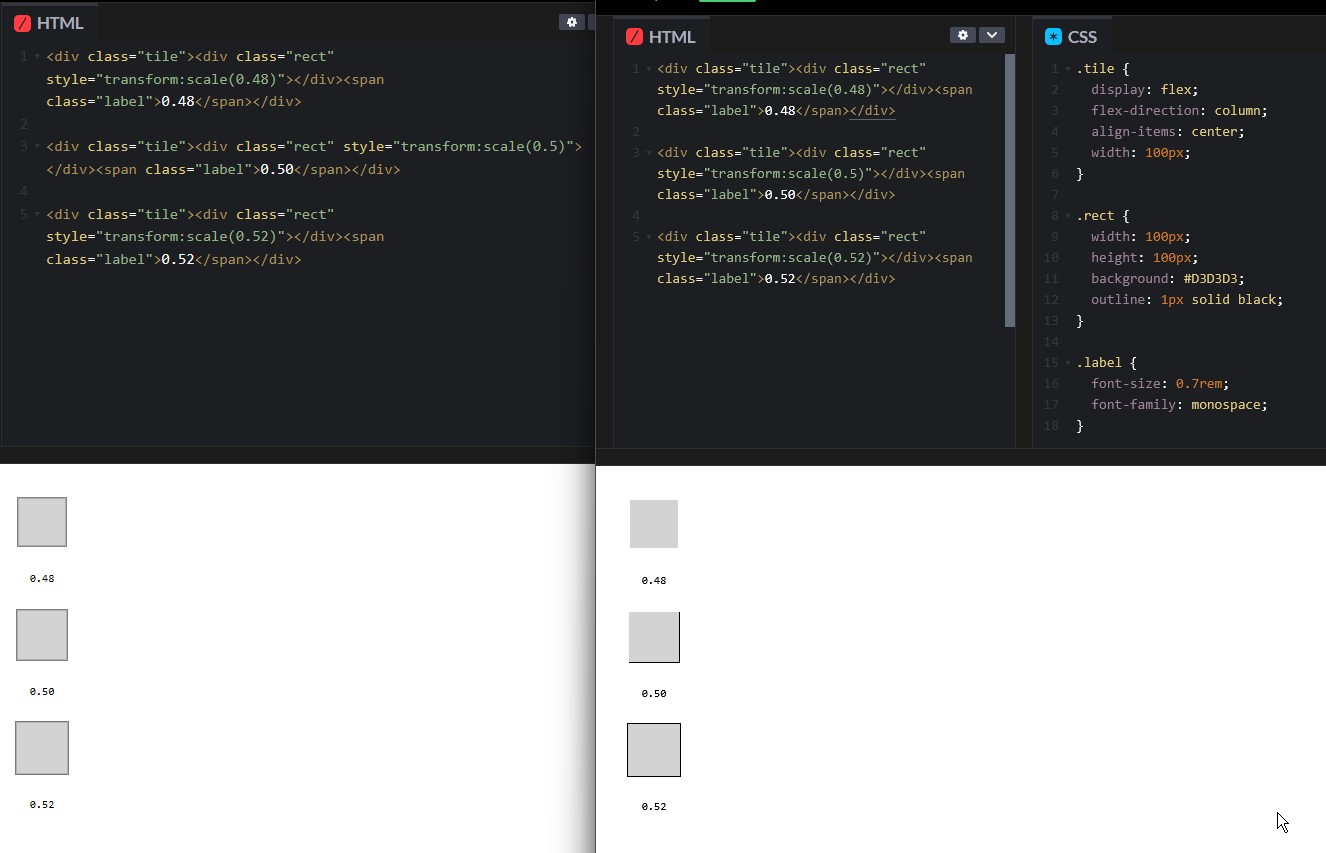
.tile {
  display: flex;
  flex-direction: column;
  align-items: center;
  width: 100px;
}

.rect {
  width: 100px;
  height: 100px;
  background: #D3D3D3;
  outline: 1px solid black;
}

.label {
  font-size: 0.7rem;
  font-family: monospace;
}
<div class="tile"><div class="rect" style="transform:scale(0.48)"></div><span class="label">0.48</span></div>

<div class="tile"><div class="rect" style="transform:scale(0.5)"></div><span class="label">0.50</span></div>

<div class="tile"><div class="rect" style="transform:scale(0.52)"></div><span class="label">0.52</span></div>
解决方案
不要使用outline: 1px,改用1.1px试试。
站内所有文章版权归属LeftHeroAI导航站,无授权禁止任何主体转载、抄袭、复制内容,亦不得私自架设镜像站点。一经侵权,本站将通过法律途径追责。
相关文章






汇集全球数千款 AI 工具,每日持续更新,配套 AI 开发学习资源,轻松用 AI 提升工作效率。快捷键 Ctrl+D/⌘+D 一键收藏本站。