


在Shiny的 selectizeInput中使用颜色和符号
以下页面:
https://shiny.posit.co/r/articles/build/selectize/
JavaScript更改字体颜色
我给出一个极简示例,并希望写得正确:
library(shiny)

seldata <- data.frame("value" = c("NT", "S", "H", "D", "C"),
                      "name" = c("NT", "♠", "♥", "♦", "♣"),
                      "color" = c("#00F", "#000", "#F00", "#F00", "#000"))

ui <- fluidPage(
  selectizeInput(inputId = "main_color", label = NULL, choices = NULL)
)

server <- function(input, output, session) {
  updateSelectizeInput(session, inputId = "main_color", choices = seldata, server = TRUE,
                       options = list(render = I(
                         "{option: function(item, escape) {
                          return '<div><span style=\"color:' + escape(item.color) + '\">' +
                          escape(item.name) + '</span></div>';
                        }}")))
}
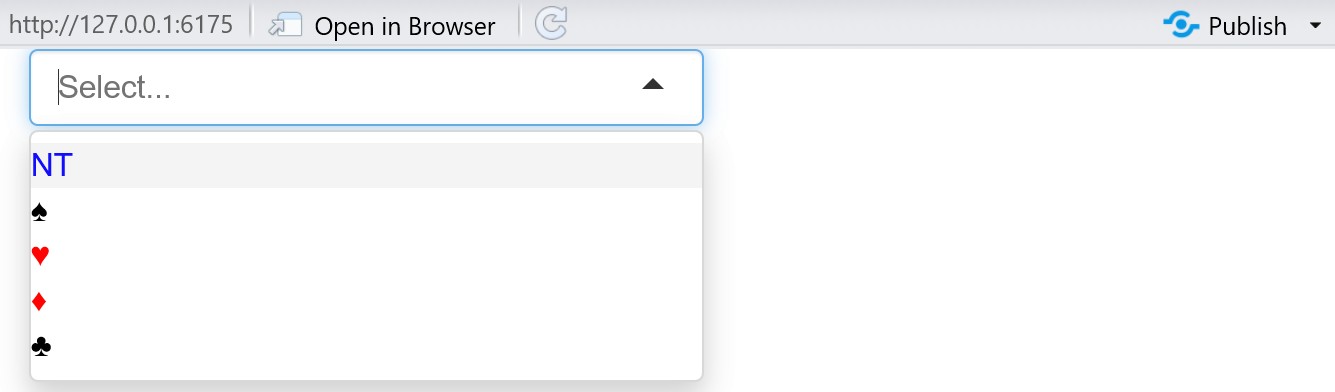
屏幕在选择框内的显示:
'undefined ▼'
而在点击这个箭头后,下拉菜单将按预期显示颜色和符号。
input$main_color的返回值与seldata$value一致。
如何去掉这个“undefined”?
解决方案
我们需要添加 item 渲染器,以告诉 selectize 如何在输入框中显示所选值,并使用与下拉菜单 option 相同的颜色格式。没有它,selectize.js 不知道如何渲染 item.name,因此会显示“undefined”。我还添加了 selected = "" 以实现空选择,以及一个 placeholder 作为默认/初始化。
server <- function(input, output, session) {
  updateSelectizeInput(session, inputId = "main_color",
                       choices = seldata, server = TRUE,
                       selected = "",
                       options = list(
                         placeholder = "Select...",
                         render = I(
                           "{
                           option: function(item, escape) {
                             return '<div><span style=\"color:' +
                             escape(item.color) + '\">' +
                               escape(item.name) + '</span></div>';
                           },
                           item: function(item, escape) {
                             return '<div><span style=\"color:' +
                             escape(item.color) + '\">' +
                               escape(item.name) + '</span></div>';
                           }
                         }"
                         )
                       ))
}

shinyApp(ui, server)
站内所有文章版权归属LeftHeroAI导航站,无授权禁止任何主体转载、抄袭、复制内容,亦不得私自架设镜像站点。一经侵权,本站将通过法律途径追责。
相关文章






汇集全球数千款 AI 工具,每日持续更新,配套 AI 开发学习资源,轻松用 AI 提升工作效率。快捷键 Ctrl+D/⌘+D 一键收藏本站。