


在通过Forma API获取关系时,我从表格血缘中得到的实体ID与工作表ID不匹配
让我们来看看提交件与图纸之间的关系如下:
{
      "id": "74b70bb8-8802-a1fd-f201-890375a60c8f",
      "createdOn": "2015-10-21T16:32:22Z",
      "isReadOnly": true,
      "isService": false,
      "isDeleted": false,
      "entities": [
        {
          "domain": "autodesk-construction-sheet",
          "type": "sheetlineage",
          "id": "2b95ba7a-3df5-4e99-a693-9c7cc15ee8c0",
          "createdOn": "2021-07-29T11:39:12+01:00"
        },
        {
          "domain": "autodesk-construction-submittals",
          "type": "submittalitem",
          "id": "urn:adsk.wipprod:dm.lineage:hC6k4hndRWaeIVhIjvHu8w",
          "createdOn": "2021-07-29T13:39:12+01:00"
        }
      ]
    }
现在,在sheetlineage实体中的这个ID,在通过其API请求图纸时,并不匹配任何图纸的ID;如果改用Docs文件,则会得到正确的文件ID。
有没有什么可行的变通办法?
解决方案
这是Sheets API的一个已知限制。
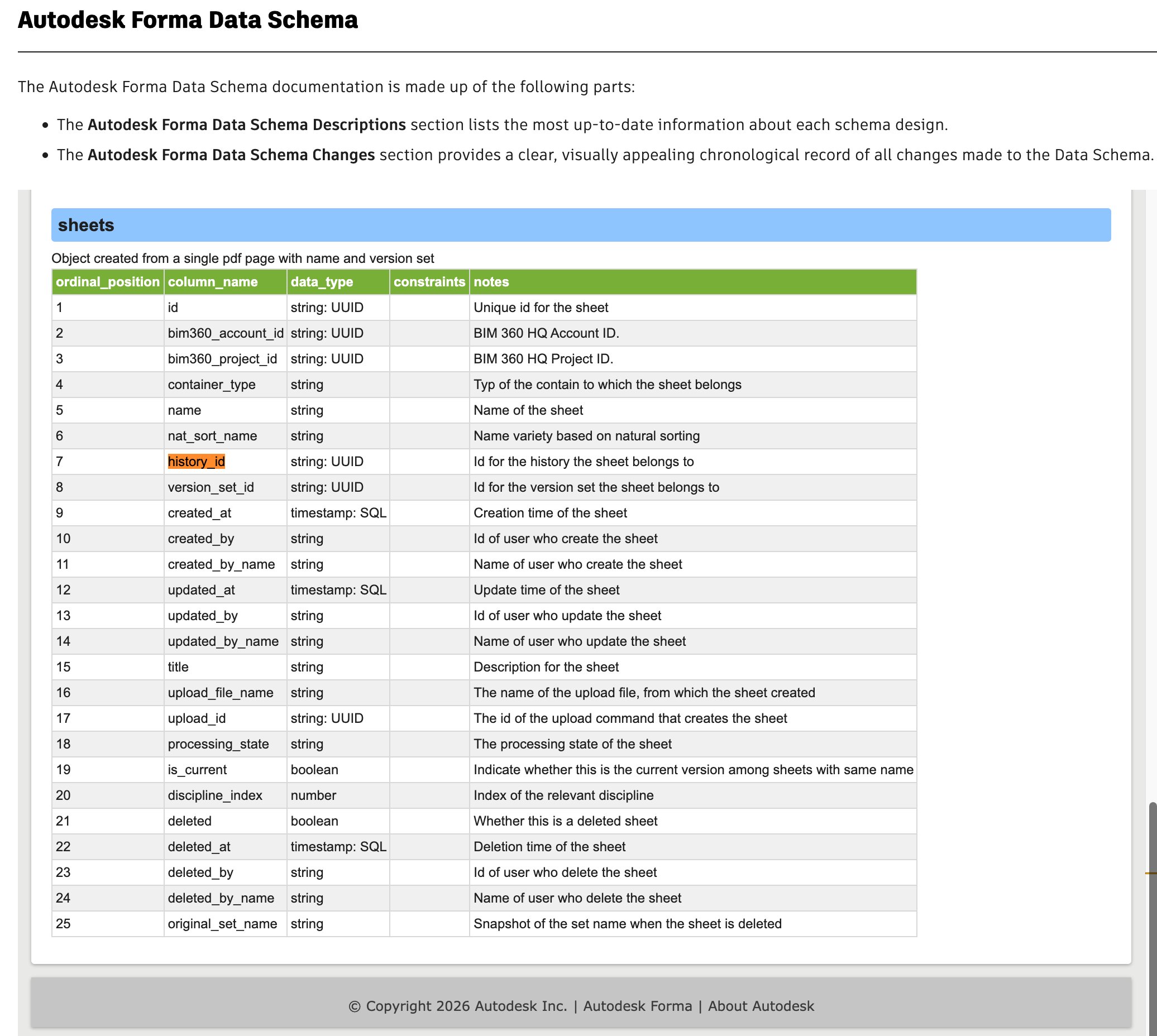
sheetlineage 实际上是图纸历史记录ID,但Sheets API不返回此字段。我们已向工程团队提交了一个名为 ACSD-26131 的请求,请他们考虑公开此字段。对于由此带来的不便,我们深感歉意!
一个变通做法是使用 Data Connector API。下面给出一个示例:
curl -v 'https://developer.api.autodesk.com/data-connector/v1/accounts/:accountId/requests' \
  -X 'POST' \
  -H 'Authorization: Bearer AuIPTf4KYLTYGVnOHQ0cuolwCW2a' \
  -H 'Content-Type: application/json' \
  -d '{
        "description": "My Sheets Data Extract",
        "isActive": true,
        "scheduleInterval": "ONE_TIME",
        "effectiveFrom": "2020-11-06T19:09:40.106Z",
        "serviceGroups": [
          "sheets"
        ],
        "callbackUrl": "https://api.mycompany.com/autodesk/jobinfo",
        "sendEmail": true,
        "projectIdList": "[ \"ffffffff-1f51-4b26-a6b7-6ac0639cb138\" ]",
      }'
以下是 [Data Connector] 的Sheets架构。我们可以在sheets表中通过 history_id 找到图纸历史记录ID。
站内所有文章版权归属LeftHeroAI导航站,无授权禁止任何主体转载、抄袭、复制内容,亦不得私自架设镜像站点。一经侵权,本站将通过法律途径追责。
相关文章






汇集全球数千款 AI 工具,每日持续更新,配套 AI 开发学习资源,轻松用 AI 提升工作效率。快捷键 Ctrl+D/⌘+D 一键收藏本站。