


HBox中的多个标签应表现得像一个被截断的标签(只有最后一个可见标签会显示省略号)
我有一个 HBox,其中包含多个 Label 节点(N个标签)。每个标签必须有自己的 Tooltip,因此不能将它们合并成一个Label。
当 HBox 变得太小时,每个Label都会应用自己的省略号,所以结果看起来像这样:
Fir...Sec...Th...
但我希望它们在视觉上像一个单独的Label,也就是说只有最后一个可见的标签应该显示省略号
First_Label Sec...
这是我的代码:
public class Test1 extends Application {

    @Override
    public void start(Stage stage) {
        var label1 = new Label("First_Label");
        label1.setTooltip(new Tooltip("Tooltip1"));

        var label2 = new Label("Second_Label");
        label2.setTooltip(new Tooltip("Tooltip2"));

        var label3 = new Label("Third_Label");
        label3.setTooltip(new Tooltip("Tooltip3"));

        var hBox = new HBox(label1, label2, label3);

        var scene = new Scene(hBox, 200, 200);
        stage.setScene(scene);
        stage.show();
    }

    public static void main(String[] args) {
        launch(args);
    }
}
这是结果:
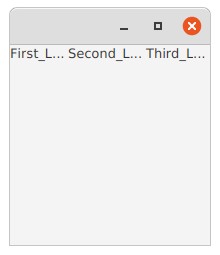
请问有人知道怎么实现吗?
解决方案
正如 @slaw在一个 评论 中所提到的,这很可能需要自定义布局。这会有点啰嗦,但思路相当简单:
- 扩展
Region - 重写computeMin/Max/PrefWidth方法,使它们返回标签的最小宽度、最大宽度和首选宽度之和
- 重写computeMin/Max/PrefHeight方法,使它们返回标签的最小高度、最大高度或首选高度中的最小值/最大值(视具体情况而定)
- 重写
layoutChildren()方法以布局标签。在此方法中,逐步设置每个标签的x位置,并将宽度设为标签的首选宽度与剩余可用空间之间的最小值。若空间充足,则标签会按其首选宽度显示所有文本;若空间较小,则使用可用空间以显示省略号;若没有空间,则宽度为零,使其不可见。
此实现会尊重容器的填充,并允许一个 “spacing” 属性来设置标签之间的间距。你也可以很容易地让它支持对齐。
import javafx.application.Application;
import javafx.beans.Observable;
import javafx.beans.property.DoubleProperty;
import javafx.beans.property.SimpleDoubleProperty;
import javafx.collections.FXCollections;
import javafx.collections.ObservableList;
import javafx.scene.Scene;
import javafx.scene.control.Label;
import javafx.scene.control.Tooltip;
import javafx.scene.layout.Region;
import javafx.stage.Stage;

public class Test1 extends Application {

    @Override
    public void start(Stage stage) {
        var label1 = new Label("First_Label");
        label1.setTooltip(new Tooltip("Tooltip1"));


        var label2 = new Label("Second_Label");
        label2.setTooltip(new Tooltip("Tooltip2"));

        var label3 = new Label("Third_Label");
        label3.setTooltip(new Tooltip("Tooltip3"));

        var box = new LabelBox(5, label1, label2, label3);

        var scene = new Scene(box, 200, 200);
        stage.setScene(scene);
        stage.show();
    }

    public static class LabelBox extends Region {
        private final ObservableList<Label> labels = FXCollections.observableArrayList();
        public ObservableList<Label> getLabels() {
            return labels;
        }

        private final DoubleProperty spacing = new SimpleDoubleProperty(0);
        public DoubleProperty spacingProperty() {
            return spacing;
        }
        public final void setSpacing(double spacing) {
            spacingProperty().set(spacing);
        }
        public final double getSpacing() {
            return spacingProperty().get();
        }

        public LabelBox(double spacing, Label... labels) {
            this.labels.addListener((Observable obs) -> {
                getChildren().setAll(this.labels);
            });
            this.labels.addAll(labels);
            setSpacing(spacing);
            this.spacing.addListener(obs -> requestLayout());
        }

        public LabelBox(Label... labels) {
            this(0, labels);
        }

        @Override
        protected double computeMinWidth(double height) {
            return computeWidth(l -> l.minWidth(height));
        }

        @Override
        protected double computePrefWidth(double height) {
            return computeWidth(l -> l.prefWidth(height));
        }

        @Override
        protected double computeMaxWidth(double height) {
            return computeWidth(l -> l.maxWidth(height));
        }

        private double computeWidth(ToDoubleFunction<Label> widthFunction) {

            // Sum the width of the labels according to the provided function,
            // then add extra for the spacing and padding
            return labels.stream().mapToDouble(widthFunction).sum() +
                    Math.max(0, labels.size() - 1) * getSpacing() +
                    snappedLeftInset() + snappedRightInset();
        }

        @Override
        protected double computeMaxHeight(double width) {
            return computeHeight(l -> l.maxHeight(width), Math::min);
        }

        @Override
        protected double computeMinHeight(double width) {
            return computeHeight(l -> l.minHeight(width), Double::max);
        }

        @Override
        protected double computePrefHeight(double width) {
            return computeHeight(l -> l.prefHeight(width), Double::max);
        }

        private double computeHeight(ToDoubleFunction<Label> heightFunction, DoubleBinaryOperator summaryFunction) {
            // compute the height of each label according to the provided function,
            // then summarize with the provided summary (e.g. max or min)
            // then add space for the padding
            return labels.stream().mapToDouble(heightFunction).reduce(Math::min).orElse(0) +
                    snappedTopInset() + snappedBottomInset();
        }

        @Override
        protected void layoutChildren() {
            double x = snappedLeftInset();
            double y = snappedTopInset();
            double h = getHeight() - y - snappedBottomInset();
            double maxX = getWidth() - snappedRightInset();
            for (Iterator<Label> it = labels.iterator(); it.hasNext();) {
                Label l = it.next();
                double lw = Math.min(l.prefWidth(h), maxX - x);
                double lh = Math.min(l.prefHeight(-1), h);
                l.resizeRelocate(x, y, lw, lh);
                x += l.getWidth();

                // Don't need spacing after the last label
                if (it.hasNext()) {
                    x += spacing.get();
                }
                x = Math.min(maxX, x);
            }
        }

    }

    public static void main(String[] args) {
        launch(args);
    }
}
站内所有文章版权归属LeftHeroAI导航站,无授权禁止任何主体转载、抄袭、复制内容,亦不得私自架设镜像站点。一经侵权,本站将通过法律途径追责。
相关文章






汇集全球数千款 AI 工具,每日持续更新,配套 AI 开发学习资源,轻松用 AI 提升工作效率。快捷键 Ctrl+D/⌘+D 一键收藏本站。