


在Makie中,如何把坐标轴标签放得离PolarAxis更近,并去除未使用的周边区域?
我想在Makie的 PolarAxis 中添加自定义坐标轴标签。由于似乎没有直接的方法在极坐标中放置标签,我尝试叠加一个第二个 Axis,并使用它的 xlabel 和 ylabel。
然而,我遇到了两个问题:
- 在
PolarAxis周围有额外的空白区域(在我的图中用蓝色标出),这使我无法将标签放得离极坐标中的三角形区域太近。 - 如果我缩小叠加的虚拟坐标轴的宽度或高度以让标签更靠近,它们就会被粉色的极坐标区域覆盖。
另外,我也不明白如何去除用绿色标出的外围区域。
下面给出一个最小示例:
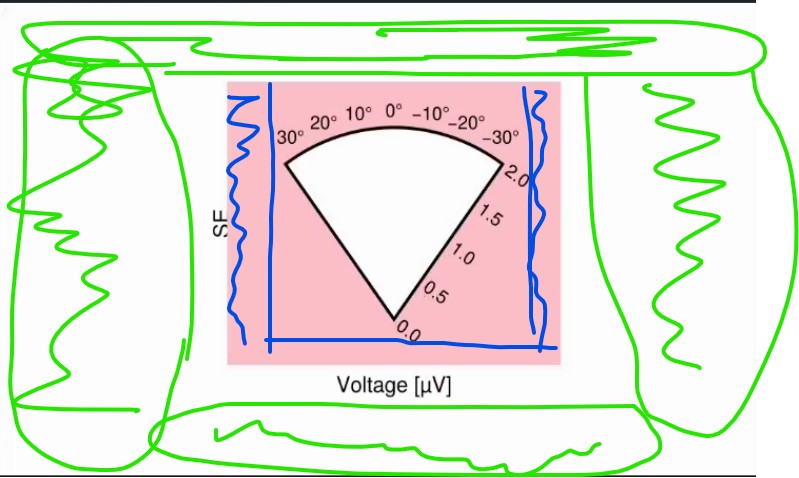
begin
    using CairoMakie
    using GeometryBasics: Point2f

    f = Figure(size = (500, 300))
    gl = f[1, 1] = GridLayout()

    rmax = 2.0
    θmin, θmax = -π/5, π/5

    pax = PolarAxis(
        gl[1, 1];
        width = 220, height = 180,
        thetalimits = (θmin, θmax),
        theta_0 = π/2,
        thetaticklabelsize = 12,
        rticklabelsize = 12,
        backgroundcolor = :pink,
    )

    tri_pts = Point2f[
        Point2f(0.0, 0.0),
        Point2f(θmin, rmax),
        Point2f(θmax, rmax),
    ]

    rlims!(pax, 0, rmax)

    dummy = Axis(
        gl[1, 1];
        width = 200, height = 180,
        xlabel = "Voltage [µV]",ylabel = "SE",
    )
    hidedecorations!(dummy, label = false); hidespines!(dummy)
    f
end
解决方案
包围的空白区域似乎是因为 f 的尺寸为 (500, 300),而 pax 的尺寸为 (220,180)。如果它们相同,白色区域就会消失。
在没有自动定位标签的情况下,一种可行的变通方法是使用手动定位的 labels。标签默认为居中,因此向标签添加一个填充元组(left, right, bottom, top)可以用来调整文本的位置。例如,向右添加填充会将文本向左移动。
局限性:
- 在这个示例中,使用PolarAxis
clip=false使标签在圆饼楔之外可见。 - 如果带填充的标签太大,极坐标轴将会失真。
using CairoMakie

let

    f = Figure(size = (200, 180))
    gl = f[1, 1] = GridLayout()

    rmax = 2.0
    θmin, θmax = -π/5, π/5

    pax = PolarAxis(
        gl[1, 1];
        width = 200, height = 180,
        thetalimits = (θmin, θmax),
        theta_0 = π/2,
        thetaticklabelsize = 12,
        rticklabelsize = 12,
        backgroundcolor = :pink,
        clip=false,
    )

    rlims!(pax, 0, rmax)

    label_SE = Label(f[1, 1], "SE", padding=(0, 135, 140, 0))
    label_voltage = Label(f[1,1], "Voltage [μV]", rotation=π/2+θmin, padding=(120,0,0,60))

    f
end
![底部原点的圆饼楔极坐标轴,标签 'SE' 位于沿曲线 theta 轴的度数上方的左上角,标签 'Voltage [μV]' 位于径向轴下方的右下角](/uploadfile/blog2026/b0533af0382447048bf38eb13590a341.jpg)
Julia v1.12.5,CairoMakie 0.15.9
站内所有文章版权归属LeftHeroAI导航站,无授权禁止任何主体转载、抄袭、复制内容,亦不得私自架设镜像站点。一经侵权,本站将通过法律途径追责。
相关文章






汇集全球数千款 AI 工具,每日持续更新,配套 AI 开发学习资源,轻松用 AI 提升工作效率。快捷键 Ctrl+D/⌘+D 一键收藏本站。