


在LinqPad中创建用于展开表格的超链接和按钮
我有一堆略微复杂的结构,喜欢在LinqPad里把它们Dump出来以便检查。
它们大多是一堆容器对象,每个容器里都包含一个项的列表,以及关于该容器本身的一些元数据。项可以通过某些属性引用同一容器中的其他项,或者引用其他容器中的项(也可以直接引用容器)。
目前这是一个非常手动的过程:查看一个项,识别对另一项的引用,然后在容器列表中逐一导航,找到那个项。我在找能把这个过程简化的方法,把引用转换成“超链接”(或某种按钮),让我能够自动展开(甚至高亮)正确的元素。
在Util库里有没什么办法,或者有其他方式可以实现?还是唯一的选项就是放弃标准的Dump,完全用HTML重建?
编辑:
添加一个示例,并对我想要实现的目标做一些澄清。
让我们看这个程序:
void Main()
{
    Dictionary<string, item2> test = new Dictionary<string, item2>
    {
        {
            "container1",
            new item2
            {
                info21 = "container1",
                items = {
                    new item1 {
                        name = "element1",
                        info11 = "references element3",
                        refContainer = 1,
                        ref1 = 1,
                    },
                    new item1 {
                        name = "element1",
                        info11 = "references element1",
                        refContainer = 0,
                        ref1 = 0,
                    }
                }
            }
        },
        {
            "container2",
            new item2
            {
                info21 = "container2",
                items = {
                    new item1 {
                        name = "element3",
                        info11 = "references element2",
                        refContainer = 0,
                        ref1 = 1,
                    },
                    new item1 {
                        name = "element4",
                        info11 = "references element2",
                        refContainer = 0,
                        ref1 = 1,
                    }
                }
            }
        },
    };

    test.Dump(1);
}

class item1
{
    public string name { get; set; }
    public string info11 { get; set; }
    public int refContainer { get; set; }
    public int ref1 { get; set; }
}

class item2
{
    public string info21 { get; set; }
    public List<item1> items { get; set; } = new List<item1>();
}
对于这个,我得到:
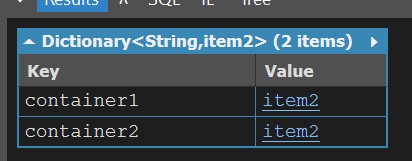
如果我手动展开第一条记录,我得到:
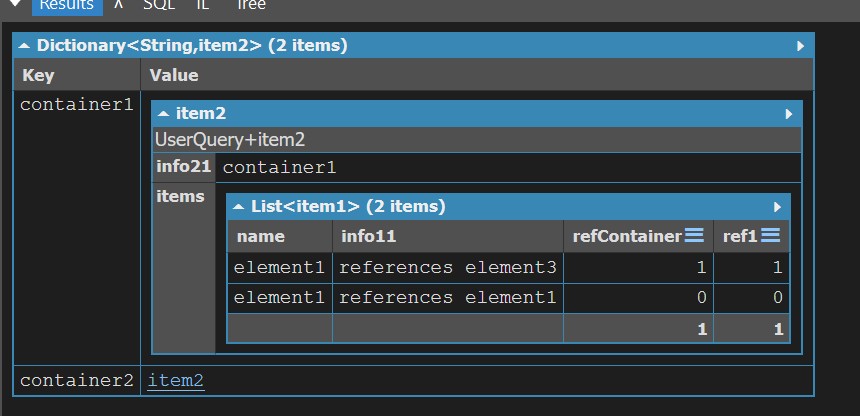
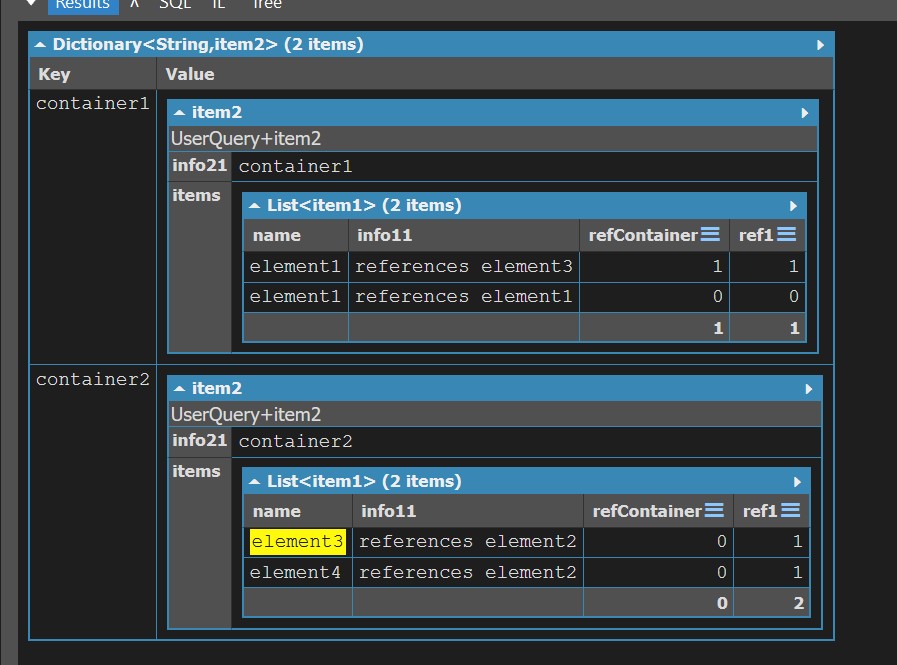
我想要的基本上就是一种能够让我点击 ref1 列中的任意内容,并让相应的元素展开(也可能被高亮显示)的东西。
基本上我点击 ref1 里的1,对应于 element1,这将是结果:
解决方案
目前还不清楚refContainer和 ref1列的作用;如果你想创建自动锚点和超链接,可以使用一个Unicode字符来表示每一个锚点/链接,然后用JavaScript来实现交互性(我是让LinqPad的 AI来编写JavaScript,而不是手写的):
void Main()
{
    Dictionary<string, item2> test = new Dictionary<string, item2>
    {
        {
            "container1",
            new item2
            {
                info21 = "container1",
                items = {
                    new item1 {
                        name = "🆔element1",
                        info11 = "references 🔗element3",
                    },
                    new item1 {
                        name = "🆔element2",
                        info11 = "references 🔗element1",
                    }
                }
            }
        },
        {
            "container2",
            new item2
            {
                info21 = "container2",
                items = {
                    new item1 {
                        name = "🆔element3",
                        info11 = "references 🔗element2",
                    },
                    new item1 {
                        name = "🆔element4",
                        info11 = "references 🔗element2",
                    }
                }
            }
        },
    };

    test.Dump (collapseTo:2);

    SetupCrossReferences();
}

// Scans dumped output for "🆔name" (defines an anchor) and "🔗name" (a link to that anchor).
// Clicking a 🔗 link scrolls to the matching 🆔 element and briefly highlights it.
void SetupCrossReferences ()
{
    Util.HtmlHead.AddStyles ("""
        .xref-link { cursor: pointer; text-decoration: underline; color: #06c; }
        @keyframes xref-flash {
            0%   { background: #ffec80; }
            100% { background: transparent; }
        }
        .xref-flash { animation: xref-flash 1.5s ease-out; }
        """);

    Util.HtmlHead.AddScript ("""
        function SetupCrossReferences() {
            const re = /(🆔|🔗)([\w-]+)/g;
            const walker = document.createTreeWalker(document.body, NodeFilter.SHOW_TEXT, null);
            const nodes = [];
            let n;
            while (n = walker.nextNode()) {
                re.lastIndex = 0;
                if (re.test(n.nodeValue)) nodes.push(n);
            }
            for (const node of nodes) {
                const text = node.nodeValue;
                const frag = document.createDocumentFragment();
                let last = 0, m;
                re.lastIndex = 0;
                while (m = re.exec(text)) {
                    if (m.index > last)
                        frag.appendChild(document.createTextNode(text.slice(last, m.index)));
                    const name = m[2];
                    if (m[1] === '🆔') {
                        const span = document.createElement('span');
                        span.id = 'xref-' + name;
                        span.textContent = name;
                        frag.appendChild(span);
                    } else {
                        const a = document.createElement('a');
                        a.className = 'xref-link';
                        a.textContent = name;
                        a.addEventListener('click', e => {
                            e.preventDefault();
                            const target = document.getElementById('xref-' + name);
                            if (!target) return;
                            RevealAncestors(target);
                            target.scrollIntoView({ behavior: 'smooth', block: 'center' });
                            target.classList.remove('xref-flash');
                            void target.offsetWidth;
                            target.classList.add('xref-flash');
                        });
                        frag.appendChild(a);
                    }
                    last = m.index + m[0].length;
                }
                if (last < text.length)
                    frag.appendChild(document.createTextNode(text.slice(last)));
                node.parentNode.replaceChild(frag, node);
            }
        }

        function RevealAncestors(el) {
            const defaults = { TR:'table-row', TBODY:'table-row-group', THEAD:'table-header-group',
                TD:'table-cell', TH:'table-cell', TABLE:'table' };
            for (let n = el; n && n !== document.body; n = n.parentElement) {
                if (getComputedStyle(n).display === 'none') {
                    n.style.display = '';
                    if (getComputedStyle(n).display === 'none')
                        n.style.display = defaults[n.tagName] || 'block';
                }
            }
        }
        """);

    Util.JS.RunFunction ("SetupCrossReferences");
}

class item1
{
    public string name { get; set; }
    public string info11 { get; set; }
}

class item2
{
    public string info21 { get; set; }
    public List<item1> items { get; set; } = new List<item1>();
}
站内所有文章版权归属LeftHeroAI导航站,无授权禁止任何主体转载、抄袭、复制内容,亦不得私自架设镜像站点。一经侵权,本站将通过法律途径追责。
相关文章






汇集全球数千款 AI 工具,每日持续更新,配套 AI 开发学习资源,轻松用 AI 提升工作效率。快捷键 Ctrl+D/⌘+D 一键收藏本站。