


在Blender中使用Python脚本生成视频
我正在做一个任务,目标是导入 glb 文件、添加关键帧和动画,并把它生成成视频,因此一直在研究这个。我在添加关键帧之前是可以正常工作的,动画也能正常运行。
但接下来,当我想把它生成成视频并在谷歌上搜索时,发现了这个博客:
https://blog.cg-wire.com/blender-programmatic-rendering/#3-adding-keyframes
这里有详细说明,所以我按照这个步骤来做,并在AI的帮助下也写了视频生成的代码,虽然也出现了一些错误:
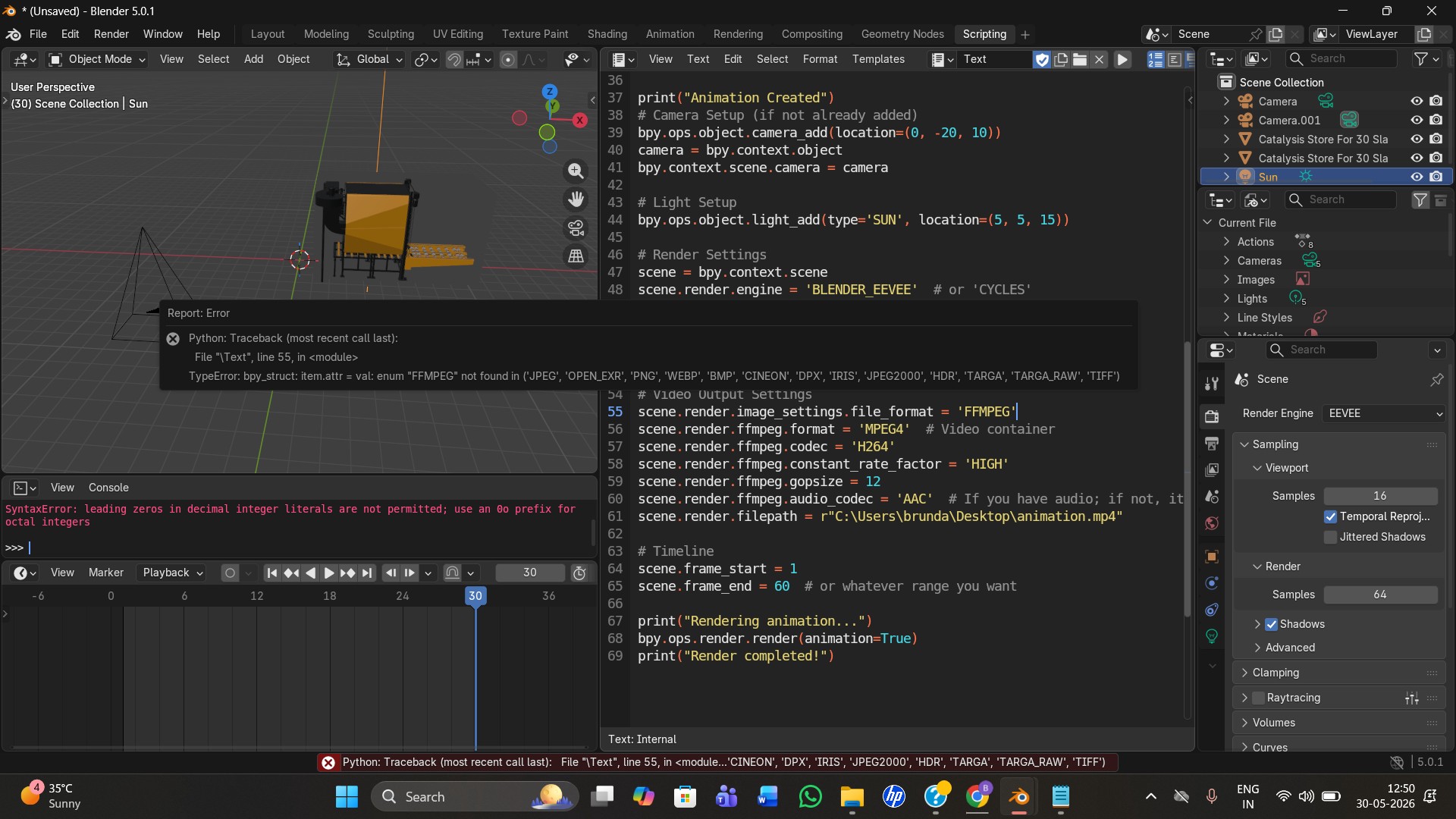
这是上面的图片(包含错误),正如它所说的 FFMPEG noT found in (JPEG, ...ETC),所以即使我按它给出的清单去尝试,还是显示同样的错误。无论我用哪种格式,都是一样的?错误:${the file format} not found in the ...,这是不是意味着无论我提供哪种文件格式,都会一直这样?
有没有需要安装或启用的东西,还是要做些什么?我是Blender的新手,不知道到底发生了什么、该怎么做,比如是否需要安装某些文件格式、是否需要启用某些选项,还是我的代码有错误。我的Blender版本是5.0.1,同时我也运行了以下代码:
import bpy

print(bpy.app.version_string)

for item in bpy.context.scene.render.image_settings.bl_rna.properties['file_format'].enum_items:
    print(item.identifier)
用于检查Blender支持的文件格式,输出如下:
JPEG
OPEN_EXR
PNG
WEBP
BMP
CINEON
DPX
IRIS
JPEG2000
HDR
TARGA
TARGA_RAW
TIFF
OPEN_EXR_MULTILAYER
FFMPEG
也许你对这种情况有想法,可能是什么原因导致会这样?
完整的视频生成代码如下:
import bpy

# -------------------------
# IMPORT GLB
# -------------------------
bpy.ops.import_scene.gltf(
    filepath=r"C:\Users\brunda\Downloads\670de912-47aa-46bf-b5a4-6ce7d21039de (2).glb"
)

# Imported object
#obj = bpy.context.selected_objects[0]

# -------------------------
# FRAME 1
# -------------------------
bpy.context.scene.frame_set(1)

obj.location = (0, 0, 0)

obj.keyframe_insert(data_path="location")

# -------------------------
# FRAME 30
# -------------------------
bpy.context.scene.frame_set(30)

obj.location = (5, 0, 0)

obj.keyframe_insert(data_path="location")

# -------------------------
# TIMELINE RANGE
# -------------------------
bpy.context.scene.frame_start = 1
bpy.context.scene.frame_end = 30

print("Animation Created")
# Camera Setup (if not already added)
bpy.ops.object.camera_add(location=(0, -20, 10))
camera = bpy.context.object
bpy.context.scene.camera = camera

# Light Setup
bpy.ops.object.light_add(type='SUN', location=(5, 5, 15))

# Render Settings
scene = bpy.context.scene
scene.render.engine = 'BLENDER_EEVEE'  # or 'CYCLES'
scene.render.resolution_x = 1920
scene.render.resolution_y = 1080
scene.render.resolution_percentage = 100
scene.render.fps = 24

# Video Output Settings
scene.render.image_settings.file_format = 'FFMPEG'
scene.render.ffmpeg.format = 'MPEG4'  # Video container
scene.render.ffmpeg.codec = 'H264'
scene.render.ffmpeg.constant_rate_factor = 'HIGH'
scene.render.ffmpeg.gopsize = 12
scene.render.ffmpeg.audio_codec = 'AAC'  # If you have audio; if not, it's fine
scene.render.filepath = r"C:\Users\brunda\Desktop\animation.mp4"

# Timeline
scene.frame_start = 1
scene.frame_end = 60  # or whatever range you want

print("Rendering animation...")
bpy.ops.render.render(animation=True)
print("Render completed!")
到关键帧动画部分的代码(在Blender中播放时一直工作良好):
import bpy

# -------------------------
# IMPORT GLB
# -------------------------
bpy.ops.import_scene.gltf(
    filepath=r"C:\Users\brunda\Downloads\670de912-47aa-46bf-b5a4-6ce7d21039de (2).glb"
)

# Imported object
obj = bpy.context.selected_objects[0]

# -------------------------
# FRAME 1
# -------------------------
bpy.context.scene.frame_set(1)

obj.location = (0, 0, 0)

obj.keyframe_insert(data_path="location")

# -------------------------
# FRAME 30
# -------------------------
bpy.context.scene.frame_set(30)

obj.location = (5, 0, 0)

obj.keyframe_insert(data_path="location")

# -------------------------
# TIMELINE RANGE
# -------------------------
bpy.context.scene.frame_start = 1
bpy.context.scene.frame_end = 30

print("Animation Created")
print(bpy.app.version_string)
解决方案
我在把它作为 python script.py 运行时得到相同的错误;但在使用完整的Blender时,代码对我而言是可用的
blender --background --python script.py
问题可能是因为 python script.py 运行 bpy 5.1.2,而我的 blender 运行 bpy 4.0.2
不同版本可能以不同的方式工作。
Blender文档:在没有用户界面的情况下使用Blender
同时我在Blender的站点找到了答案:
python - FFMPEG not available - Blender Stack Exchange
它需要使用 media_type 配合 VIDEO,而不是使用 file_format 配合 FFMPEG。
#bpy.context.scene.render.image_settings.file_format = 'FFMPEG'
bpy.context.scene.render.image_settings.media_type = 'VIDEO'
这对我在 bpy 5.1.2 时有效,但在使用 blender(它使用 bpy 4.0.2)时就无效。
#if bpy.app.version[0] == 4:  # (4, 0, 2)
if bpy.app.version_string.startswith("4"):  # "4.0.2"
    bpy.context.scene.render.image_settings.file_format = 'FFMPEG'
else:
    bpy.context.scene.render.image_settings.media_type = 'VIDEO'