


Plotly 3D的背景线和前景线会引发闪烁和绘制冲突
我在plotly3d场景中给线条加边框,通过在较粗的线条之上叠加较细的线条来实现,例如
import plotly.graph_objects as go
import numpy as np

t = np.linspace(0, 10, 100)
x, y, z = np.sin(t), np.cos(t), t

fig = go.Figure(go.Scatter3d(
    x=x, y=y, z=z,
    mode='lines',
    line=dict(color='black', width=100)
))

fig.add_trace(go.Scatter3d(
    x=x, y=y, z=z,
    mode='lines',
    line=dict(color='cyan', width=90)
))

fig.update_layout(title="3D Path with Effect", template='none')
fig.show()
但存在一些绘制冲突。这些似乎不会出现在 scatter3d 上。
有解决办法吗?
根据评论,我说的意思是,散点版本不会出现这个问题;如果我使用圆盘,则没有Z-order问题或闪烁。
t = np.linspace(0, 10, 100)
x, y, z = np.sin(t), np.cos(t), t

fig = go.Figure(go.Scatter3d(
    x=x, y=y, z=z,
    mode='markers',
    marker=dict(color='black', size=10)
))

fig.add_trace(go.Scatter3d(
    x=x, y=y, z=z,
    mode='markers',
    marker=dict(color='cyan', size=9)
))

fig.update_layout(template='none')
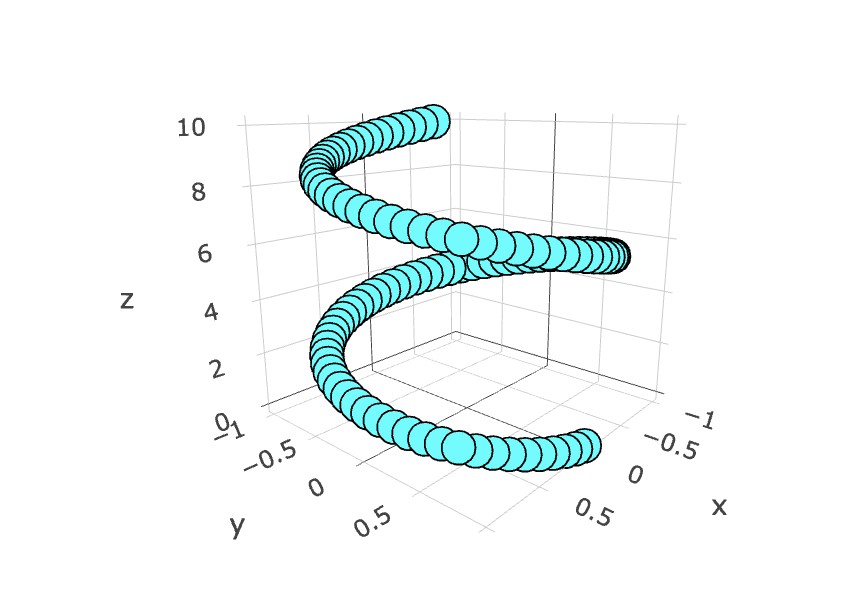
我想在一些简单的线条绘图中实现平涂着色并带有漂亮的边框,直接使用原始线条似乎是最高效的。若有需要,我可以使用完整网格和扁平光照条件,但这感觉应该有办法解决。
最后一个表面问题,我希望线条不要因透视而变短(像管子一样),但如果需要绕过这个问题,我会这么做。
解决方案
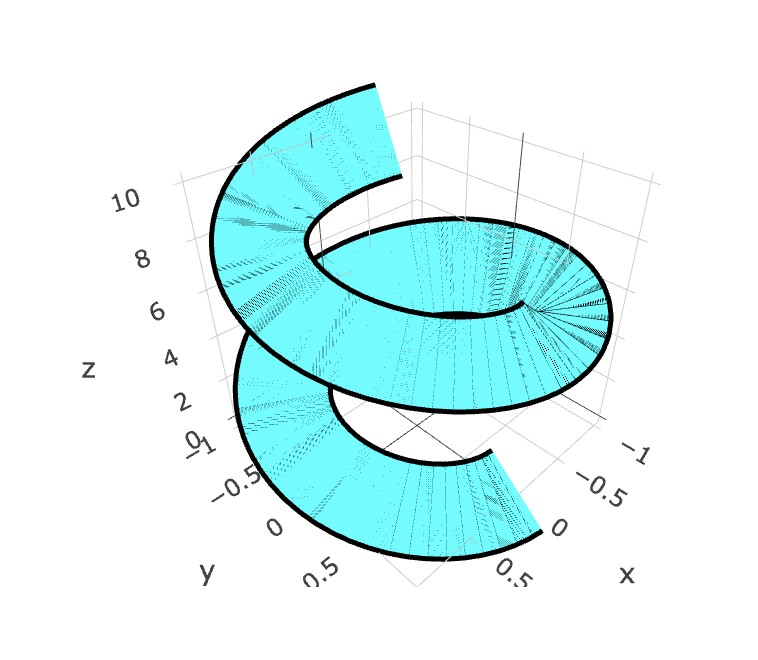
闪烁是由于WebGL渲染器中的z-fighting引起的。当两个三维对象(例如一个表面和一个边框线)共享完全相同的深度值时,GPU无法判断哪一个应该在前面,从而导致可见的闪烁。
我尝试了这段代码,似乎解决了它
我选择在output.html上编写,因为在使用 fig.show() 时我在WSL上遇到了问题,你可以按需要在末尾更改那段代码。
import numpy as np
import plotly.graph_objects as go

# spiral surface
theta = np.linspace(0, 4*np.pi, 250)
r = np.linspace(0.2, 1, 60)

theta, r = np.meshgrid(theta, r)

x = r * np.cos(theta)
y = r * np.sin(theta)
z = theta

fig = go.Figure()

# main surface
fig.add_trace(go.Surface(
    x=x,
    y=y,
    z=z,
    colorscale=[[0, "#67dfe3"], [1, "#67dfe3"]],
    showscale=False,
    lighting=dict(
        ambient=0.9,
        diffuse=0.4,
        specular=0.05
    )
))

# outer edge border
fig.add_trace(go.Scatter3d(
    x=x[-1],
    y=y[-1],
    z=z[-1],
    mode="lines",
    line=dict(
        color="black",
        width=6
    ),
    showlegend=False
))

# inner edge border
fig.add_trace(go.Scatter3d(
    x=x[0],
    y=y[0],
    z=z[0],
    mode="lines",
    line=dict(
        color="black",
        width=6
    ),
    showlegend=False
))

# layout styling
fig.update_layout(

    template="none",

    scene=dict(

        bgcolor="#f2f2f2",

        xaxis=dict(
            title="x",
            backgroundcolor="#f2f2f2",
            gridcolor="gray",
            showbackground=True,
            zerolinecolor="gray"
        ),

        yaxis=dict(
            title="y",
            backgroundcolor="#f2f2f2",
            gridcolor="gray",
            showbackground=True,
            zerolinecolor="gray"
        ),

        zaxis=dict(
            title="z",
            backgroundcolor="#f2f2f2",
            gridcolor="gray",
            showbackground=True,
            zerolinecolor="gray"
        ),

        camera=dict(
            eye=dict(
                x=1.3,
                y=1.3,
                z=0.9
            )
        )
    ),

    margin=dict(l=0, r=0, b=0, t=40),

    title="3D Spiral Surface"
)

fig.write_html("output.html")
站内所有文章版权归属LeftHeroAI导航站,无授权禁止任何主体转载、抄袭、复制内容,亦不得私自架设镜像站点。一经侵权,本站将通过法律途径追责。
相关文章






汇集全球数千款 AI 工具,每日持续更新,配套 AI 开发学习资源,轻松用 AI 提升工作效率。快捷键 Ctrl+D/⌘+D 一键收藏本站。