


用x、y、width、height拼接图像切片,结果却对不上齐——我是不是漏掉了什么?
我正在尝试从多张图像切片重建整版报纸页面。
每个切片的坐标都被编码在文件名中,例如:
01_<x>_<y>_<width>_<height>.jpg
示例:
01_181.5_41_738_148.jpg
从HTML来看,这些切片是通过CSS来定位的,如:
<a href="slice.jpg" style="top:41px; left:181.5px; width:738px; height:148px"></a>
我本以为这些切片可以拼接在一起,重建整页。
我正在看看 https://epaper.janayugomonline.com/
期望的图片类似于 这个.
然而,输出的图片错位:
有些区域重叠,有些部分缺失,最终的布局与原始页面不符
一个完美重建的整页。
import requests
from PIL import Image
from io import BytesIO

urls = [
"https://epaper.janayugomonline.com/assets/epaper/thiruvananthapuram/2026/04/05/slices/01_38_43_141.5_359.jpg",
"https://epaper.janayugomonline.com/assets/epaper/thiruvananthapuram/2026/04/05/slices/01_181.5_41_738_148.jpg",
"https://epaper.janayugomonline.com/assets/epaper/thiruvananthapuram/2026/04/05/slices/01_38.5_406_137_180.jpg",
"https://epaper.janayugomonline.com/assets/epaper/thiruvananthapuram/2026/04/05/slices/01_36.5_579_147_359.jpg",
"https://epaper.janayugomonline.com/assets/epaper/thiruvananthapuram/2026/04/05/slices/01_182.5_184_739_283.jpg",
"https://epaper.janayugomonline.com/assets/epaper/thiruvananthapuram/2026/04/05/slices/01_182.5_466_592_474.jpg",
"https://epaper.janayugomonline.com/assets/epaper/thiruvananthapuram/2026/04/05/slices/01_774.5_465_143_263.jpg",
"https://epaper.janayugomonline.com/assets/epaper/thiruvananthapuram/2026/04/05/slices/01_773.5_725_144_215.jpg",
"https://epaper.janayugomonline.com/assets/epaper/thiruvananthapuram/2026/04/05/slices/01_39.5_938_440_310.jpg",
"https://epaper.janayugomonline.com/assets/epaper/thiruvananthapuram/2026/04/05/slices/01_38.5_1242_440_147.jpg",
"https://epaper.janayugomonline.com/assets/epaper/thiruvananthapuram/2026/04/05/slices/01_477.5_937_151_458.jpg",
"https://epaper.janayugomonline.com/assets/epaper/thiruvananthapuram/2026/04/05/slices/01_625.5_937_294_451.jpg"
]

tiles = []
max_w, max_h = 0, 0

for url in urls:
    name = url.split("/")[-1].replace(".jpg", "")
    _, x, y, w, h = name.split("_")

    x, y, w, h = map(float, [x, y, w, h])

    img = Image.open(BytesIO(requests.get(url).content))

    tiles.append((img, round(x), round(y)))

    max_w = max(max_w, round(x + w))
    max_h = max(max_h, round(y + h))

canvas = Image.new("RGB", (max_w, max_h), (255, 255, 255))

for img, x, y in tiles:
    canvas.paste(img, (x, y))

canvas.save("output.jpg")
解决方案
图片的实际尺寸通常比名字中标注的要大得多。
大概可以用于放大,并仍然保持可读的图片。
使用 print(img.size),我得到了 (349, 886),对于名称为 01_38_43_141.5_359.jpg 的图片。
网页浏览器使用 width:738px; height:148px 来以这个尺寸显示它——因此会自动缩放。
但在Python中,你必须在 paste() 之前自行对其进行缩放。
img = Image.open(BytesIO(requests.get(url).content))

#pritn(img.size)

img = img.resize((int(w), int(h)))
结果:(在新标签页/窗口打开时,文本不太易读)
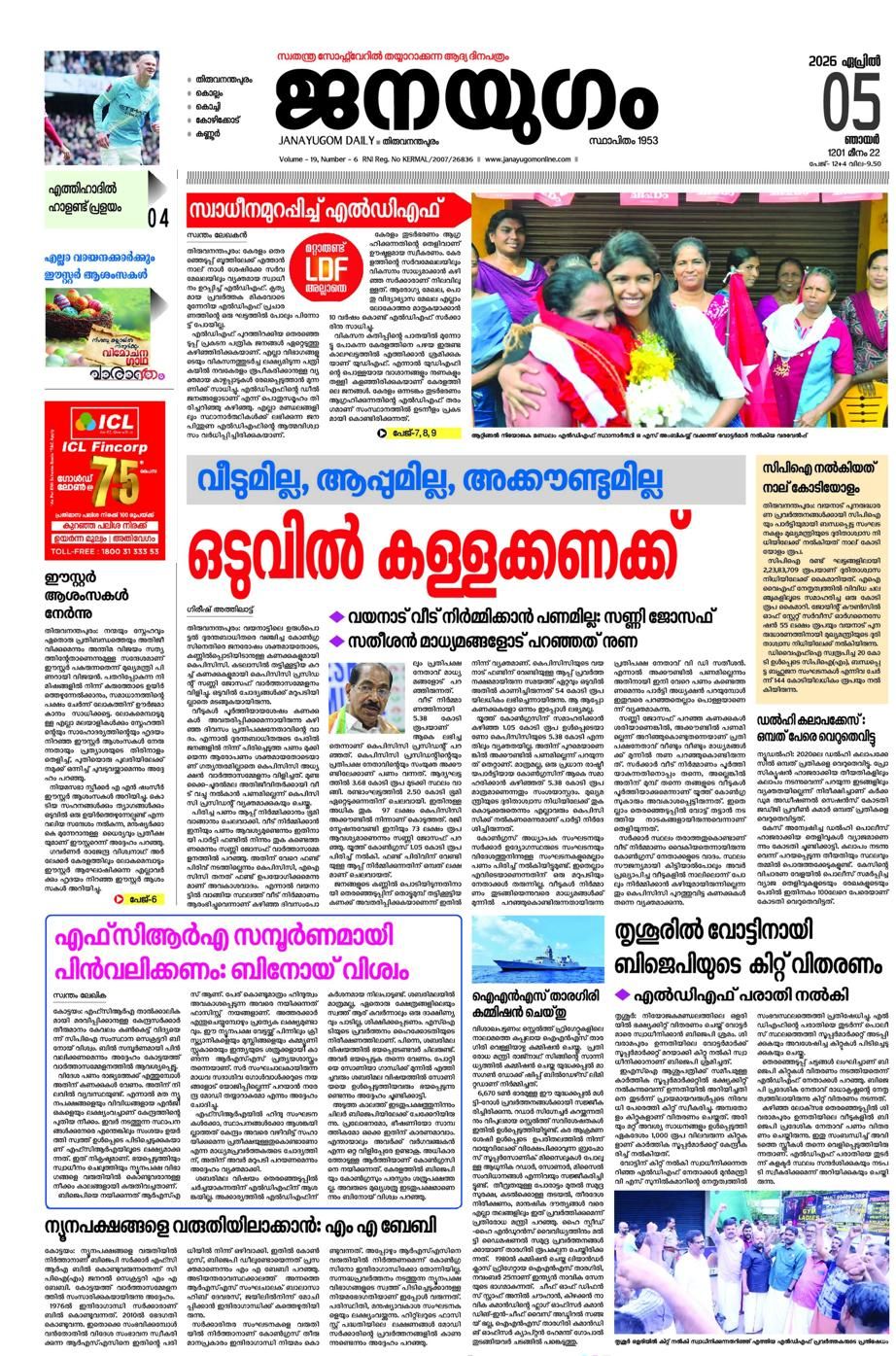
为了让它更易读,你可能需要计算图像处于的缩放比例,并将数值 x,y,w,h 重新缩放以获得更大的图像。
使用数值 (349, 886) 和 01_38_43_141.5_359.jpg,看起来缩放比例是 ~2.648,所以可能需要这个(不包含 img.resize)
    x, y, w, h = map(float, [x, y, w, h])
    x = 2.468 * x
    y = 2.468 * y
    w = 2.468 * w
    h = 2.468 * h
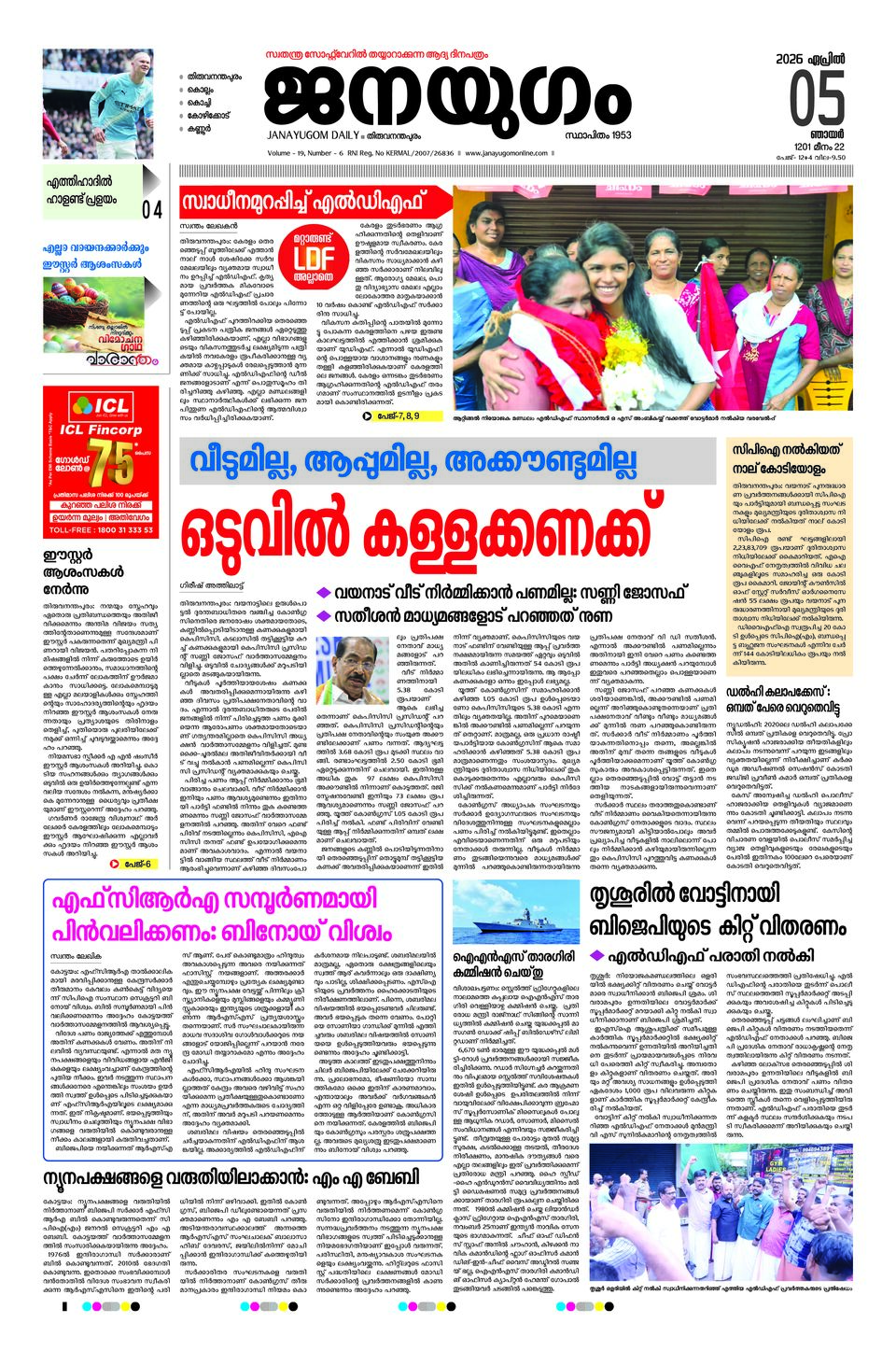
现在我得到了一张可读的图片。
结果(在新标签页/窗口打开以查看完整大小并看到可读文本)
完整代码:
import requests
from PIL import Image
from io import BytesIO

urls = [
    "https://epaper.janayugomonline.com/assets/epaper/thiruvananthapuram/2026/04/05/slices/01_38_43_141.5_359.jpg",
    "https://epaper.janayugomonline.com/assets/epaper/thiruvananthapuram/2026/04/05/slices/01_181.5_41_738_148.jpg",
    "https://epaper.janayugomonline.com/assets/epaper/thiruvananthapuram/2026/04/05/slices/01_38.5_406_137_180.jpg",
    "https://epaper.janayugomonline.com/assets/epaper/thiruvananthapuram/2026/04/05/slices/01_36.5_579_147_359.jpg",
    "https://epaper.janayugomonline.com/assets/epaper/thiruvananthapuram/2026/04/05/slices/01_182.5_184_739_283.jpg",
    "https://epaper.janayugomonline.com/assets/epaper/thiruvananthapuram/2026/04/05/slices/01_182.5_466_592_474.jpg",
    "https://epaper.janayugomonline.com/assets/epaper/thiruvananthapuram/2026/04/05/slices/01_774.5_465_143_263.jpg",
    "https://epaper.janayugomonline.com/assets/epaper/thiruvananthapuram/2026/04/05/slices/01_773.5_725_144_215.jpg",
    "https://epaper.janayugomonline.com/assets/epaper/thiruvananthapuram/2026/04/05/slices/01_39.5_938_440_310.jpg",
    "https://epaper.janayugomonline.com/assets/epaper/thiruvananthapuram/2026/04/05/slices/01_38.5_1242_440_147.jpg",
    "https://epaper.janayugomonline.com/assets/epaper/thiruvananthapuram/2026/04/05/slices/01_477.5_937_151_458.jpg",
    "https://epaper.janayugomonline.com/assets/epaper/thiruvananthapuram/2026/04/05/slices/01_625.5_937_294_451.jpg",
]

tiles = []
max_w, max_h = 0, 0

for url in urls:
    print("url:", url)

    name = url.split("/")[-1].replace(".jpg", "")
    _, x, y, w, h = name.split("_")

    x, y, w, h = map(float, [x, y, w, h])
    x = 2.468 * x
    y = 2.468 * y
    w = 2.468 * w
    h = 2.468 * h

    img = Image.open(BytesIO(requests.get(url).content))
    print("size:", img.size)

    # img = img.resize((int(w), int(h)))

    tiles.append((img, round(x), round(y)))

    max_w = max(max_w, round(x + w))
    max_h = max(max_h, round(y + h))

canvas = Image.new("RGB", (max_w, max_h), (255, 255, 255))

for img, x, y in tiles:
    canvas.paste(img, (x, y))

canvas.save("output.jpg")
站内所有文章版权归属LeftHeroAI导航站,无授权禁止任何主体转载、抄袭、复制内容,亦不得私自架设镜像站点。一经侵权,本站将通过法律途径追责。
相关文章






汇集全球数千款 AI 工具,每日持续更新,配套 AI 开发学习资源,轻松用 AI 提升工作效率。快捷键 Ctrl+D/⌘+D 一键收藏本站。