


在CSS @page页边距盒中控制图像大小
我有一个将要打印的HTML页面。Chrome已经支持CSS的页边距盒(page margin boxes)有一段时间了,因此我在用它们。
<html>
    <head>
        <style>
            @page {
                size: a4;
                margin-top: 30mm;
                margin-bottom: 15mm;
                margin-left: 10mm;
                margin-right: 10mm;

                @top-left {
                    content: url("/images/300x50.png");
                    background-color: thistle;
                }

                @top-center {
                    content: "";
                    background-color: red;
                }

                @top-right {
                    content: "First line of text in the header\A Second line of text in the header\A Third line of text in the header";
                    white-space: pre;
                    background-color: yellow;
                }
            }
        </style>
    </head>
    <body>
      <p>Document content starts here</p>
    </body>
</html>
在 @top-left盒中,我需要一个徽标图片,但目前它可能来自大约十几种不同的图像,形状和尺寸各异,并且可能会定期增加更多图像,因此我需要一个无论徽标图像的尺寸/宽高比如何都能工作的解决方案。
(测试时背景颜色属性只是为了更容易看到边距盒的位置;在最终文档中它们不会出现。)
使用300 x 50的图片时,我得到如下效果,令人满意。
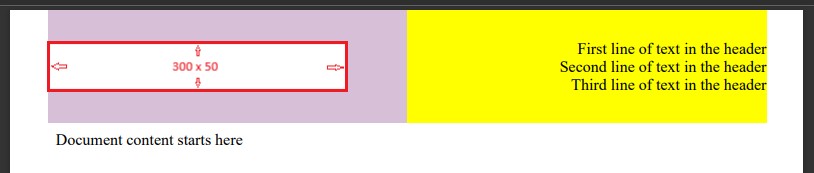
我不希望 @top-left盒始终跨越页面的一半以上,因此我添加了一个空的 @top-center盒。
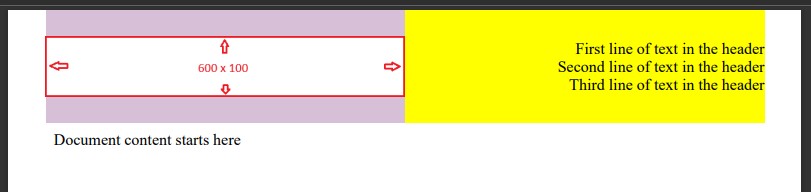
但是使用600 x 100的图片时,我得到以下效果
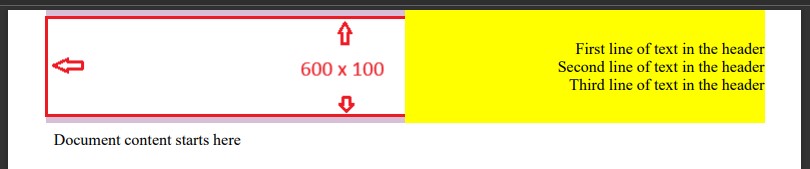
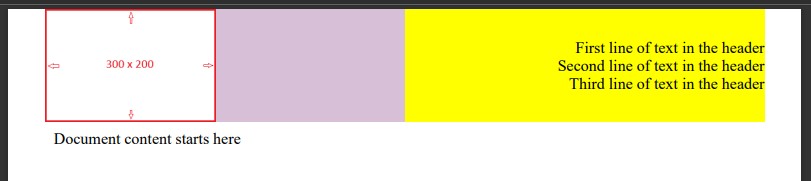
再来是300 x 200的图片,我得到的是
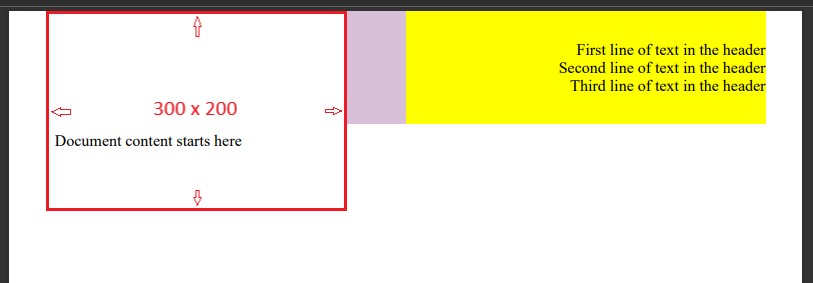
如果图片比边距盒大,我想把它缩小以适合盒子(当然要保持相同的纵横比)。理想情况下,我希望盒子顶部和底部留出少量内边距,使图片的最大高度大致达到边距盒高度的90%。我不介意图片能触及盒子左右两端。 我已经尝试了padding、margins、max-height、max-width和 object-fit,但它们似乎都作用在盒子本身上,而不是图片。
解决方案
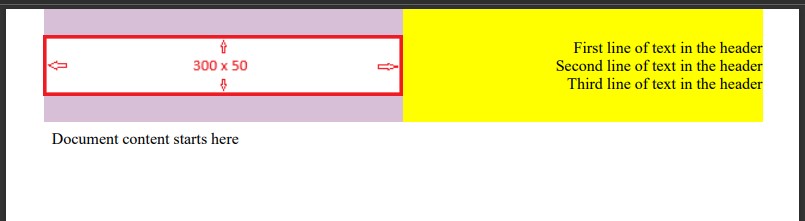
若对其他人有帮助,我通过把它做成背景图片,基本上已经实现了大部分效果。起初我以为背景图片根本不起作用,但后来意识到必须有一些内容(即使是空的)才会渲染背景。
这并不完美,因为它会把小于边距盒的图片放大,这点我并不太愿意看到;另外,我还没能实现顶部和底部的内边距,但可以凑合着用。
你需要在打印对话框中勾选“显示背景图片”,不过我在用Puppeteer,可以控制这个选项。
<html>
    <head>
        <style>
            @page {
                size: a4;
                margin-top: 30mm;
                margin-bottom: 15mm;
                margin-left: 10mm;
                margin-right: 10mm;

                @top-left {
                    content: "";
                    background-image: url("/images/300x50.png");
                    background-position: left;
                    background-repeat: no-repeat;
                    background-size: contain;
                    background-color: thistle;
                }

                @top-center {
                    content: "";
                    background-color: red;
                }

                @top-right {
                    content: "First line of text in the header\A Second line of text in the header\A Third line of text in the header";
                    white-space: pre;
                    background-color: yellow;
                }
            }
        </style>
    </head>
    <body>
      <p>Document content starts here</p>
    </body>
</html>
备选方案
你可以使用max-width和 max-height来限制图片大小。
站内所有文章版权归属LeftHeroAI导航站,无授权禁止任何主体转载、抄袭、复制内容,亦不得私自架设镜像站点。一经侵权,本站将通过法律途径追责。
相关文章






汇集全球数千款 AI 工具,每日持续更新,配套 AI 开发学习资源,轻松用 AI 提升工作效率。快捷键 Ctrl+D/⌘+D 一键收藏本站。