


如何在子组件中对NgTemplateOutlet的 let-变量进行类型检查
在下图中,你可以看到对signal对象的类型检查工作正常,但对let对象却不行,尽管它们具有相同的类型。
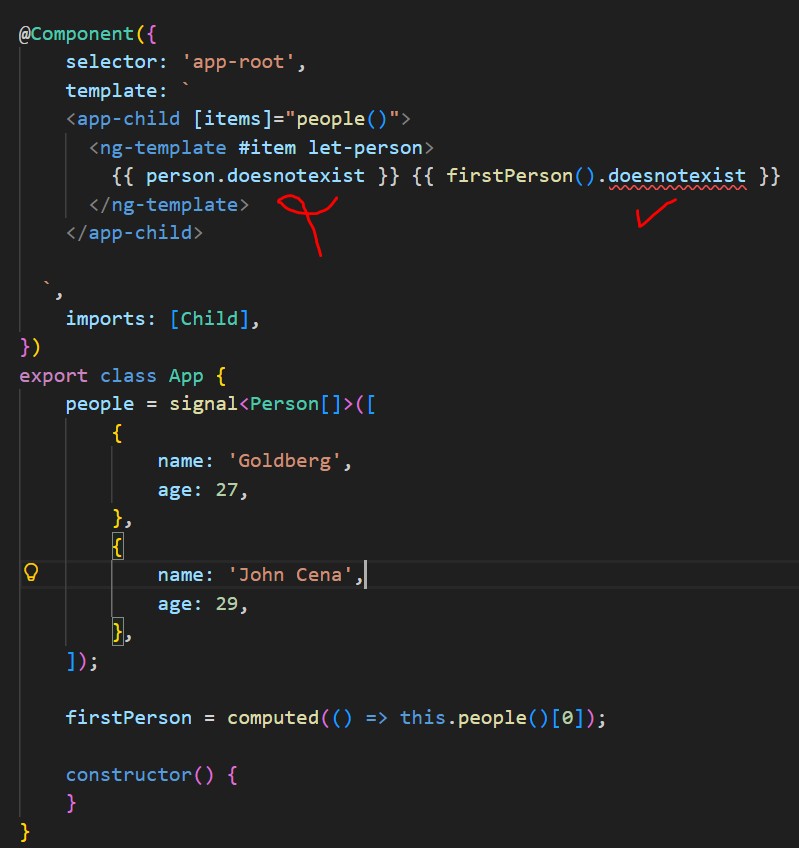
StackBlitz上的示例 - https://stackblitz.com/edit/stackblitz-starters-hynkmzq5?file=src%2Fmain.ts
应用组件(App组件):
import { Component, computed, signal } from '@angular/core';
import { bootstrapApplication } from '@angular/platform-browser';
import { Child } from './app/child/child';

@Component({
  selector: 'app-root',
  template: `
    <app-child [items]="people()">
      <ng-template #item let-person>
        {{ person.doesnotexist }} {{ firstPerson().name }}
      </ng-template>
    </app-child>

  `,
  imports: [Child],
})
export class App {
  people = signal<Person[]>([
    {
      name: 'Goldberg',
      age: 27,
    },
    {
      name: 'John Cena',
      age: 29,
    },
  ]);

  firstPerson = computed(() => this.people()[0]);

}

export interface Person {
  name: string;
  age: number;
}
子组件(Child Component):
import { Component, contentChild, effect, input, TemplateRef } from '@angular/core';
import { NgTemplateOutlet } from '@angular/common';

@Component({
  selector: 'app-child',
  imports: [NgTemplateOutlet],
  template: `
    @for(item of items(); track $index) {
      <ng-container [ngTemplateOutlet]="itemTemplate()" [ngTemplateOutletContext]="{ $implicit: item }" />
    }
  `,
  styles: ``,
})
export class Child<T> {

  items = input.required<T[]>();
  readonly itemTemplate = contentChild.required<TemplateRef<{ $implicit: T }>>('item');

}
如何让对let对象也能进行类型检查?
理想情况下,我并不想将整个数组传递给指令,只是为了在解决方案中推断类型
解决方案
Angular不支持动态类型检查,因为 person 的值可能是任意类型,这些类型只有在运行时才会被确定。
据我所知,截至2026-02-03,情况就是这样。
你可以通过使用一个对值进行类型化的函数来实现严格的类型检查。这里我使用 @let 来创建带类型的变量,并在整个模板中使用它。
HTML:
<app-child [items]="people()">
  <ng-template #item let-person>
    @let personTyped = isFirstPerson(person);
    {{ personTyped.doesnotexist }} {{ firstPerson().name }}
  </ng-template>
</app-child>
TS:
isFirstPerson(val: any): Person {
  return val;
}
StackBlitz演示
站内所有文章版权归属LeftHeroAI导航站,无授权禁止任何主体转载、抄袭、复制内容,亦不得私自架设镜像站点。一经侵权,本站将通过法律途径追责。
相关文章






汇集全球数千款 AI 工具,每日持续更新,配套 AI 开发学习资源,轻松用 AI 提升工作效率。快捷键 Ctrl+D/⌘+D 一键收藏本站。