


.NET 10解决方案模板在SLNX解决方案中未应用解决方案文件夹
我在为公司维护项目模板,并获得将旧的 .SLN 格式迁移到新的 .SLNX 格式的任务。为组织我们的代码,我们有两个解决方案目录:source 和 tests。
一切都正常,唯一的问题是新解决方案中没有把这些解决方案文件夹添加进去。
这是模板中我的基准解决方案文件的样子:
    <Solution>
        <Folder Name="source">
            <Project Path="source/SomeSourceProject.csproj"/>
            <!--#if (someTemplateToggle)-->
            <Project Path="source/SomeOptionalSourceProject.csproj"/>
            <!--#endif-->
        </Folder>
        <Folder Name="tests">
            <Project Path="tests/SomeSourceProjectTests.csproj"/>
            <!--#if (someTemplateToggle)-->
            <Project Path="tests/SomeOptionalSourceProjectTests.csproj"/>
            <!--#endif-->
        </Folder>
    </Solution>
新建一个项目后,它的样子是这样的。无论是用CLI、Rider还是VS创建,结果总是完全一样。
    <Solution>
        <Project Path="source/SomeSourceProject.csproj"/>
        <Project Path="source/SomeOptionalSourceProject.csproj"/>
        <Project Path="tests/SomeSourceProjectTests.csproj"/>
        <Project Path="tests/SomeOptionalSourceProjectTests.csproj"/>
    </Solution>
我已经尝试过对后置动作脚本进行调整以及一切尝试,并尝试手动构建我的解决方案,但越来越糟(缺失的项目、一般情况下未生成解决方案,……)。
解决方案
无论是用CLI创建它,问题都不重要
我无法重现这个问题。
无效的文件夹路径
我创建了一个简化的 C:\template\template.slnx 文件,在甚至没有创建模板的情况下就尝试对其进行验证。
<Solution>
  <Folder Name="source" />
</Solution>
用Visual Studio 2022打开时,出现如下错误:
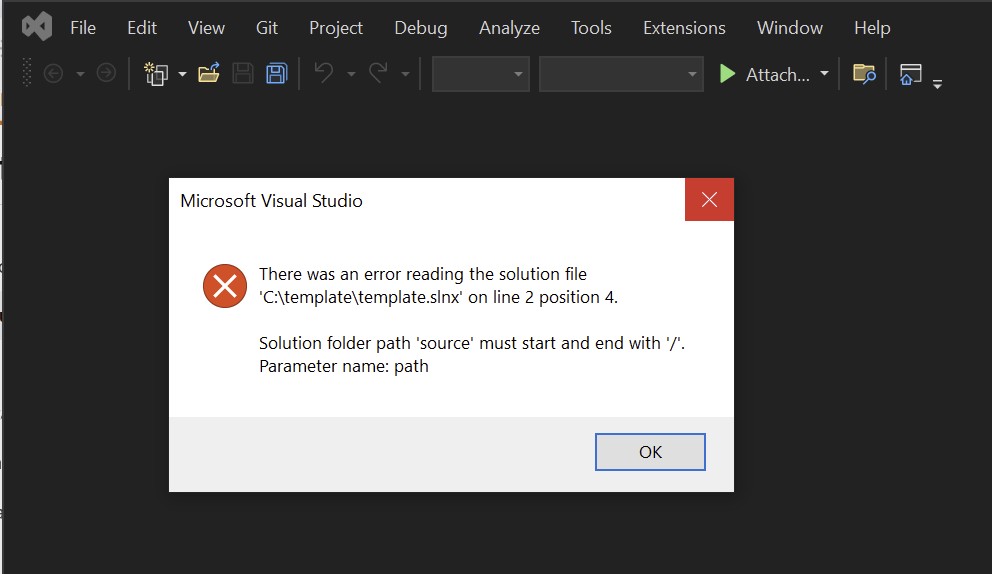
通过CLI构建时,dotnet build 也会因为同样的错误而失败:
C:\template>dotnet build
C:\template\template.slnx(2,4): error MSB4025:
  The project file could not be loaded. Microsoft.VisualStudio.SolutionPersistence.Model.SolutionException: Solution folder path 'source' must start and end with '/'. (Parameter 'path')
   ---> Microsoft.VisualStudio.SolutionPersistence.Model.SolutionArgumentException: Solution folder path 'source' must start and end with '/'. (Parameter 'path')
     at Microsoft.VisualStudio.SolutionPersistence.Model.SolutionModel.AddFolder(String path)
     at Microsoft.VisualStudio.SolutionPersistence.Serializer.Xml.XmlDecorators.XmlFolder.AddToModel(SolutionModel solutionModel, List`1 newProjects)
     --- End of inner exception stack trace ---
     at Microsoft.VisualStudio.SolutionPersistence.Serializer.Xml.XmlDecorators.XmlFolder.AddToModel(SolutionModel solutionModel, List`1 newProjects)
     at Microsoft.VisualStudio.SolutionPersistence.Serializer.Xml.XmlDecorators.XmlSolution.ToModel()
     at Microsoft.VisualStudio.SolutionPersistence.Serializer.Xml.XmlDecorators.SlnxFile.ToModel()
     at Microsoft.VisualStudio.SolutionPersistence.Serializer.Xml.SlnXmlSerializer.Reader.Parse()
     at Microsoft.VisualStudio.SolutionPersistence.Serializer.Xml.SlnXmlSerializer.ReadModelAsync(String fullPath, Stream reader, CancellationToken cancellationToken)
     at Microsoft.VisualStudio.SolutionPersistence.Serializer.SingleFileSerializerBase`1.Microsoft.VisualStudio.SolutionPersistence.ISolutionSerializer.OpenAsync(String moniker, CancellationToken cancellationToken)
     at Microsoft.Build.Construction.SolutionFile.ParseUsingNewParser()

Build failed with 1 error(s) in 0.1s
按建议修改路径即可解决这些问题。
完成模板
我添加了一个项目 C:\template\source\template.csproj
<Project Sdk="Microsoft.NET.Sdk">

  <PropertyGroup>
    <OutputType>Exe</OutputType>
    <TargetFramework>net9.0</TargetFramework>
    <ImplicitUsings>enable</ImplicitUsings>
    <Nullable>enable</Nullable>
  </PropertyGroup>

</Project>
到 C:\template\template.slnx,
<Solution>
  <Folder Name="/source/">
    <Project Path="source/template.csproj"/>
  </Folder>
</Solution>
添加了最小模板脚手架 C:\template\.template.config\template.json
{
  "$schema": "http://json.schemastore.org/template",
  "identity": "template",
  "name": "template",
  "shortName": "template",
}
并安装了模板:
C:\template>dotnet new install .\
The following template packages will be installed:
   C:\template

Success: C:\template installed the following templates:
Template Name  Short Name  Language  Tags
-------------  ----------  --------  ----
template       template
使用模板
在文件夹 C:\application 中应用模板,结果如预期
C:\application>dotnet new template
The template "template" was created successfully.
创建的解决方案文件 C:\application\template.slnx
<Solution>
  <Folder Name="/source/">
    <Project Path="source/template.csproj"/>
  </Folder>
</Solution>
是对 C:\template\template.slnx 的逐字拷贝,正如预期。
该文件在Visual Studio 2022中打开也没问题,并且如预期地显示了解决方案文件夹:
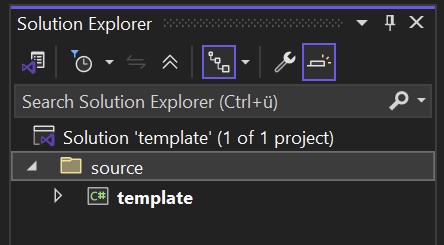
你能重现这个吗?如果是这样,问题就出在别处。
站内所有文章版权归属LeftHeroAI导航站,无授权禁止任何主体转载、抄袭、复制内容,亦不得私自架设镜像站点。一经侵权,本站将通过法律途径追责。
相关文章






汇集全球数千款 AI 工具,每日持续更新,配套 AI 开发学习资源,轻松用 AI 提升工作效率。快捷键 Ctrl+D/⌘+D 一键收藏本站。