


在弹出窗口中使用时,Mathjax无法渲染
下面是我的HTML:
<!DOCTYPE html>
<html>
<head>

<meta charset="UTF-8">
<title>Math Popup Test</title>

<!-- MathJax configuration -->
<script>
window.MathJax = {
tex: {
inlineMath: [['\\(','\\)']],
displayMath: [['\\[','\\]']]
}
};
</script>

<!-- Load MathJax -->
<script src="https://cdn.jsdelivr.net/npm/mathjax@3/es5/tex-mml-chtml.js"></script>

<style>

body{
font-family:serif;
padding:40px;
}

button{
font-size:16px;
padding:10px 20px;
}

#overlay{
position:fixed;
top:0;
left:0;
width:100%;
height:100%;
background:rgba(0,0,0,0.5);
display:none;
}

#popup{
position:fixed;
left:50%;
top:50%;
transform:translate(-50%,-50%);
width:60vw;
height:60vh;
background:#eee;
border:3px solid gold;
display:none;
padding:20px;
overflow:auto;
}

.math-block{
font-size:18px;
line-height:1.6;
}

mjx-container[jax="CHTML"][display="true"]{
text-align:left !important;
margin-left:0 !important;
}

</style>

</head>

<body>

<button onclick="openPopup()">Open Example</button>

<div id="overlay"></div>

<div id="popup">
<div id="popupContent"></div>
</div>

<script>

/* popup content */

const htmlContent = `
<div class="math-block">

<span>\$begin:math:text$ \\\\text\{ASSUME\} \\$end:math:text$</span>
<span>\$begin:math:text$ \[\\\\text\{R\.V\.\}\[N\]\] \\$end:math:text$</span> :
Default happens on the Year
<span>\$begin:math:text$ \[n\,\\\\\: n \= 1\(1\)\\\\infty\] \\$end:math:text$</span>

</div>
`;


function openPopup(){

const popupContent = document.getElementById("popupContent");

popupContent.innerHTML = htmlContent;

document.getElementById("overlay").style.display="block";
document.getElementById("popup").style.display="block";

/* render math */

MathJax.typesetPromise([popupContent]);

}

</script>

</body>
</html>
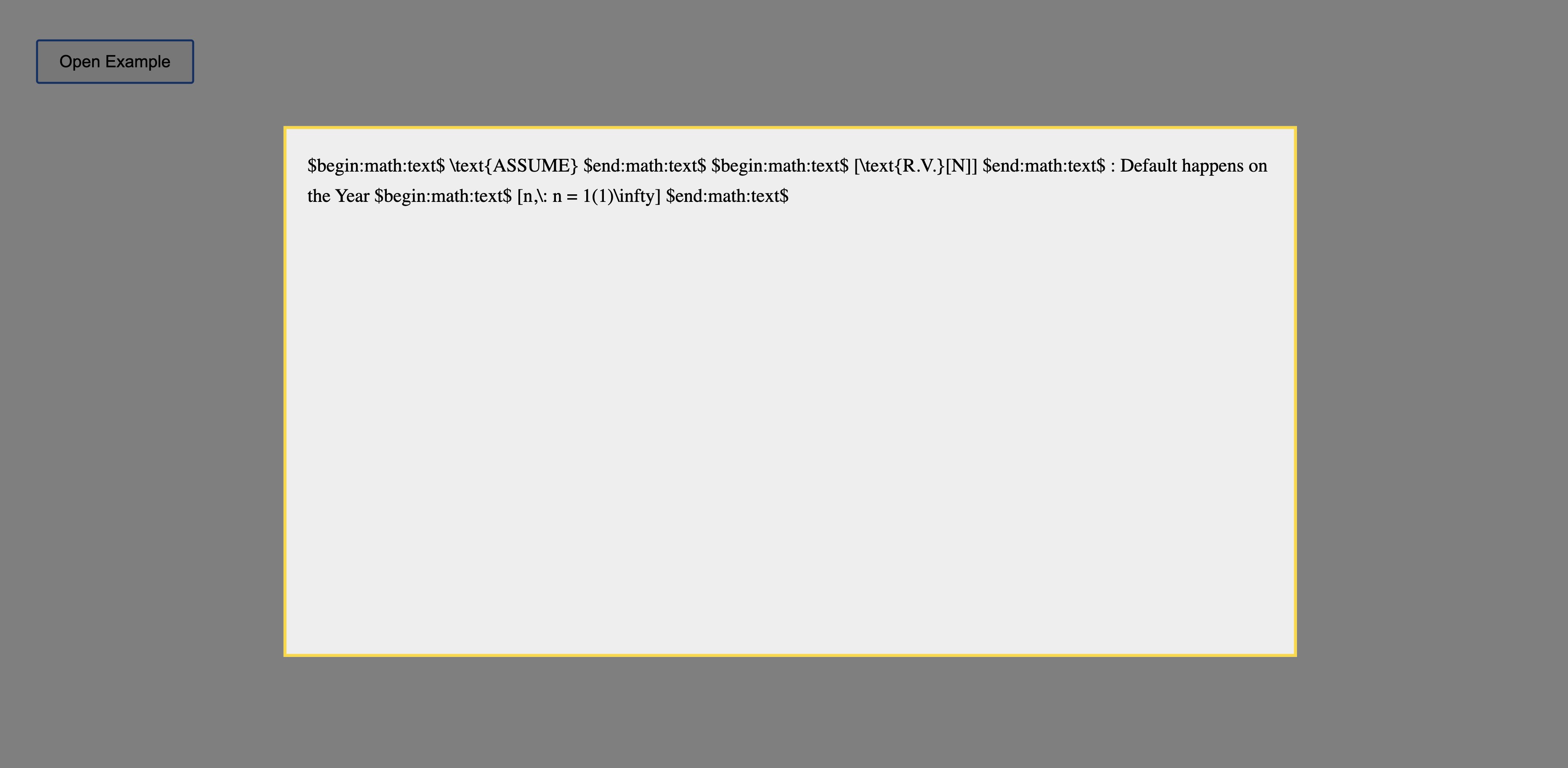
然而这没有正确渲染数学表达式。下面是在Opera浏览器中的输出。请您帮忙解决这个渲染问题吗?
按原样渲染的文本在我的Opera浏览器中的效果
$begin:math:text$ \text{ASSUME} $end:math:text$ $begin:math:text$ [\text{R.V.}[N]] $end:math:text$ : Default happens on the Year $begin:math:text$ [n,\: n = 1(1)\infty] $end:math:text$

Discriminant:

$begin:math:display$ D = b^2 - 4ac $end:math:display$
$begin:math:text$D>0$end:math:text$ → two real roots
$begin:math:text$D=0$end:math:text$ → one root
$begin:math:text$D<0$end:math:text$ → complex roots
快照:
解决方案
这里的问题不在弹出窗口,而在你的MathJax配置。或者在公式的 htmlContent 中。现在MathJax只处理
\( ... \)
\[ ... \]
最简单的改动是 htmlContent,因为现在还不清楚那里到底是什么。也许可以像下面这样:
/* popup content */

const htmlContent = `
<div class='math-block'>

<span>\\(\\text{ASSUME}\\)</span>
<span>\\[\\text{R.V.}[N]\\]</span> :
Default happens on the Year
<span>\\[n\\,\\: n = 1(1)\\infty\\]</span>

</div>
`;


function openPopup(){

const popupContent = document.getElementById("popupContent");

popupContent.innerHTML = htmlContent;

document.getElementById("overlay").style.display="block";
document.getElementById("popup").style.display="block";

/* render math */

MathJax.typesetPromise([popupContent]);

}
body{
font-family:serif;
padding:40px;
}

button{
font-size:16px;
padding:10px 20px;
}

#overlay{
position:fixed;
top:0;
left:0;
width:100%;
height:100%;
background:rgba(0,0,0,0.5);
display:none;
}

#popup{
position:fixed;
left:50%;
top:50%;
transform:translate(-50%,-50%);
width:60vw;
height:60vh;
background:#eee;
border:3px solid gold;
display:none;
padding:20px;
overflow:auto;
}

.math-block{
font-size:18px;
line-height:1.6;
}

mjx-container[jax="CHTML"][display="true"]{
text-align:left !important;
margin-left:0 !important;
}
<!-- MathJax configuration -->
<script>
window.MathJax = {
tex: {
inlineMath: [['\\(','\\)']],
displayMath: [['\\[','\\]']]
}
};
</script>

<!-- Load MathJax -->
<script src="https://cdn.jsdelivr.net/npm/mathjax@3/es5/tex-mml-chtml.js"></script>

<button onclick="openPopup()">Open Example</button>

<div id="overlay"></div>

<div id="popup">
<div id="popupContent"></div>
</div>
站内所有文章版权归属LeftHeroAI导航站,无授权禁止任何主体转载、抄袭、复制内容,亦不得私自架设镜像站点。一经侵权,本站将通过法律途径追责。
相关文章






汇集全球数千款 AI 工具,每日持续更新,配套 AI 开发学习资源,轻松用 AI 提升工作效率。快捷键 Ctrl+D/⌘+D 一键收藏本站。