


在React中,SVG分割线的flex容器高度与输入框的高度不一致
我正在React应用中构建一个Hero区块,并创建一个带下拉菜单、输入框以及两者之间的竖直分隔线的搜索栏。
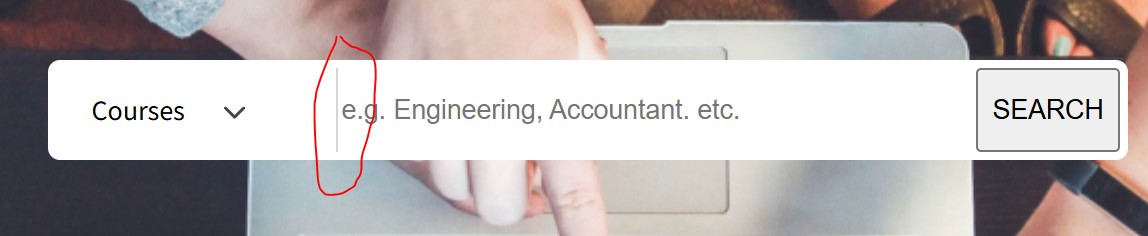
搜索框是一个flex容器。我希望竖直分隔线(SVG线)与输入框的高度保持一致,与截图中输入框和下拉菜单的高度相同。如图所示。
不过SVG分隔线没有撑满容器的完整高度。
这是我看到的效果:
React Component Code:
import "./Hero.css";
import bgImage from "../../assets/images/bg-image.png";

// FindTheRightCourse (Hero Section)
export default function FindTheRightCourse(){
    return (
        <section
            className="find-course-section"
            style= {{ backgroundImage:`url(${bgImage})`}}
        >
            <div className= "find-course-overlay">
                <h1 className="find-course-title">FIND THE RIGHT COURSE</h1>

                <div className="find-course-search-box">
                    <div className= "find-course-select-wrapper">
                        <select className="find-course-select">
                            <option>Courses </option>
                            <option>Engineering</option>
                            <option>Accountant</option>
                            <option>Science</option>
                            <option>Management</option>
                        </select>
                        <span className = "find-course-select-arrow"><svg width="11" height="7" viewBox="0 0 11 7" fill="#464646" xmlns="http://www.w3.org/2000/svg">
    <path d="M4.77277 5.82317L0.216514 1.26678C-0.0734701 0.976921 -0.0734701 0.506996 0.216514 0.2173C0.506238 -0.0724335 0.976142 -0.0724335 1.26584 0.2173L5.29744 4.249L9.3289 0.2174C9.61874 -0.072319 10.0886 -0.072319 10.3783 0.2174C10.6682 0.507133 10.6682 0.977043 10.3783 1.26688L5.82199 5.82328C5.67706 5.96815 5.48731 6.04049 5.29746 6.04049C5.10753 6.04049 4.91764 5.96802 4.77277 5.82317Z" fill="#464646"/>
    </svg></span>
                    </div>

                    <svg className="find-course-divider" viewBox="0 0 1 49" fill="black" xmlns="http://www.w3.org/2000/svg">
<line x1="0.5" x2="0.5" y2="49" stroke="#CECECE"/>
</svg>


                    <input
                        type="text"
                        className="find-course-input"
                        placeholder="e.g. Engineering, Accountant. etc."/>


                    <button className = "find-course-button">SEARCH</button>
                </div>
            </div>
        </section>
    );
}
CSS代码:
/* CSS For Hero Section (Find the Right Course) */
@import url('https://fonts.googleapis.com/css2?family=Source+Sans+Pro:wght@300;400;600;700&display=swap');
.find-course-section{
    width:100%;
    height:500px;
    background-size:cover;
    background-position:center;
    background-repeat:no-repeat;
    display:flex;
    justify-content: center;
    align-items: center;
    position:relative;
}

.find-course-overlay{
    width:100%;
    max-width:1200px;
    padding:0 20px;
    display:flex;
    flex-direction: column;
    align-items:center;
}


.find-course-title{
    color:#fff;
    font-size:3rem;
    font-weight:500;
    letter-spacing:1px;
    margin-bottom: 30px;
    text-align: center;
    font-family: "Source Sans Pro",sans-serif;
}

.find-course-search-box{
    width:540px;
    height:50px;
    background-color:#ffffff;
    border:4px solid #ffffff;
    border-radius:6px;
    overflow:hidden;
    display:flex;
    align-items:stretch;
    box-sizing: border-box;
}

.find-course-select-wrapper{
    position:relative;
    height:100%;
    display:flex;
    align-items:center;
}


.find-course-select{
    width:140px;
    border:none;
    outline:none;
    font-size:14px;
    font-family:"Source Sans Pro", sans-serif;
    padding:0 18px;
    /* border-right:1px solid #d9d9d9; */
    appearance:none;
    -webkit-appearance:none;
    -moz-appearance:none;
    cursor:pointer;
}

.find-course-select-arrow{
    position:absolute;
    right:45px;
    top:50%;
    transform:translateY(-50%);
    color:#464646;
    font-size:16px;
    pointer-events: none;
}


.find-course-input{
    flex:1;
    border:none;
}

.find-course-divider{
    height:auto;
    width:1px;
    align-self:stretch;
}
如何让SVG分隔线自动拉伸到flex容器的整個高度,以便与输入框的高度保持一致?
解决方案
如果你确实需要在这里使用 svg,请把 overflow: hidden; 从 .find-course-search-box 区块中移除,并在 svg 的高度上加入 border-width:
/* CSS For Hero Section (Find the Right Course) */
@import url('https://fonts.googleapis.com/css2?family=Source+Sans+Pro:wght@300;400;600;700&display=swap');
.find-course-section{
    width:100%;
    height:500px;
    background-size:cover;
    background-position:center;
    background-repeat:no-repeat;
    display:flex;
    justify-content: center;
    align-items: center;
    position:relative;
}

.find-course-overlay{
    width:100%;
    max-width:1200px;
    padding:0 20px;
    display:flex;
    flex-direction: column;
    align-items:center;
}


.find-course-title{
    color:#fff;
    font-size:3rem;
    font-weight:500;
    letter-spacing:1px;
    margin-bottom: 30px;
    text-align: center;
    font-family: "Source Sans Pro",sans-serif;
}

.find-course-search-box{
    --border-width:4px;
    width:540px;
    height:50px;
    background-color:#ffffff;
    border:var(--border-width) solid #ffffff;
    border-radius:6px;
    /*overflow:hidden*/;
    display:flex;
    align-items:stretch;
    box-sizing: border-box;
}

.find-course-select-wrapper{
    position:relative;
    height:100%;
    display:flex;
    align-items:center;
}


.find-course-select{
    width:140px;
    border:none;
    outline:none;
    font-size:14px;
    font-family:"Source Sans Pro", sans-serif;
    padding:0 18px;
    /* border-right:1px solid #d9d9d9; */
    appearance:none;
    -webkit-appearance:none;
    -moz-appearance:none;
    cursor:pointer;
}

.find-course-select-arrow{
    position:absolute;
    right:45px;
    top:50%;
    transform:translateY(-50%);
    color:#464646;
    font-size:16px;
    pointer-events: none;
}


.find-course-input{
    flex:1;
    border:none;
}

.find-course-divider{
    height:calc(100% + 2 * var(--border-width));
    margin-top:calc(-1 * var(--border-width));
    width:1px;
    align-self:stretch;
}
<section
            class="find-course-section"
            style="background-image:url(https://picsum.photos/600/400/?blur)"
        >
            <div class= "find-course-overlay">
                <h1 class="find-course-title">FIND THE RIGHT COURSE</h1>

                <div class="find-course-search-box">
                    <div class= "find-course-select-wrapper">
                        <select class="find-course-select">
                            <option>Courses </option>
                            <option>Engineering</option>
                            <option>Accountant</option>
                            <option>Science</option>
                            <option>Management</option>
                        </select>
                        <span class = "find-course-select-arrow"><svg width="11" height="7" viewBox="0 0 11 7" fill="#464646" xmlns="http://www.w3.org/2000/svg">
    <path d="M4.77277 5.82317L0.216514 1.26678C-0.0734701 0.976921 -0.0734701 0.506996 0.216514 0.2173C0.506238 -0.0724335 0.976142 -0.0724335 1.26584 0.2173L5.29744 4.249L9.3289 0.2174C9.61874 -0.072319 10.0886 -0.072319 10.3783 0.2174C10.6682 0.507133 10.6682 0.977043 10.3783 1.26688L5.82199 5.82328C5.67706 5.96815 5.48731 6.04049 5.29746 6.04049C5.10753 6.04049 4.91764 5.96802 4.77277 5.82317Z" fill="#464646"/>
    </svg></span>
                    </div>

                    <svg class="find-course-divider" viewBox="0 0 1 49" fill="black" xmlns="http://www.w3.org/2000/svg">
<line x1="0.5" x2="0.5" y2="49" stroke="#CECECE"/>
</svg>


                    <input
                        type="text"
                        class="find-course-input"
                        placeholder="e.g. Engineering, Accountant. etc."/>


                    <button class = "find-course-button">SEARCH</button>
                </div>
            </div>
        </section>
站内所有文章版权归属LeftHeroAI导航站,无授权禁止任何主体转载、抄袭、复制内容,亦不得私自架设镜像站点。一经侵权,本站将通过法律途径追责。
相关文章






汇集全球数千款 AI 工具,每日持续更新,配套 AI 开发学习资源,轻松用 AI 提升工作效率。快捷键 Ctrl+D/⌘+D 一键收藏本站。