


如何在不损失质量的情况下将SVG图像绘制到画布上?
在将SVG元素绘制到画布上时,是否有办法复现直接在文档中渲染的SVG外观?
该SVG包含一组较小的三角形,并将 shape-rendering 设置为 crisp-edges 以避免出现可见缝隙。单独的SVG不会产生伪影,但绘制到画布上时却会出现大量缝隙。这些伪影与画布的分辨率无关。
Code:
async function svg_to_canvas(svg_el, canvas) {
  // svg to blob URL
  const serializer = new XMLSerializer();
  const source = serializer.serializeToString(svg_el);
  const svg_blob = new Blob([source], {
    type: "image/svg+xml;charset=utf-8"
  });
  const svg_url = URL.createObjectURL(svg_blob);
  // convert blob URL to image
  const img = new Image();
  await new Promise((resolve, reject) => {
    img.onload = () => resolve(img);
    img.onerror = (err) => reject(err);
    img.src = svg_url;
  })
  // then paint on canvas
  canvas.setAttribute('width', svg_el.getAttribute("width"));
  canvas.setAttribute('height', svg_el.getAttribute("height"));
  const context = canvas.getContext('2d');
  context.imageSmoothingQuality = "high";
  context.drawImage(img, 0, 0, canvas.width, canvas.height);
}
输出:水平可见的缝隙出乎意料。这是Firefox在 Windows 11上的输出。Edge会产生不同的伪影,似乎忽略了shape-rendering属性。
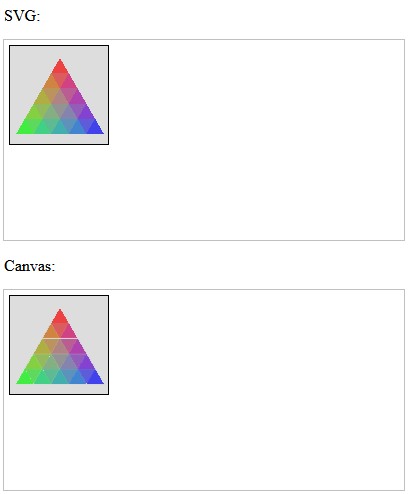
片段版本,这个版本会考虑devicePixelRatio,因此你可以看到在不同的缩放水平或DPI比例下的效果。
async function svg_to_canvas(svg_el, canvas) {
  // svg to blob URL
  const serializer = new XMLSerializer();
  const source = serializer.serializeToString(svg_el);
  const svg_blob = new Blob([source], {
    type: "image/svg+xml;charset=utf-8"
  });
  const svg_url = URL.createObjectURL(svg_blob);
  // convert blob URL to image
  const img = new Image();
  await new Promise((resolve, reject) => {
    img.onload = () => resolve(img);
    img.onerror = (err) => reject(err);
    img.src = svg_url;
  })
  // then paint on canvas
  const ratio = window.devicePixelRatio;
  canvas.setAttribute('width', svg_el.getAttribute("width") * ratio);
  canvas.setAttribute('height', svg_el.getAttribute("height") * ratio);
  canvas.style.width = svg_el.getAttribute("width") + "px";
  const context = canvas.getContext('2d');
  context.imageSmoothingQuality = "high";
  context.drawImage(img, 0, 0, canvas.width, canvas.height);
}

svg_to_canvas(document.getElementById("test-svg"), document.getElementById('test-canvas'));
<p>SVG:</p>
<!-- The below is an SVG with many triangles, filling up a large triangle -->
<svg id="test-svg" width="400" height="200" style="display: block; outline: 1px solid silver;">
<rect x="5.5" y="5.5" width="99" height="99" fill="#ddd" stroke="black"/>
<g shape-rendering="crispEdges"><path d="M 56.0 18.0 L 47.2 33.2 L 64.8 33.2 Z" fill="rgb(237.41034097107058, 65.8077882928761, 65.8077882928761)" stroke-width="none" stroke="none"></path><path d="M 47.2 33.2 L 64.8 33.2 L 56.0 48.4 Z" fill="rgb(218.40072063744432, 93.07557473646084, 93.07557473646084)" stroke-width="none" stroke="none"></path><path d="M 64.8 33.2 L 56.0 48.4 L 73.6 48.4 Z" fill="rgb(208.22744775845476, 65.8077882928761, 131.664972562941)" stroke-width="none" stroke="none"></path><path d="M 56.0 48.4 L 73.6 48.4 L 64.8 63.6 Z" fill="rgb(186.25593481725875, 93.07557473646082, 147.20959252992503)" stroke-width="none" stroke="none"></path><path d="M 73.6 48.4 L 64.8 63.6 L 82.3 63.6 Z" fill="rgb(174.22304669589496, 65.8077882928761, 174.18571985096827)" stroke-width="none" stroke="none"></path><path d="M 64.8 63.6 L 82.3 63.6 L 73.6 78.8 Z" fill="rgb(147.25376645215857, 93.07557473646084, 186.2210129204828)" stroke-width="none" stroke="none"></path><path d="M 82.3 63.6 L 73.6 78.8 L 91.1 78.8 Z" fill="rgb(131.71435001547857, 65.8077882928761, 208.19621754489202)" stroke-width="none" stroke="none"></path><path d="M 73.6 78.8 L 91.1 78.8 L 82.3 94.0 Z" fill="rgb(93.14542508380538, 93.07557473646084, 218.37093939770165)" stroke-width="none" stroke="none"></path><path d="M 91.1 78.8 L 82.3 94.0 L 99.9 94.0 Z" fill="rgb(65.9065247149324, 65.8077882928761, 237.3829501038354)" stroke-width="none" stroke="none"></path><path d="M 47.2 33.2 L 38.4 48.4 L 56.0 48.4 Z" fill="rgb(208.22744775845476, 131.664972562941, 65.8077882928761)" stroke-width="none" stroke="none"></path><path d="M 38.4 48.4 L 56.0 48.4 L 47.2 63.6 Z" fill="rgb(186.25593481725875, 147.20959252992503, 93.07557473646082)" stroke-width="none" stroke="none"></path><path d="M 56.0 48.4 L 47.2 63.6 L 64.8 63.6 Z" fill="rgb(174.223046695895, 131.664972562941, 131.664972562941)" stroke-width="none" stroke="none"></path><path d="M 47.2 63.6 L 64.8 63.6 L 56.0 78.8 Z" fill="rgb(147.2537664521586, 147.20959252992503, 147.20959252992503)" stroke-width="none" stroke="none"></path><path d="M 64.8 63.6 L 56.0 78.8 L 73.6 78.8 Z" fill="rgb(131.7143500154786, 131.664972562941, 174.18571985096827)" stroke-width="none" stroke="none"></path><path d="M 56.0 78.8 L 73.6 78.8 L 64.8 94.0 Z" fill="rgb(93.14542508380542, 147.20959252992506, 186.2210129204828)" stroke-width="none" stroke="none"></path><path d="M 73.6 78.8 L 64.8 94.0 L 82.3 94.0 Z" fill="rgb(65.9065247149324, 131.664972562941, 208.19621754489202)" stroke-width="none" stroke="none"></path><path d="M 38.4 48.4 L 29.7 63.6 L 47.2 63.6 Z" fill="rgb(174.22304669589496, 174.18571985096827, 65.8077882928761)" stroke-width="none" stroke="none"></path><path d="M 29.7 63.6 L 47.2 63.6 L 38.4 78.8 Z" fill="rgb(147.25376645215857, 186.2210129204828, 93.07557473646084)" stroke-width="none" stroke="none"></path><path d="M 47.2 63.6 L 38.4 78.8 L 56.0 78.8 Z" fill="rgb(131.71435001547857, 174.18571985096827, 131.664972562941)" stroke-width="none" stroke="none"></path><path d="M 38.4 78.8 L 56.0 78.8 L 47.2 94.0 Z" fill="rgb(93.1454250838054, 186.2210129204828, 147.20959252992506)" stroke-width="none" stroke="none"></path><path d="M 56.0 78.8 L 47.2 94.0 L 64.8 94.0 Z" fill="rgb(65.9065247149324, 174.18571985096827, 174.18571985096827)" stroke-width="none" stroke="none"></path><path d="M 29.7 63.6 L 20.9 78.8 L 38.4 78.8 Z" fill="rgb(131.71435001547857, 208.19621754489202, 65.8077882928761)" stroke-width="none" stroke="none"></path><path d="M 20.9 78.8 L 38.4 78.8 L 29.7 94.0 Z" fill="rgb(93.14542508380538, 218.37093939770165, 93.07557473646084)" stroke-width="none" stroke="none"></path><path d="M 38.4 78.8 L 29.7 94.0 L 47.2 94.0 Z" fill="rgb(65.90652471493237, 208.19621754489202, 131.664972562941)" stroke-width="none" stroke="none"></path><path d="M 20.9 78.8 L 12.1 94.0 L 29.7 94.0 Z" fill="rgb(65.9065247149324, 237.3829501038354, 65.8077882928761)" stroke-width="none" stroke="none"></path></g>
</svg>

<p>Canvas:</p>
<canvas id="test-canvas" style="display: block; margin-bottom: 1em; outline: 1px solid silver;"></canvas>
解决方案
这似乎是硬件加速渲染器的问题。
你可以在 https://bugzilla.mozilla.org/enter_bug.cgi 提交一个问题。
作为一种变通方法,你可以在调用 getContext() 时传入 willReadFrequently: true 选项,将你的2D上下文强制为软件渲染。
async function svg_to_canvas(svg_el, canvas) {
  // svg to blob URL
  const serializer = new XMLSerializer();
  const source = serializer.serializeToString(svg_el);
  const svg_blob = new Blob([source], {
    type: "image/svg+xml;charset=utf-8"
  });
  const svg_url = URL.createObjectURL(svg_blob);
  // convert blob URL to image
  const img = new Image();
  await new Promise((resolve, reject) => {
    img.onload = () => resolve(createImageBitmap(img));
    img.onerror = (err) => reject(err);
    img.src = svg_url;
  })
  // then paint on canvas
  const ratio = window.devicePixelRatio;
  canvas.setAttribute('width', svg_el.getAttribute("width") * ratio);
  canvas.setAttribute('height', svg_el.getAttribute("height") * ratio);
  canvas.style.width = svg_el.getAttribute("width") + "px";
  const context = canvas.getContext('2d', { willReadFrequently: true });
  context.imageSmoothingQuality = "high";
  context.drawImage(img, 0, 0, canvas.width, canvas.height);
}

svg_to_canvas(document.getElementById("test-svg"), document.getElementById('test-canvas'));
<p>SVG:</p>
<!-- The below is an SVG with many triangles, filling up a large triangle -->
<svg id="test-svg" width="400" height="200" style="display: block; outline: 1px solid silver;">
<rect x="5.5" y="5.5" width="99" height="99" fill="#ddd" stroke="black"/>
<g shape-rendering="crispEdges"><path d="M 56.0 18.0 L 47.2 33.2 L 64.8 33.2 Z" fill="rgb(237.41034097107058, 65.8077882928761, 65.8077882928761)" stroke-width="none" stroke="none"></path><path d="M 47.2 33.2 L 64.8 33.2 L 56.0 48.4 Z" fill="rgb(218.40072063744432, 93.07557473646084, 93.07557473646084)" stroke-width="none" stroke="none"></path><path d="M 64.8 33.2 L 56.0 48.4 L 73.6 48.4 Z" fill="rgb(208.22744775845476, 65.8077882928761, 131.664972562941)" stroke-width="none" stroke="none"></path><path d="M 56.0 48.4 L 73.6 48.4 L 64.8 63.6 Z" fill="rgb(186.25593481725875, 93.07557473646082, 147.20959252992503)" stroke-width="none" stroke="none"></path><path d="M 73.6 48.4 L 64.8 63.6 L 82.3 63.6 Z" fill="rgb(174.22304669589496, 65.8077882928761, 174.18571985096827)" stroke-width="none" stroke="none"></path><path d="M 64.8 63.6 L 82.3 63.6 L 73.6 78.8 Z" fill="rgb(147.25376645215857, 93.07557473646084, 186.2210129204828)" stroke-width="none" stroke="none"></path><path d="M 82.3 63.6 L 73.6 78.8 L 91.1 78.8 Z" fill="rgb(131.71435001547857, 65.8077882928761, 208.19621754489202)" stroke-width="none" stroke="none"></path><path d="M 73.6 78.8 L 91.1 78.8 L 82.3 94.0 Z" fill="rgb(93.14542508380538, 93.07557473646084, 218.37093939770165)" stroke-width="none" stroke="none"></path><path d="M 91.1 78.8 L 82.3 94.0 L 99.9 94.0 Z" fill="rgb(65.9065247149324, 65.8077882928761, 237.3829501038354)" stroke-width="none" stroke="none"></path><path d="M 47.2 33.2 L 38.4 48.4 L 56.0 48.4 Z" fill="rgb(208.22744775845476, 131.664972562941, 65.8077882928761)" stroke-width="none" stroke="none"></path><path d="M 38.4 48.4 L 56.0 48.4 L 47.2 63.6 Z" fill="rgb(186.25593481725875, 147.20959252992503, 93.07557473646082)" stroke-width="none" stroke="none"></path><path d="M 56.0 48.4 L 47.2 63.6 L 64.8 63.6 Z" fill="rgb(174.223046695895, 131.664972562941, 131.664972562941)" stroke-width="none" stroke="none"></path><path d="M 47.2 63.6 L 64.8 63.6 L 56.0 78.8 Z" fill="rgb(147.2537664521586, 147.20959252992503, 147.20959252992503)" stroke-width="none" stroke="none"></path><path d="M 64.8 63.6 L 56.0 78.8 L 73.6 78.8 Z" fill="rgb(131.7143500154786, 131.664972562941, 174.18571985096827)" stroke-width="none" stroke="none"></path><path d="M 56.0 78.8 L 73.6 78.8 L 64.8 94.0 Z" fill="rgb(93.14542508380542, 147.20959252992506, 186.2210129204828)" stroke-width="none" stroke="none"></path><path d="M 73.6 78.8 L 64.8 94.0 L 82.3 94.0 Z" fill="rgb(65.9065247149324, 131.664972562941, 208.19621754489202)" stroke-width="none" stroke="none"></path><path d="M 38.4 48.4 L 29.7 63.6 L 47.2 63.6 Z" fill="rgb(174.22304669589496, 174.18571985096827, 65.8077882928761)" stroke-width="none" stroke="none"></path><path d="M 29.7 63.6 L 47.2 63.6 L 38.4 78.8 Z" fill="rgb(147.25376645215857, 186.2210129204828, 93.07557473646084)" stroke-width="none" stroke="none"></path><path d="M 47.2 63.6 L 38.4 78.8 L 56.0 78.8 Z" fill="rgb(131.71435001547857, 174.18571985096827, 131.664972562941)" stroke-width="none" stroke="none"></path><path d="M 38.4 78.8 L 56.0 78.8 L 47.2 94.0 Z" fill="rgb(93.1454250838054, 186.2210129204828, 147.20959252992506)" stroke-width="none" stroke="none"></path><path d="M 56.0 78.8 L 47.2 94.0 L 64.8 94.0 Z" fill="rgb(65.9065247149324, 174.18571985096827, 174.18571985096827)" stroke-width="none" stroke="none"></path><path d="M 29.7 63.6 L 20.9 78.8 L 38.4 78.8 Z" fill="rgb(131.71435001547857, 208.19621754489202, 65.8077882928761)" stroke-width="none" stroke="none"></path><path d="M 20.9 78.8 L 38.4 78.8 L 29.7 94.0 Z" fill="rgb(93.14542508380538, 218.37093939770165, 93.07557473646084)" stroke-width="none" stroke="none"></path><path d="M 38.4 78.8 L 29.7 94.0 L 47.2 94.0 Z" fill="rgb(65.90652471493237, 208.19621754489202, 131.664972562941)" stroke-width="none" stroke="none"></path><path d="M 20.9 78.8 L 12.1 94.0 L 29.7 94.0 Z" fill="rgb(65.9065247149324, 237.3829501038354, 65.8077882928761)" stroke-width="none" stroke="none"></path></g>
</svg>

<p>Canvas:</p>
<canvas id="test-canvas" style="display: block; margin-bottom: 1em; outline: 1px solid silver;"></canvas>
在我的Firefox(两台显示器)上的结果: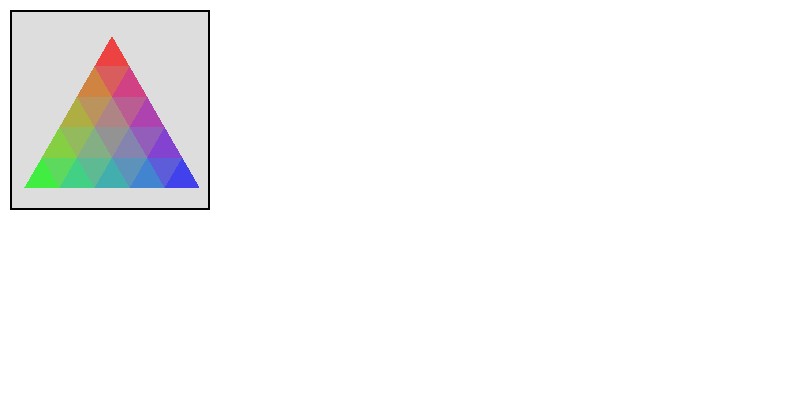
站内所有文章版权归属LeftHeroAI导航站,无授权禁止任何主体转载、抄袭、复制内容,亦不得私自架设镜像站点。一经侵权,本站将通过法律途径追责。
相关文章






汇集全球数千款 AI 工具,每日持续更新,配套 AI 开发学习资源,轻松用 AI 提升工作效率。快捷键 Ctrl+D/⌘+D 一键收藏本站。