


当另一个类中的属性发生变化时,如何在我的窗口中绑定该属性的变化?
我想让属性 UserBalance 在窗口中改变,但这个变化发生在另一个类中。
这是我的 bankaccount.cs,其中有余额,并且通过deposit等方法来改变:
public class BankAccount : INotifyPropertyChanged
{
    private decimal _balance;
    public decimal Balance
    {
        get { return _balance; }
        private set
        {
            if (_balance != value)
            {
                _balance = value;
                NotifyPropertyChanged();
            }
        }

    }

    public event PropertyChangedEventHandler? PropertyChanged;

    private void NotifyPropertyChanged([CallerMemberName] string? propertyName = null)
    {
        PropertyChanged?.Invoke(this, new PropertyChangedEventArgs(propertyName));
    }
}
这是 dashboard.xaml.cs,我希望余额的变化能够在窗口的文本块中显示:
public partial class Dashboard : Window, INotifyPropertyChanged
{
     private static readonly CultureInfo EuroInfo = new("de-DE");
     private User? _currentUser;
     private UserRepository? _allUsers;
     private decimal _userBalance;

     public decimal UserBalance
     {
         get => _userBalance;
         set
         {
             if (_userBalance != value)
             {
                 _userBalance = value;
                 NotifyPropertyChanged();
             }
         }
     }

     public event PropertyChangedEventHandler? PropertyChanged;
     private void NotifyPropertyChanged(string propertyName = null)
     {
         PropertyChanged?.Invoke(this, new PropertyChangedEventArgs(propertyName));
     }

     public Dashboard(User currentUser, UserRepository allUsers)
     {
         InitializeComponent();
         this.DataContext = this;

         try
         {
             this.Title = currentUser.FullName;
             _currentUser = currentUser;
             _allUsers = allUsers;

             UserBalance = _currentUser?.BankAccount?.Balance ?? 0m;
         }
         catch (NullReferenceException e)
         {
             MessageBox.Show(e.StackTrace);
         }
    }
}
在问题尚未公开时,有人告诉我窗口不应该拥有INotifyPropertyChanged,所以我就在我的adshboard.xaml.cs中添加了一个方法,并把它与BankAccount的 PropertyChanged事件绑定起来 这就是我的dashboard.xaml.cs的样子:
public partial class Dashboard : Window
{
    //i save the user and the list to pass their values to other windows as well
    private User? _currentUser;
    private UserRepository? _allUsers;

    //i create the balance prop so we can see the changes in the window
    private decimal _userBalance;

    public decimal UserBalance
    {
        get => _userBalance;
        set
        {
            _userBalance = value;
        }
    }

    public Dashboard(User currentUser, UserRepository allUsers)
    {
        InitializeComponent();
        this.DataContext = currentUser;

        try
        {
            this.Title = currentUser.FullName;
            _currentUser = currentUser;
            _allUsers = allUsers;

            UserBalance = _currentUser?.BankAccount?.Balance ?? 0m;
            if (currentUser.BankAccount != null)
                _currentUser.BankAccount.PropertyChanged += BankAccount_PropertyChanged;

        }
        catch (NullReferenceException e)
        {
            MessageBox.Show(e.StackTrace);
        }
        catch (Exception e)
        {
            MessageBox.Show(e.GetType() + e.StackTrace);
        }
    }

    private void BankAccount_PropertyChanged(object? sender, PropertyChangedEventArgs e)
    {
        if (e == null || e.PropertyName == null || e.PropertyName == nameof(BankAccount.Balance))
            Dispatcher.Invoke(() => UserBalance = _currentUser?.BankAccount?.Balance ?? 0m);
    }
解决方案
你在混用两个概念:一方面你想使用数据绑定,另一方面你在代码背后(即 *.xaml.cs 文件)写了大量逻辑来处理数值变化。数据绑定的要点在于让 *.xaml.cs 文件保持不变(也就是说那里不再添加代码),并在 *.xaml 文件中使用数据绑定。
对于这个示例,我对 BankAccount.cs 做了略微修改。
using System.ComponentModel;
using System.Runtime.CompilerServices;

namespace MultiWindowBind;

public class BankAccount : INotifyPropertyChanged
{
    private decimal _balance;
    public decimal Balance
    {
        get => _balance;
        set // <-----------changed to be public for this example
        {
            if (_balance != value)
            {
                _balance = value;
                NotifyPropertyChanged();
            }
        }
    }

    public event PropertyChangedEventHandler? PropertyChanged;

    private void NotifyPropertyChanged([CallerMemberName] string? propertyName = null)
    {
        PropertyChanged?.Invoke(this, new PropertyChangedEventArgs(propertyName));
    }
}
我创建了一个 Dashboard.xaml,里面带有一个 TextBox 用来编辑 Balance 属性:
<Window x:Class="MultiWindowBind.Dashboard"
        xmlns="http://schemas.microsoft.com/winfx/2006/xaml/presentation"
        xmlns:x="http://schemas.microsoft.com/winfx/2006/xaml"
        xmlns:d="http://schemas.microsoft.com/expression/blend/2008"
        xmlns:mc="http://schemas.openxmlformats.org/markup-compatibility/2006"
        xmlns:local="clr-namespace:MultiWindowBind" d:DataContext="{d:DesignInstance Type=local:BankAccount}"
        mc:Ignorable="d"
        Title="Dashboard" Height="200" Width="300">
    <TextBox Text="{Binding Balance, UpdateSourceTrigger=PropertyChanged}"/>
</Window>
如前所述,我没有在 Dashboard.xaml.cs 上添加任何逻辑:
using System.Windows;

namespace MultiWindowBind
{
    /// <summary>
    /// Interaction logic for Dashboard.xaml
    /// </summary>
    public partial class Dashboard : Window
    {
        public Dashboard()
        {
            InitializeComponent();
        }
    }
}
我添加了第二个窗口 YetAnotherDashboard.xaml,它通过一个 TextBlock 和一个 Label 显示 Balance 属性的值:
<Window x:Class="MultiWindowBind.YetAnotherDashboard"
        xmlns="http://schemas.microsoft.com/winfx/2006/xaml/presentation"
        xmlns:x="http://schemas.microsoft.com/winfx/2006/xaml"
        xmlns:d="http://schemas.microsoft.com/expression/blend/2008"
        xmlns:mc="http://schemas.openxmlformats.org/markup-compatibility/2006"
        xmlns:local="clr-namespace:MultiWindowBind" d:DataContext="{d:DesignInstance Type=local:BankAccount}"
        mc:Ignorable="d"
        Title="YetAnotherDashboard" Height="200" Width="300">
    <Grid>
        <Grid.ColumnDefinitions>
            <ColumnDefinition/>
            <ColumnDefinition/>
        </Grid.ColumnDefinitions>

        <Label Content="Balance"/>
        <TextBlock Text="{Binding Balance}"
                   Grid.Column="1"/>
    </Grid>
</Window>
同样,没有在 YetAnotherDashboard.xaml.cs 上添加任何逻辑:
using System.Windows;

namespace MultiWindowBind
{
    /// <summary>
    /// Interaction logic for YetAnotherDashboard.xaml
    /// </summary>
    public partial class YetAnotherDashboard : Window
    {
        public YetAnotherDashboard()
        {
            InitializeComponent();
        }
    }
}
要把它们绑定在一起,你需要创建一个单一的 BankAccount 对象,使其同时绑定到两个窗口的 DataContext,从而在它们之间共享。
在应用初始化时,我是这样做的:
var account = new BankAccount();

var dashboard = new Dashboard
{
    DataContext = account
};
dashboard.Show();

var yetAnotherDashboard = new YetAnotherDashboard
{
    DataContext = account
};
yetAnotherDashboard.Show();
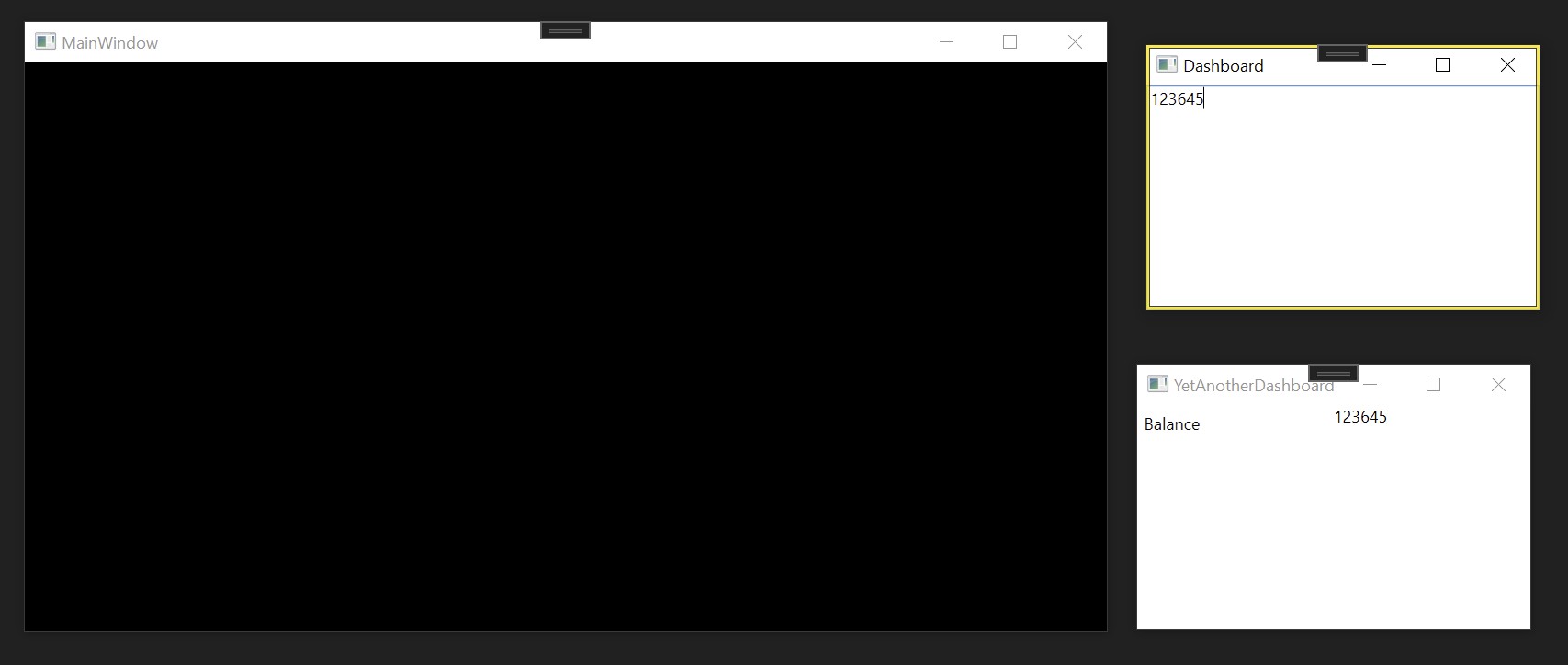
这就是你所需要的全部。运行应用时,你会看到在 YetAnotherDashboard 显示的值 123645 与在 Dashboard 输入的值绑定为同一个。
相关文章





