


HorizontalHeaderView未显示表头数据
我正在尝试在QML(Qt 6、Qt Quick Controls 2)中创建一个TableView,其布局看起来与下图相似:
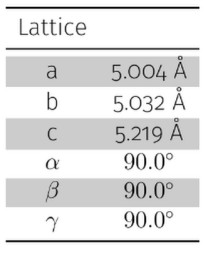
在LatticeTableModel中,我有以下方法:
QVariant LatticeTableModel::headerData(int section,
                                       Qt::Orientation orientation,
                                       int role) const
{
    if (role != Qt::DisplayRole)
        return {};

    if (orientation == Qt::Horizontal) {
        switch (section) {
            case 0: return QStringLiteral("Lattice");
            case 1: return QStringLiteral("");
            default: return {};
        }
    }
    return {};
}
以及
QVariant LatticeTableModel::data(const QModelIndex &index, int role) const
{
    if (!index.isValid() || role != Qt::DisplayRole || !m_controller)
        return {};

    const int r = index.row();
    const int c = index.column();

    auto labelOrValue = [&](const char* label, const std::string &value) -> QVariant {
        return (c == 0) ? QVariant(label) : QVariant(QString::fromStdString(value));
    };

    switch (r) {
        case 0: return labelOrValue("a", std::format("{:.3f} Å", m_controller->a()));
        case 1: return labelOrValue("b", std::format("{:.3f} Å", m_controller->b()));
        case 2: return labelOrValue("c", std::format("{:.3f} Å", m_controller->c()));
        case 3: return labelOrValue("α", std::format("{:.3f} °", m_controller->alpha()));
        case 4: return labelOrValue("β", std::format("{:.3f} °", m_controller->beta()));
        case 5: return labelOrValue("γ", std::format("{:.3f} °", m_controller->gamma()));
        default: return {};
    }
}
我的QML看起来是这样的:
import QtQuick
import QtQuick.Controls
import QtQuick.Layouts

Item {
    required property var lController
    required property var lModel

    ColumnLayout {
        anchors.fill: parent
        spacing: 6

        Label {
            font.bold: true
            text: "Lattice Information"
        }
        Frame {
            Layout.fillHeight: false
            Layout.fillWidth: true
            Layout.preferredHeight: 240
            padding: 8

            Item {
                anchors.fill: parent

                HorizontalHeaderView {
                    id: horizontalHeader

                    anchors.left: tv.left
                    anchors.right: tv.right
                    anchors.top: parent.top
                    clip: true
                    height: 32
                    syncView: tv

                    delegate: Rectangle {
                        required property int section

                        border.color: "#00000022"
                        border.width: 1
                        color: "#efefef"
                        implicitHeight: 32
                        implicitWidth: 200

                        Text {
                            anchors.fill: parent
                            anchors.leftMargin: 8
                            anchors.rightMargin: 8
                            elide: Text.ElideRight
                            font.bold: true
                            horizontalAlignment: section === 0 ? Text.AlignLeft : Text.AlignRight

                            text: display
//text: model.display does also not help
                            verticalAlignment: Text.AlignVCenter
                        }
                    }
                }
                TableView {
                    id: tv

                    anchors.bottom: parent.bottom
                    anchors.fill: parent
                    anchors.left: parent.left
                    anchors.right: parent.right
                    anchors.top: horizontalHeader.bottom
                    clip: true
                    columnSpacing: 0
                    columnWidthProvider: function (col) {
                        const first = 30;
                        const restCols = Math.max(1, tv.columns - 1);
                        if (col === 0)
                            return first;
                        return Math.max(80, (tv.width - first) / restCols);
                    }
                    model: lModel
                    rowHeightProvider: function (row) {
                        return 28;
                    }
                    rowSpacing: 0

                    delegate: Rectangle {
                        required property int column
                        required property var display
                        required property int row

                        border.color: "#00000022"
                        border.width: 1


                        color: column === 0 ? "#e8f2ff" : (row % 2 === 0 ? "#ffffff" : "#fafafa")
                        implicitHeight: 28

                        Text {
                            anchors.fill: parent
                            anchors.leftMargin: 8
                            anchors.rightMargin: 8
                            elide: Text.ElideRight
                            horizontalAlignment: column === 0 ? Text.AlignLeft : Text.AlignRight


                            text: {
                                if (column === 0)
                                    return display;
                                const n = Number(display);
                                return isNaN(n) ? display : n.toFixed(6);
                            }
                            verticalAlignment: Text.AlignVCenter
                        }
                    }
                }
            }
        }// end Frame
    } // end ColumnLayout
} // end Item
但标题行还没出现:
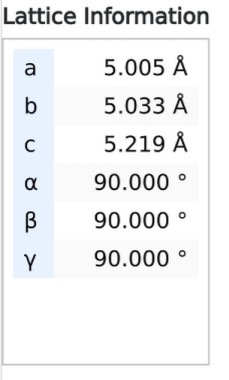
解决方案
你的TableView隐藏了标题。
你对 TableView 类的锚点定义包含一个不必要的 anchors.fill: parent。这会导致表格主体被渲染在标题之上。
anchors.bottom: parent.bottom
anchors.fill: parent
anchors.left: parent.left
anchors.right: parent.right
anchors.top: horizontalHeader.bottom
如果我
- 删除那一行
- 将你的
text: display改为text: model.display - 将
required property int section替换为使用column
就能看到标题被渲染出来。
站内所有文章版权归属LeftHeroAI导航站,无授权禁止任何主体转载、抄袭、复制内容,亦不得私自架设镜像站点。一经侵权,本站将通过法律途径追责。
相关文章






汇集全球数千款 AI 工具,每日持续更新,配套 AI 开发学习资源,轻松用 AI 提升工作效率。快捷键 Ctrl+D/⌘+D 一键收藏本站。