


在WPF的 DataGridTextColumn中,如何简化针对空值的数据触发器?
正如这个例子所示,我需要在每一列的触发器中重复绑定。有没有办法把它做成通用的,这样我只需设置一次样式,而不必用不同的绑定表达式逐个复制粘贴?
请注意,触发器应仅在 null 上触发,而不是在空字符串上。
<DataGridTextColumn Binding="{Binding FirstName}" Header="Lender Employee Id">
    <DataGridTextColumn.CellStyle>
        <Style TargetType="{x:Type DataGridCell}">
            <Style.Triggers>
                <DataTrigger Binding="{Binding FirstName}" Value="{x:Null}">
                    <Setter Property="Background" Value="BlanchedAlmond" />
                </DataTrigger>
            </Style.Triggers>
        </Style>
    </DataGridTextColumn.CellStyle>
</DataGridTextColumn>

<DataGridTextColumn Binding="{Binding LastName}" Header="Lender Employee Id">
    <DataGridTextColumn.CellStyle>
        <Style TargetType="{x:Type DataGridCell}">
            <Style.Triggers>
                <DataTrigger Binding="{Binding LastName}" Value="{x:Null}">
                    <Setter Property="Background" Value="BlanchedAlmond" />
                </DataTrigger>
            </Style.Triggers>
        </Style>
    </DataGridTextColumn.CellStyle>
</DataGridTextColumn>

<DataGridTextColumn Binding="{Binding LenderEmployeeId}" Header="Lender Employee Id">
    <DataGridTextColumn.CellStyle>
        <Style TargetType="{x:Type DataGridCell}">
            <Style.Triggers>
                <DataTrigger Binding="{Binding LenderEmployeeId}" Value="{x:Null}">
                    <Setter Property="Background" Value="BlanchedAlmond" />
                </DataTrigger>
            </Style.Triggers>
        </Style>
    </DataGridTextColumn.CellStyle>
</DataGridTextColumn>
解决方案
首先你需要一个空值转换器。
internal sealed class CellValueIsNullConverter : IMultiValueConverter
{
    public object Convert(object[] values, Type targetType, object parameter, CultureInfo culture)
    {
        if (values.Length < 2)
            return false;

        var item = values[0];
        if (item is null)
            return true;

        if (values[1] is not DataGridBoundColumn column || column.Binding is not Binding binding)
            return false;

        var propertyPath = binding.Path?.Path;
        if (string.IsNullOrEmpty(propertyPath))
            return false;

        var property = item.GetType().GetProperty(propertyPath);
        return property?.GetValue(item) is null;
    }

    public object[] ConvertBack(object value, Type[] targetTypes, object parameter, CultureInfo culture)
    {
        throw new NotSupportedException();
    }
}
然后你需要一个 MultiBinding,其中包含要传入转换器的两个值。
从技术上讲,你可以使用一个 DataTrigger 来代替 MultiDataTrigger,但在行被选中时看起来会很丑陋。
        <Style x:Key="NullHighlightCellStyle" TargetType="{x:Type DataGridCell}">
            <Style.Triggers>
                <MultiDataTrigger>
                    <MultiDataTrigger.Conditions>
                        <Condition Value="True">
                            <Condition.Binding>
                                <MultiBinding Converter="{StaticResource CellValueIsNullConverter}">
                                    <Binding />
                                    <Binding RelativeSource="{RelativeSource Self}" Path="Column" />
                                </MultiBinding>
                            </Condition.Binding>
                        </Condition>
                        <Condition Binding="{Binding IsSelected, RelativeSource={RelativeSource Self}}" Value="False" />
                    </MultiDataTrigger.Conditions>
                    <Setter Property="Background" Value="BlanchedAlmond" />
                </MultiDataTrigger>
            </Style.Triggers>
        </Style>
以下是它在使用中的一个示例。
<DataGrid ItemsSource="{Binding Configurations}" IsReadOnly="True"  AutoGenerateColumns="False" CellStyle="{StaticResource NullHighlightCellStyle}">
    <DataGrid.Columns>
        <DataGridTextColumn Binding="{Binding ConfigurationKey}" Header="Configuration Key" />
        <DataGridTextColumn Binding="{Binding Description}" Header="Description" />
        <DataGridTextColumn Binding="{Binding ConfigurationValue}" Header="Value" />
    </DataGrid.Columns>
</DataGrid>
备选方案
实现这个问题的难点在于你明确需要一个空值(null)。当你把TextBox或 TextBlock绑定为null时,它会自动被替换为string.Empty。因此,在视觉树中就无法区分null与 string.Empty。
为了解决这个问题,你需要以某种方式从绑定中获取原始属性的值。 其中一个选项是使用附加属性:
    public static class ValueChecker
    {
        public static readonly DependencyProperty ObservedValueProperty =
            DependencyProperty.RegisterAttached("ObservedValue", typeof(object), typeof(ValueChecker), new PropertyMetadata(null));

        public static object GetObservedValue(DependencyObject obj) => obj.GetValue(ObservedValueProperty);
        public static void SetObservedValue(DependencyObject obj, object value) => obj.SetValue(ObservedValueProperty, value);

        public static readonly DependencyProperty IsActiveProperty =
            DependencyProperty.RegisterAttached("IsActive", typeof(bool), typeof(ValueChecker), new PropertyMetadata(false, OnIsActiveChanged));

        public static bool GetIsActive(DependencyObject obj) => (bool)obj.GetValue(IsActiveProperty);
        public static void SetIsActive(DependencyObject obj, bool value) => obj.SetValue(IsActiveProperty, value);

        private static void OnIsActiveChanged(DependencyObject d, DependencyPropertyChangedEventArgs e)
        {
            if (d is DataGridCell cell && (bool)e.NewValue)
            {
                var column = cell.Column as DataGridBoundColumn;
                if (column?.Binding is BindingBase columnBinding)
                {
                    BindingOperations.SetBinding(cell, ObservedValueProperty, columnBinding);
                }
            }
        }
    }
    public static class ValueChecker
    {
        public static readonly DependencyProperty ObservedValueProperty =
            DependencyProperty.RegisterAttached("ObservedValue", typeof(object), typeof(ValueChecker), new PropertyMetadata(null));

        public static object GetObservedValue(DependencyObject obj) => obj.GetValue(ObservedValueProperty);
        public static void SetObservedValue(DependencyObject obj, object value) => obj.SetValue(ObservedValueProperty, value);

        public static readonly DependencyProperty IsActiveProperty =
            DependencyProperty.RegisterAttached("IsActive", typeof(bool), typeof(ValueChecker), new PropertyMetadata(false, OnIsActiveChanged));

        public static bool GetIsActive(DependencyObject obj) => (bool)obj.GetValue(IsActiveProperty);
        public static void SetIsActive(DependencyObject obj, bool value) => obj.SetValue(IsActiveProperty, value);

        private static void OnIsActiveChanged(DependencyObject d, DependencyPropertyChangedEventArgs e)
        {
            if (d is DataGridCell cell && (bool)e.NewValue)
            {
                var column = cell.Column as DataGridBoundColumn;
                if (column?.Binding is BindingBase columnBinding)
                {
                    BindingOperations.SetBinding(cell, ObservedValueProperty, columnBinding);
                }
            }
        }
    }
示例:
    <Window.Resources>
        <Style x:Key="text.empty" TargetType="DataGridCell">
            <Setter Property="local:ValueChecker.IsActive" Value="True" />
            <Setter Property="Background" Value="LightGreen"/>
            <Style.Triggers>
                <DataTrigger
                    Binding="{Binding RelativeSource={RelativeSource Self},
                                      Path=(local:ValueChecker.ObservedValue)}"
                    Value="{x:Null}">
                    <Setter Property="Background" Value="Red"/>
                </DataTrigger>
            </Style.Triggers>
        </Style>

        <Style x:Key="tbox.cell" TargetType="TextBox">
            <Setter Property="Background"
                    Value="Transparent"/>
        </Style>


    </Window.Resources>
    <Grid>
        <DataGrid ItemsSource="{Binding Collection}" AutoGenerateColumns="False" CanUserAddRows="False">
            <DataGrid.Columns>
                <DataGridTextColumn Header="Name"
                                    Binding="{Binding name}"
                                    CellStyle="{StaticResource text.empty}"
                                    EditingElementStyle="{StaticResource tbox.cell}"/>
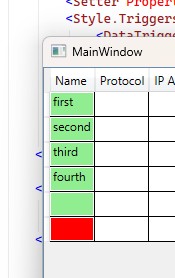
附言。 如果你需要对所有列都使用此方法,可以将样式移动到DataGrid资源中并移除它们的键。这样你就不需要再分配CellStyl和 EditingElementStyle。
站内所有文章版权归属LeftHeroAI导航站,无授权禁止任何主体转载、抄袭、复制内容,亦不得私自架设镜像站点。一经侵权,本站将通过法律途径追责。
相关文章






汇集全球数千款 AI 工具,每日持续更新,配套 AI 开发学习资源,轻松用 AI 提升工作效率。快捷键 Ctrl+D/⌘+D 一键收藏本站。