


需要实现的代码:选中某个单元格时,突出显示该行以及列B中值相同的所有行
需要这段代码:选中一个单元格时,突出显示该行以及列B中值相同的所有行(仅限表格,如可能的话)。
I tried an even simpler code suggested by google, and it didn't work. if I could get that fixed, that would be an ok plan-B:
function onSelectionChange(e) {
  const sheet = e.source.getActiveSheet();
  const range = e.range;
  const selectedValue = range.getValue();

  // Clear previous highlights (optional, but recommended)
  // Change 'Sheet1' to your actual sheet name if different
  const fullRange = sheet.getRange('A:Z'); // Adjust this range as needed (e.g., 'A1:E100' or 'A:Z')
  fullRange.setBackground(null);

  if (selectedValue) {
    // Apply new highlights using a conditional formatting rule
    const rule = SpreadsheetApp.newConditionalFormatRule()
      .withFormulaCode(`=$A1="${selectedValue}"`) // This formula compares each cell to the selected value
      .setBackground("#ff0000") // Change to your desired highlight color code
      .setRanges([fullRange])
      .build();

    const rules = sheet.getConditionalFormatRules();
    rules.push(rule);
    sheet.setConditionalFormatRules(rules);
  }
}
解决方案
you can try:
function onOpen() {
  SpreadsheetApp.getUi()
    .createMenu("🔍 Highlight")
    .addItem("Highlight matching rows", "highlightMatches")
    .addItem("Clear highlights", "clearHighlights")
    .addToUi();}

function highlightMatches() {
  const sheet = SpreadsheetApp.getActiveSheet();
  const selectedValue = sheet.getActiveCell().getValue();
  if (!selectedValue) {
    SpreadsheetApp.getUi().alert("Please select a cell with a value.");
    return;}
  const lastRow = sheet.getLastRow();
  const totalCols = 26; // A to Z — change to 50 if you need more columns
  sheet.getRange(1, 1, lastRow, totalCols).setBackground(null);
  const colBValues = sheet.getRange(1, 2, lastRow, 1).getValues();
  colBValues.forEach((row, index) => {
    if (row[0].toString().trim().toLowerCase() === selectedValue.toString().trim().toLowerCase()) {
      sheet.getRange(index + 1, 1, 1, totalCols).setBackground("#ff0000");}});}

function clearHighlights() {
  const sheet = SpreadsheetApp.getActiveSheet();
  sheet.getRange(1, 1, sheet.getLastRow(), 26).setBackground(null);}
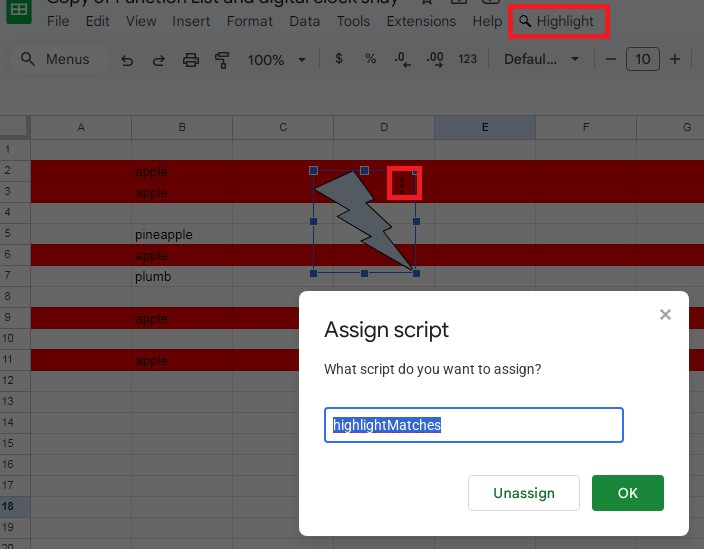
you can either bind it to button or execute it from menu
or something simpler:
function onEdit(e) {
  const sheet = e.source.getActiveSheet();
  const range = e.range;
  if (range.getRow() !== 1 || range.getColumn() !== 4) return; // D1 = input
  const lastRow = sheet.getLastRow();
  const lastCol = sheet.getMaxColumns();
  const searchValue = range.getValue().toString().trim().toLowerCase();
  sheet.getRange(1, 1, lastRow, lastCol).setBackground(null);
  if (!searchValue) return;
  const colBValues = sheet.getRange(1, 2, lastRow, 1).getValues();
  colBValues.forEach((row, index) => {
    if (row[0].toString().trim().toLowerCase() === searchValue) {
      sheet.getRange(index + 1, 1, 1, lastCol).setBackground("#FF0000");}});}
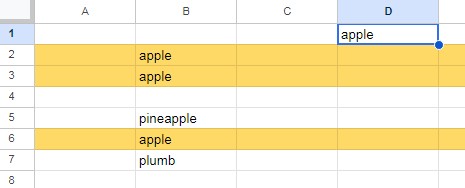
this will highlight all rows with value that is typed in D1
备选方案
This onSelectionChange function will work. Change the TARGET_SHEET and the highlight color.
const TARGET_SHEET = 'Sheet1'

function onSelectionChange(e) {
  if (e.range.getSheet().getName() !== TARGET_SHEET) return

  const sheet = e.range.getSheet()
  const nCols = sheet.getMaxColumns()
  sheet.getRange(1, 1, sheet.getMaxRows(), nCols).setBackground(null)
  const bValues = e.range.getSheet().getRange('B:B').getValues()
  const value = e.range.offset(0, 2 - e.range.getColumn()).getValue()

  bValues.forEach((v, i) => {

    if (v[0] === value) sheet.getRange(i + 1, 1, 1, nCols).setBackground('#FFF2CC')
  })
}
Note: You need to refresh the sheet once each time you open the sheet in order for onSelectionChange to work. Also, this script is first removing all background color on the TARGET_SHEET in order to clear the previous selection's highlights.
站内所有文章版权归属LeftHeroAI导航站,无授权禁止任何主体转载、抄袭、复制内容,亦不得私自架设镜像站点。一经侵权,本站将通过法律途径追责。
相关文章






汇集全球数千款 AI 工具,每日持续更新,配套 AI 开发学习资源,轻松用 AI 提升工作效率。快捷键 Ctrl+D/⌘+D 一键收藏本站。