


在Bash中运行密码解密时收到“读取输入文件时出错”
在进行一个关于构建简单的密码和账户管理器的BASH练习时,我需要添加一个允许用户检索加密密码的函数。下面是我的代码:
generate_passwords() {
    while true; do
        read -p "Do you want to input your own passwords? (y/n)" rep
        if [ "$rep" == 'n' ]; then
            rpw=$(openssl rand -base64 24)
            echo "$rpw"
            break
        elif [ "$rep" == 'y' ]; then
            read -s -p "Enter your password: " own_pw
            if [ -z "$own_pw" ]; then
                echo "Your input is empty"
                continue
            else
                echo "$own_pw"
                break
            fi
        fi
    done
}

encrypt_password() {
# The first argument is by default the MASTER_PASSWORD
    echo -n $(echo -n "$2" | openssl enc -aes-256-cbc -pbkdf2 -a -iter 10000 -pass "pass:$1")
}

new_password() {
    if ! [ -d ./data/passwords ]; then
        mkdir ./data/passwords
    fi
    while true; do
        read -p "Please create a new account or press 'q' to exit: " account_name
        if [ "$account_name" == 'q' ]; then
            exit
        fi

        read -p "Is $account_name your desired account name? (y/n)" reply

        if  [ "$reply" == 'y' ]; then
            if [ -f ./data/passwords/${account_name} ] && ! [ -s ./data/passwords/${account_name} ]; then
                echo "The input account name already exists"
                echo "Please exit to the main menu to remove or update the current password, or input another account"
                continue
            else
                break
            fi

        elif [ "$reply" == 'n' ]; then
            continue
        else
            echo "Your response is not valid. Please restart this process"
        fi
    done

    touch ./data/passwords/${account_name}
    pw=$(generate_passwords)
    enc_pw=$(encrypt_password $MASTER_PASSWORD $pw)
    echo -n "$enc_pw" > ./data/passwords/${account_name}
}

decrypt_password() {
# The first argument is by default the MASTER_PASSWORD
    echo -n $(openssl enc -d -aes-256-cbc -pbkdf2 -a -iter 10000 -pass "pass:$1" -in "$2")
}

retrieve_password() {
# The first argument is by default the MASTER_PASSWORD

    if ! [ -d ./data/passwords ] || [ -z "$(ls -A ./data/passwords)" ]; then
    # if the directory does not exist or is empty
        return 1
    fi
    while true; do
        read -p "Please enter your account name: " ac_name
        if ! [ -f ./data/passwords/"${ac_name}" ]; then
            echo "Cannot find the input account"
            read -p "Press 'q' to quit, or other keys to re-enter an account name" rp
            if [ "$rp" == 'q' ]; then
                return 0
            else
                continue
            fi
        else
            pm_path="./data/passwords/${ac_name}"
            dec_pw=$(decrypt_password "$MASTER_PASSWORD" "$pm_path")
            echo "$dec_pw"
            read -p "Please press Enter when done viewing ... "
            clear
            break
        fi
    done
}
在调用retrieve_password函数时,我遇到了错误“error reading input file”。我猜这个错误发生在调用decrypt_password函数时,但还看不出为什么会这样。任何帮助或提示都将不胜感激。
更新: 下方是错误的截图。decrypt函数无法读取 $MASTER_PASSWORD 变量。不过,我相信加密和解密都可以把空字符串作为密码来读取,但我仍然不知道为什么程序在读取文件时出错。
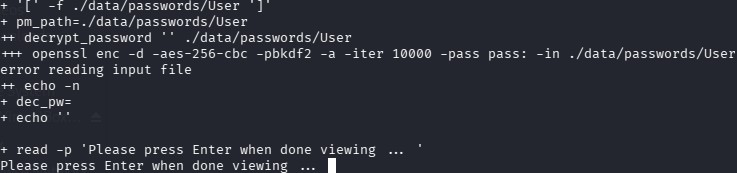
解决方案
更新
为了证明问题是密文/密码文件的问题,而不是空的主密码

原始答案
我测试了你的脚本,错误发生是因为文件存在但包含错误的密文/与解密参数不匹配。 当密文匹配时,脚本可以成功执行。
测试步骤
- 将你的Bash脚本保存到文件
test.sh,在底部添加两行:
MASTER_PASSWORD='super_secret_master_password'
retrieve_password "$MASTER_PASSWORD"
- 使用与解密命令完全相同的参数生成密文:
$ echo "test user password" > user.plain
$ openssl enc -e -aes-256-cbc -pbkdf2 -a -iter 10000 \
  -pass "pass:super_secret_master_password" \
  -in user.plain \
  -out ./data/passwords/user
- 运行脚本
$ sh test.sh
Please enter your account name: user
test user password
Please press Enter when done viewing ...
站内所有文章版权归属LeftHeroAI导航站,无授权禁止任何主体转载、抄袭、复制内容,亦不得私自架设镜像站点。一经侵权,本站将通过法律途径追责。
相关文章






汇集全球数千款 AI 工具,每日持续更新,配套 AI 开发学习资源,轻松用 AI 提升工作效率。快捷键 Ctrl+D/⌘+D 一键收藏本站。