


在Excel的 VBA编码中,如何在XLOOKUP公式中引入变量,以便将数据从一个工作簿提取到一个新工作簿中?
我在尝试把一个变量整合进一些VBA代码。以下代码已粘贴。
本质上,我想做的是把一个导出的数据集,以及需要运行的顺序和来自一个文件的其他信息,传送到另一个文件。我一直在使用XLOOKUP公式,想要简化这个过程。我已经能够得到一个弹出对话框,在更新信息时可以选择作为数据源的文件;当我把数据源的文件名硬编码到代码中时,运行起来也很完美。
问题出现在我尝试把包含数据源的变量整合进来时,不管是用一个变量来替代 "06-11-26 production prioritization",还是用带有或不带 ".xlsx" 的文件扩展名的变量。正如下面的代码所示,我其实只对公式返回的值感兴趣,而不是公式本身。
LastPriority变量的截图。消息框处于活动状态,用来验证VBA是否获取了用于该变量的正确文件:
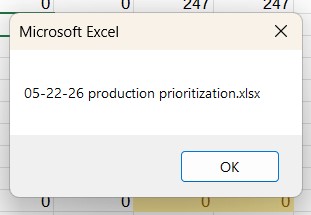
这是在选择数据源文件后得到的消息框截图
文本框中的对话框显示:"05-22-26 production prioritization.xlsx"。这是我为LastPriority变量所选数据源文件的名称。
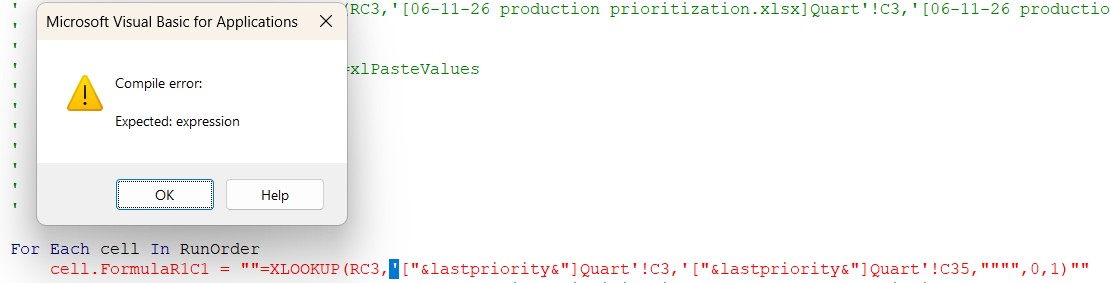
输入这个公式时,我会看到一个消息框,显示以下信息
"Compile error:

Expected: Expression"

cell.FormulaR1C1 = ""=XLOOKUP(RC3,**'**\["&lastpriority&"\]Quart'!C3,'\["&lastpriority&"\]Quart'!C35,"""",0,1)""
当出现错误信息时,上方粘贴的整行都会变成红色文本,紧跟在RC3之后的那个单引号是第一个。
这是在尝试把公式写入VBA代码时得到的错误对话框截图
不胜感激。
Sub IGH_Production_Priority()

Dim LastRow
Dim j
Dim answer As Integer
'Dim LastPriority
Dim FormulaStr
Dim LastQuart
Dim LastTwinPack
Dim LastPail
Dim LastGallon
Dim LastCrandall
Dim LastDrum
Dim LastTote
Dim RunOrder
Dim ProdDate
Dim ShipDate
Dim BackOrderDate1
Dim BackOrderDate2
Dim BackOrderDate3
Dim RunNum
Dim BO1
Dim BO2
Dim BO3
Dim wbSource As Workbook
Dim wsSource As Worksheet
Dim LookupArray As Range
Dim ReturnArray As Range


MsgBox "The most-recent production prioritization file MUST be open", vbInformation

answer = MsgBox("Is the most-recent production prioritization file open?", vbQuestion + vbYesNo)
If answer = vbNo Then Exit Sub

ProdPriorityForm.Show


LastPriority = InputBox("Enter the name of the last IGH production prioritization file.")

MsgBox LastPriority

'Set wbSource = Workbooks(LastPriority)
'
''MsgBox wbSource
'
''set wbsource=Workbooks("&lastpriority&".xlsx")

'A bunch of code here.

Set RunOrder= Range(cells(3,35), cells(LastRow,35))

For Each cell In RunOrder

    cell.FormulaR1C1 = ""=XLOOKUP(RC3,'["&lastpriority&"]Quart'!C3,'["&lastpriority&"]Quart'!C35,"""",0,1)""

'    FormulaStr = "=XLOOKUP(RC3,'[06-11-26 production prioritization.xlsx]Quart'!C3astPriority&".xlsx]Quart'!C3"",""'["&LastPriority&".xlsx]Quart'!C35"","""",0,1)"

'    FormulaStr = "=XLOOKUP(RC3,""" & LookupArray & """,""" & ReturnArray & ""","""",0,1)"

'    cell.FormulaR1C1 = FormulaStr

    cell.FormulaR1C1 = "=XLOOKUP(RC3,'[06-11-26 production prioritization.xlsx]Quart'!C3,'[06-11-26 production prioritization.xlsx]Quart'!C35,"""",0,1)"

    cell.Value = cell.Value

    If cell.Value = "0" Then

    cell.ClearContents

    Else

    End If

    Next cell
'A bunch more code here.

end sub
解决方案
我没有Excel,但在LibreOffice Calc上测试过。
你使用了错误的引号 "",应该用 ",这会导致问题。
应该是这样的
var = "text1" & variable1 & "text2" & variable2 & "text3"
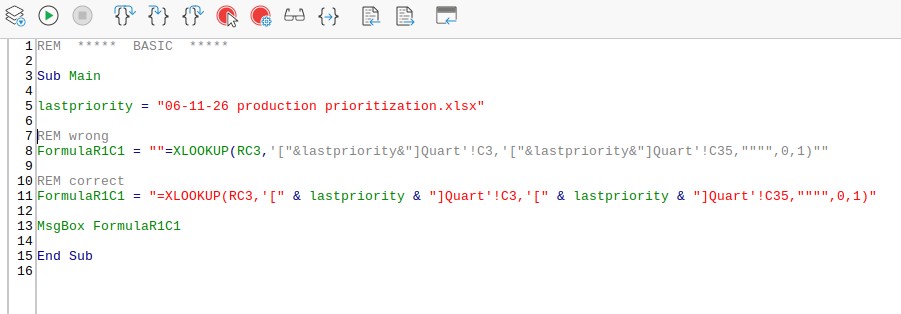
LibreOffice(甚至Stack Overflow)把大部分代码以灰色高亮显示为注释——这表明格式有问题。
cell.FormulaR1C1 = ""=XLOOKUP(RC3,'\["&lastpriority&"\]Quart'!C3,'\["&lastpriority&"\]Quart'!C35,"""",0,1)""
但当我使用这一行
cell.FormulaR1C1 = "=XLOOKUP(RC3,'[" & lastpriority & "]Quart'!C3,'[" & lastpriority & "]Quart'!C35,"""",0,1)"
时会高亮显示字符串和变量为不同的颜色
而LibreOffice能顺利生成字符串。
来自LibreOffice的截图
站内所有文章版权归属LeftHeroAI导航站,无授权禁止任何主体转载、抄袭、复制内容,亦不得私自架设镜像站点。一经侵权,本站将通过法律途径追责。
相关文章






汇集全球数千款 AI 工具,每日持续更新,配套 AI 开发学习资源,轻松用 AI 提升工作效率。快捷键 Ctrl+D/⌘+D 一键收藏本站。