


用于返回多个结果的查找用户信息宏
我正在做一个数据库,用来记录监狱里的CashApp名称。
我对Excel宏有点不熟悉,所以只能在网上找一个例子来使用;不过我手头的这个例子只返回一个数值和一个名称。
我想让它在工作表中显示输入的号码在数据库中出现的次数,而不仅仅给出第一处出现的提示。
如果输入的号码不存在,就会弹出一个消息框,提示它不存在。
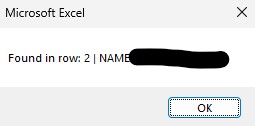
这是我正在使用的宏,我看到它写着msgBox,这就是返回上面图片的原因。
不过,我希望在用户输入数字时,能把工作表填充为包含信息的内容,而不仅仅是显示一个消息框。有什么办法可以做到吗?
Sub LookupUserInfo()
    Dim userPrompt As String
    Dim foundCell As Range
    Dim searchRange As Range

    ' 1. Prompt user for input
    userPrompt = InputBox("Enter the ID or Name to look up:")

    If userPrompt = "" Then Exit Sub ' Exit if Cancel is clicked

    ' 2. Set the search area (e.g., column C)
    Set searchRange = Sheets("Data").Columns("C")

    ' 3. Perform the search
    Set foundCell = searchRange.Find(What:=userPrompt, LookIn:=xlValues, LookAt:=xlWhole)

    ' 4. Return result
    If Not foundCell Is Nothing Then
        ' Return value from adjacent cell (column B)
        MsgBox "Found in row: " & foundCell.Row & " | NAME: " & foundCell.Offset(0, 1).Value
    Else
        MsgBox "Information not found."
    End If
End Sub
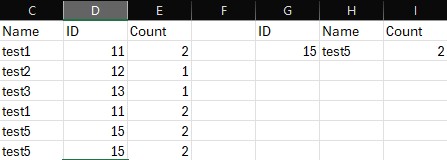
我想要填充的信息是,基于输入的数字得到的名称、输入的数字,以及它在数据库中的出现次数,并把这些信息返回到该工作表上,而不是在消息框中显示。
解决方案
我修改了你提供的代码。看起来它实现了你想要达到的效果:程序会询问用户在表中出现的ID/名称。基于这些信息,它会在指定的位置填充关于给定ID/名称的信息。显示的变量包括:ID、名称,以及该条目在表中的出现次数。此外,程序还会在表中创建一列,记录每个不同条目出现的次数。
' Source - https://stackoverflow.com/q/79920078
' Posted by Sebastian Maher, modified by community. See post 'Timeline' for change
' history
' Retrieved 2026-04-09, License - CC BY-SA 4.0

Option Explicit

Sub LookupUserInfo()

    Dim userPrompt As String
    Dim foundCell As Range
    Dim searchRange As Range
    Dim targetSheet As Worksheet
    Dim i As Long
    Dim lastRow As Long

    Set targetSheet = ThisWorkbook.Worksheets("Sheet1")

    userPrompt = InputBox("Enter the ID or Name to look up:")

    If userPrompt = "" Then Exit Sub

    Set searchRange = targetSheet.Range("C:D")

    Set foundCell = searchRange.Find(What:=userPrompt, LookIn:=xlValues, _
    LookAt:=xlWhole)

    lastRow = targetSheet.Cells(targetSheet.Rows.Count, 3).End(xlUp).Row

    If Not foundCell Is Nothing Then

        With targetSheet

            If IsNumeric(userPrompt) Then

                For i = 2 To lastRow
                    .Cells(i, 5).Value = WorksheetFunction.CountIf(.Range( _
                    .Cells(2, 4), .Cells(lastRow, 4)), .Cells(i, 4).Value)
                Next i

                .Cells(2, 8).Value = WorksheetFunction.XLookup(CInt(userPrompt), _
                .Range(.Cells(2, 4), .Cells(lastRow, 4)), .Range(.Cells(2, 3), _
                .Cells(lastRow, 3)), 0)
                .Cells(2, 7).Value = userPrompt

            Else

                For i = 2 To lastRow
                    .Cells(i, 5).Value = WorksheetFunction.CountIf(.Range( _
                    .Cells(2, 3), .Cells(lastRow, 3)), .Cells(i, 3).Value)
                Next i

                .Cells(2, 7).Value = WorksheetFunction.XLookup(userPrompt, _
                .Range(.Cells(2, 3), .Cells(lastRow, 3)), .Range(.Cells(2, 4), _
                .Cells(lastRow, 4)), 0)
                .Cells(2, 8).Value = userPrompt

            End If

            .Cells(1, 7).Value = "ID"
            .Cells(1, 8).Value = "Name"

            .Cells(1, 5).Value = "Count"
            .Cells(1, 9).Value = "Count"
            .Cells(2, 9).Value = WorksheetFunction.CountIf(.Range( _
            .Cells(2, 3), .Cells(lastRow, 4)), "=" & .Cells(2, 7).Value)

        End With

    Else
        MsgBox "Information not found."

    End If

End Sub
站内所有文章版权归属LeftHeroAI导航站,无授权禁止任何主体转载、抄袭、复制内容,亦不得私自架设镜像站点。一经侵权,本站将通过法律途径追责。
相关文章






汇集全球数千款 AI 工具,每日持续更新,配套 AI 开发学习资源,轻松用 AI 提升工作效率。快捷键 Ctrl+D/⌘+D 一键收藏本站。