


JavaFX ListView通过编程方式选中项时,只有该项不在当前可见区域内才会滚动
在 ListView 中以编程方式选择项时,我希望滚动行为像原生键盘导航一样——只有当所选项位于可视区域之外时才滚动。使用 listView.scrollTo(index) 总是会重新定位视图,这种感觉不自然。以下是我的代码:
public class Test1 extends Application {

    @Override
    public void start(Stage stage) {
        ListView<String> listView = new ListView<>();
        listView.getItems().addAll(
            IntStream.rangeClosed(1, 30)
                .mapToObj(i -> "Item " + i)
                .collect(Collectors.toList())
        );
        listView.setPrefHeight(200);
        listView.getSelectionModel().select(0);

        Button up = new Button("Up");
        Button down = new Button("Down");

        up.setOnAction(e -> {
            int index = listView.getSelectionModel().getSelectedIndex();
            if (index > 0) {
                listView.getSelectionModel().select(index - 1);
                scrollToIfNeeded(listView, index - 1);
            }
        });

        down.setOnAction(e -> {
            int index = listView.getSelectionModel().getSelectedIndex();
            if (index < listView.getItems().size() - 1) {
                listView.getSelectionModel().select(index + 1);
                scrollToIfNeeded(listView, index + 1);
            }
        });

        HBox buttons = new HBox(10, up, down);
        VBox root = new VBox(10, listView, buttons);
        root.setPadding(new Insets(10));

        stage.setScene(new Scene(root, 300, 300));
        stage.show();
    }

    private void scrollToIfNeeded(ListView<?> listView, int index) {
        VirtualFlow<?> flow = (VirtualFlow<?>) listView.lookup(".virtual-flow");
        if (flow == null) {
            return;
        }

        var firstCell = flow.getFirstVisibleCell();
        var lastCell = flow.getLastVisibleCell();
        if (firstCell == null || lastCell == null) {
            return;
        }

        int first = firstCell.getIndex();
        int last = lastCell.getBoundsInParent().getMaxY() > flow.getHeight()
                ? lastCell.getIndex() - 1
                : lastCell.getIndex();

        if (index < first) {
            listView.scrollTo(index);
        } else if (index >= last) {
            listView.scrollTo(index - (last - first));
        }
    }

    public static void main(String[] args) {
        launch(args);
    }
}
如下结果:
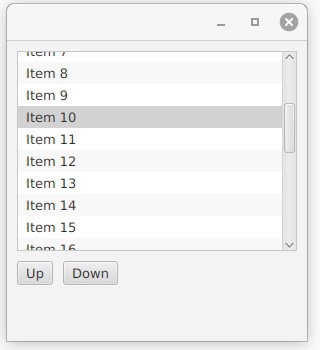
如你所见,它在 7 上失败,因为所选单元格应始终完全可见。有人能说说如何实现吗?
解决方案
方法 getFirstVisibleCell() 将返回第一个完全可见或部分可见的单元格。(因此在你的示例中,它返回包含 Item 7 的单元格。)如果那就是你以编程方式选中的单元格,那么你将得到 index == first。由于在你的 if 子句中对 index < first 进行了测试,因此在这种情况下你不会滚动。
方法 ListView 的 scrollTo(int) 将确保指定索引处的单元格完全可见,因此我认为你需要做的只是当它成为第一个单元格(完全可见或部分可见)时滚动到该单元格。只需在你的 if 测试中将 < 替换为 <=。
将此更改为:
    if (index < first) {
        listView.scrollTo(index);
    } else if (index >= last) {
        listView.scrollTo(index - (last - first));
    }
……改为如下内容:
    if (index <= first) {  // ⬅️ `<=`
        listView.scrollTo(index);
    } else if (index >= last) {
        listView.scrollTo(index - (last - first));
    }
似乎已解决该问题。
站内所有文章版权归属LeftHeroAI导航站,无授权禁止任何主体转载、抄袭、复制内容,亦不得私自架设镜像站点。一经侵权,本站将通过法律途径追责。
相关文章






汇集全球数千款 AI 工具,每日持续更新,配套 AI 开发学习资源,轻松用 AI 提升工作效率。快捷键 Ctrl+D/⌘+D 一键收藏本站。