


如何在嵌套的ScrollView中(垂直方向包含水平方向的ScrollView)通过编程滚动到指定的单元格?
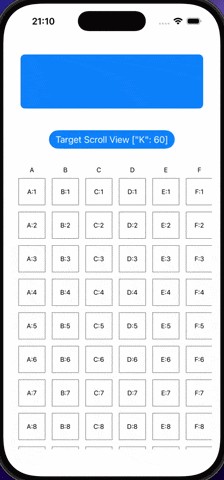
我有一个SwiftUI视图,里面是 嵌套的滚动视图 —— 一个垂直的 ScrollView,其中包含一个水平的 ScrollView,它展示一个格子网格(列A-K,行1-100)。我想在点击按钮时,编程地滚动到某个特定的单元格(例如 K:60)。
部署目标:iOS 16(iOS 17+的解决方案可接受,但优先与iOS 16兼容)
约束: 我无法计算目标单元格的确切坐标/偏移量——这是一个简化的生产代码演示,在这种场景下不现实进行手动偏移计算。
import SwiftUI


struct ContentView: View {
    var body: some View {
        VStack {
            NestedScrollingView()
        }
        .padding()
    }
}

struct NestedScrollingView: View {
    @StateObject var viewModel = NestedScrollingViewModel()
    let myMap = Dictionary(uniqueKeysWithValues: ["A", "B", "C", "D", "E", "F", "G", "H", "I", "J", "K"].map { ($0, Array(1...100)) })

    var body: some View {
        ScrollView(.vertical, showsIndicators: false) {
            RoundedRectangle(cornerRadius: 8)
                .foregroundStyle(Color.blue)
                .frame(height: 100)
                .padding()
            Button("Target Scroll View \(viewModel.scrollTokey.description)") {
                viewModel.onClickScrollTo()
            }
            .buttonStyle(.borderedProminent)
            .padding()

            gridView
        }
    }

    var gridView: some View {
        ScrollView(.horizontal, showsIndicators: false) {
            HStack(alignment: .top, spacing: 4) {
                ForEach(myMap.keys.sorted(), id: \.self) { key in
                    VStack(spacing: 4) {
                        Text(key)
                            .font(.caption)

                        ForEach(myMap[key] ?? [], id: \.self) { value in
                            Text("\(key):\(value)")
                                .font(.caption)
                                .frame(width: 50, height: 50)
                                .border(Color.gray, width: 1)
                                .padding(4)
                        }
                    }
                }
            }
            .padding(8)
        }
    }
}

class NestedScrollingViewModel: ObservableObject {
    let scrollTokey: [String: Int] = ["K": 60]

    func onClickScrollTo() {
        // Need to scroll to K:60
    }
}
What I've Tried
- iOS 17+
scrollPosition(id:)修饰符 —— 给每个单元格添加了.id("\(key)-\(value)"),并在水平ScrollView上对其使用@State private var scrollPosition: String?搭配.scrollPosition(id: $scrollPosition, anchor: .center)。这只对ScrollView内容的直接子项起作用,对VStack/HStack内部的嵌套项不起作用。 ScrollViewReader在水平ScrollView上 —— 将水平滚动视图包裹在ScrollViewReader之中,并使用proxy.scrollTo(id, anchor: .center)。它可以水平滚动到列K,但不能垂直滚动到第60行。ScrollViewReader在垂直ScrollView上 —— 垂直代理无法找到位于嵌套的水平滚动视图内的ID。- 两个
ScrollViewReader(一个用于每个坐标轴) —— 为垂直和水平滚动分别使用了代理。水平代理工作正常,但垂直代理仍然无法访问嵌套的水平滚动视图中的ID。
单一的 ScrollView([.horizontal, .vertical]) —— 将两个坐标轴合并到一个ScrollView,使一个 ScrollViewReader 能滚动到任意单元格。这会改变UX(不再有独立坐标轴滚动)。
要求:
- iOS 16+兼容(若无iOS 16兼容实现,iOS 17+的解决方案可作为回退)
- 不能手动计算像素偏移量
- 必须保持嵌套ScrollView的结构(垂直包含水平)
解决方案
先简要回顾一些关键约束:
- 顶层的
ScrollView同时包含一些头部内容和网格单元格。当水平滚动时,这些内容应当一起滚动。 - 嵌套的网格也应能水平滚动。整张网格应作为一个视图整体滚动,网格的行不应独立滚动。重要的是水平滚动不应影响头部区域,头部应保持在同一位置。
在你提到的第3 点中,你描述了当外层的 ScrollView 被包裹在 ScrollViewReader 时的问题
ScrollViewReader在垂直ScrollView上—— 垂直代理无法找到嵌套的水平ScrollView内的ID。
这个问题的一种变通做法,是在网格背景中使用占位符。类似这样的:
gridView
    .background {
        VStack(spacing: 0) {
            ForEach(myMap["A"] ?? [], id: \.self) { row in
                Color.clear
                    .id(row)
            }
        }
    }
这将滚动目标提升到一个位于嵌套的(水平)ScrollView 之外的视图。
使用简单的 Color.clear 作为占位符只有在网格的所有行高度都相同的情况下才有效。如果并非如此,你可能需要使用虚拟内容作为占位,然后再将其隐藏,例如:
ForEach(myMap["A"] ?? [], id: \.self) { row in
    CellContent(col: "A", row: row)
        .disabled(true)
        .hidden()
        .accessibilityHidden(true)
        .id(row)
}
要以与iOS 16兼容的方式实现真正的编程滚动,你可以考虑把 ScrollViewProxy 传递给嵌套视图。或者,你可以使用一个状态变量来保存要滚动到的ID。然后,使用 .onChange 或 .task 在已经有代理作用域的视图中检测到状态变量的变化。这本质上就是一个自制的 .scrollPosition。
如果使用状态变量,只有变量真的发生变化时才起效。因此,设想这样的场景:先执行一次编程滚动,然后再执行一次手动滚动,然后再次对同一目标进行编程滚动。在这种情况下,目标并没有改变,因此不会执行滚动。为了解决这个问题,最好先重置之前的目标,然后异步地把状态变量更新为新的目标。
下面是将示例更新为上述技术的方式。为了确保在这种情况下也能工作,一些容器也改为懒加载容器,以防万一。
struct CellKey {
    let col: String
    let row: Int
}

struct NestedScrollingView: View {
    @StateObject var viewModel = NestedScrollingViewModel()
    let myMap = Dictionary(uniqueKeysWithValues: ["A", "B", "C", "D", "E", "F", "G", "H", "I", "J", "K"].map { ($0, Array(1...100)) })
    @State private var targetKey: CellKey?

    private func scrollTo(key: CellKey) {
        if targetKey == nil {
            targetKey = key
        } else {
            targetKey = nil
            Task { @MainActor in
                targetKey = key
            }
        }
    }

    var body: some View {
        ScrollViewReader { rowProxy in
            ScrollView(.vertical, showsIndicators: false) {
                LazyVStack {
                    RoundedRectangle(cornerRadius: 8)
                        .foregroundStyle(Color.blue)
                        .frame(height: 100)
                        .padding()
                    Button("Target Scroll View \(viewModel.scrollTokey.description)") {
                        // viewModel.onClickScrollTo()
                        scrollTo(key: CellKey(col: "K", row: 60))
                    }
                    .buttonStyle(.borderedProminent)
                    .padding()

                    gridView
                        .background {
                            VStack(spacing: 0) {
                                ForEach(myMap["A"] ?? [], id: \.self) { row in
                                    Color.clear
                                        .id(row)
                                }
                            }
                        }
                }
                .task(id: targetKey?.row) {
                    if let row = targetKey?.row {
                        withAnimation {
                            rowProxy.scrollTo(row)
                        }
                    }
                }
            }
        }
    }

    var gridView: some View {
        ScrollViewReader { colProxy in
            ScrollView(.horizontal, showsIndicators: false) {
                LazyHStack(alignment: .top, spacing: 4) {
                    ForEach(myMap.keys.sorted(), id: \.self) { key in
                        VStack(spacing: 4) {
                            Text(key)
                                .font(.caption)

                            ForEach(myMap[key] ?? [], id: \.self) { value in
                                let isSelected = targetKey?.col == key && targetKey?.row == value
                                Text("\(key):\(value)")
                                    .font(.caption)
                                    .frame(width: 50, height: 50)
                                    .border(Color.gray, width: 1)
                                    .background(isSelected ? .yellow : Color(.systemBackground))
                                    .onTapGesture { scrollTo(key: CellKey(col: key, row: value)) }
                                    .padding(4)
                            }
                        }
                        .id(key)
                    }
                }
                .task(id: targetKey?.col) {
                    if let col = targetKey?.col {
                        withAnimation {
                            colProxy.scrollTo(col)
                        }
                    }
                }
                .padding(8)
            }
        }
    }
}
相关文章





