


如何实现无缝动画?
这就是我正在做的事情:
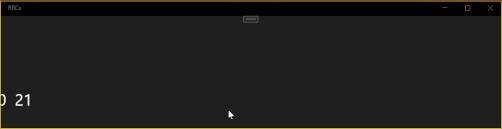
我有一排标签放在一个 HorizontalStackLayout 里面。
我的目标是使用 HorizontalStackLayout.TranslationX 来实现滚动标签的无缝循环,但我没能把它做到位。
这个动画动作有些卡顿,且不够平滑,我也不确定该如何修复。
这是我的代码:
private async void ContentView_Loaded(object sender, EventArgs e)
{
    await Task.Delay(500);
    tempWidth = this.Width;
    Dispatcher.StartTimer(TimeSpan.FromMilliseconds(16), () =>  {
        TickStrip();
        return true;
    });
}

float currentPosition = 0, labelSpeed = 1.5f, LabelWidth = 52, tempWidth;

private void TickStrip()
{
    if (currentPosition >= 0)
    {
        var item = horizontalStackLayout.Children.Last();
        horizontalStackLayout.Children.RemoveAt(horizontalStackLayout.Children.Count - 1);
        horizontalStackLayout.Children.Insert(0, item);
        // Apply translation to create a continuous scrolling effect
        currentPosition = (float)-(LabelWidth);
    }
    else
    {
        currentPosition += labelSpeed;
    }
    horizontalStackLayout.TranslationX = currentPosition;
}
这是我创建这些标签的方式:
private async void AddOneRowLabels()
{
  // Assuming 44 labels fit across the screen at once
  double labelCount = tempWidth / 52;

  for (int i = 0; i < labelCount; i++)
  {
    var label = new Label();
    label.Text = (i + 1).ToString();
    horizontalStackLayout.Children.Add(label);
  }

  horizontalStackLayout.TranslationX = currentPosition = (float)-tempWidth;
}
我的样式是这样的:
<Style TargetType="Label">
  <Setter Property="FontSize" Value="Large"/>
  <Setter Property="Margin" Value="4, 0"/>
  <Setter Property="WidthRequest" Value="44"/>
  <Setter Property="HorizontalTextAlignment" Value="Center"/>
  <Setter Property="VerticalTextAlignment" Value="Center"/>
</Style>
解决方案
目前为止,这是最终结果,但这只是一个加载页。
我使用了 Animation 类来替代 Dispatcher.StartTimer。
这是加载:
private const float LabelWidth = 52;
private double tempWidth;

private async void ContentView_Loaded(object sender, EventArgs e)
{
    await Task.Delay(500);
    tempWidth = DeviceDisplay.Current.MainDisplayInfo.Width + LabelWidth;
    AddOneRowLabels();
}

// This is the `Label` factory.
private async void AddOneRowLabels()
{
    // Assuming 44 labels fit across the screen at once
    double labelCount = tempWidth / LabelWidth;

    for (int i = 0; i < labelCount; i++)
    {
        var label = new Label();
        label.Text = (i + 1).ToString();
        horizontalStackLayout.Children.Add(label);
    }

    var intro = new Animation(
        callback: t =>
        {
            // This checks if the next position would be past the point where the first label is fully on screen. If so, we start transitioning to the loop animation. We also ensure we hit exactly 0 at the end of the intro for a seamless transition.
            if (t >= -LabelWidth)
            {
                if (speed == 0) // If the speed hasn't been set yet, calculate the speed needed to reach 0 in the remaining time
                    speed = Math.Abs(stackBase.TranslationX - t);
                else if (horizontalStackLayout.TranslationX >= 0) // This check ensures we only transition to the loop once when the first label fully enters the screen
                {
                    this.AbortAnimation("LabelIntro");
                    StartLoopAnimation();
                }
                // Transition smoothly from the intro speed to the loop speed as we approach the end of the intro
                horizontalStackLayout.TranslationX += speed;
            }
            else
            horizontalStackLayout.TranslationX = t;
        },
        start: -(tempWidth + LabelWidth * 2),
        end: 0,
        easing: Easing.CubicOut
    );
    intro.Commit(
        owner: this,
        name: "LabelIntro",
        length: 6000
    );
}

// And here the second animation:
private void StartLoopAnimation()
{
    var item = horizontalStackLayout.Children.Last();
    horizontalStackLayout.Children.RemoveAt(stackBase.Children.Count - 1);
    horizontalStackLayout.Children.Insert(0, item);

    // Before animating, teleport the layout to the right start point
    horizontalStackLayout.TranslationX = -LabelWidth;
    var loop = new Animation(
        callback: t => horizontalStackLayout.TranslationX = t,
        start: -LabelWidth,
        end: 0
    );

    loop.Commit(
        owner: this,
        name: "LabelLoop",
        length: 1000,       // ms for one full sweep across the screen
        finished: (_, cancelled) =>
        {
            if (cancelled) return;
            StartLoopAnimation();    // seamlessly restart
        }
    );
}
站内所有文章版权归属LeftHeroAI导航站,无授权禁止任何主体转载、抄袭、复制内容,亦不得私自架设镜像站点。一经侵权,本站将通过法律途径追责。
相关文章






汇集全球数千款 AI 工具,每日持续更新,配套 AI 开发学习资源,轻松用 AI 提升工作效率。快捷键 Ctrl+D/⌘+D 一键收藏本站。