


在使用GridBagLayout的 Java Swing中,无法将JCheckBox与 JLabel垂直对齐
我在用带有GridBagLayout的 Swing UI,但每当我使用JCheckBox甚至JRadioButton时,它总是与其他元素(如JLabel)对齐不正确
import java.awt.GridBagConstraints;
import java.awt.GridBagLayout;
import java.awt.Insets;
import javax.swing.JCheckBox;
import javax.swing.JFrame;
import javax.swing.JLabel;
import javax.swing.JPanel;

public class PanelTest extends JPanel {

    // instance variabels
    private GridBagLayout testLayout;
    private GridBagConstraints gbc;
    private JLabel label;
    private JCheckBox checkBox;

    public PanelTest() {
        testLayout = new GridBagLayout();
        setLayout(testLayout);
        gbc = new GridBagConstraints();
        // set initial gbc format
        gbc.anchor = GridBagConstraints.SOUTHWEST;
        gbc.insets = new Insets(5, 5, 0, 0);
        gbc.gridx = gbc.gridy = 0;
        gbc.weightx = gbc.weighty = 0;
        // label
        label = new JLabel("Label here:");
        add(label, gbc);
        // check box
        checkBox = new JCheckBox("Check box");
        gbc.gridx++;
        add(checkBox, gbc);
    }

    public static void main(String[] args) {
        JFrame frame = new JFrame();
        PanelTest panelTest = new PanelTest();
        frame.setDefaultCloseOperation(JFrame.EXIT_ON_CLOSE);
        frame.setTitle("Panel test");
        frame.add(panelTest);
        frame.pack();
        frame.setLocationRelativeTo(null);
        frame.setVisible(true);
    }
}
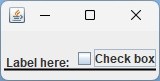
这样做时,复选框的文本和复选框本身相对JLabel都偏高。
复选框本身比标签文本高出2 像素,复选框的文本又高出4 像素。
有没有办法把复选框下移2 像素,复选框文本再下移4 像素?
(图片中的线只是用于参考未对齐的情况。)
解决方案
在你给出的简单居中组件的代码示例中,移除所有不必要的元素。
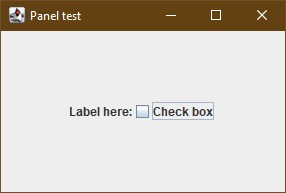
    public PanelTest() {
        testLayout = new GridBagLayout();
        setLayout(testLayout);
        gbc = new GridBagConstraints();
        // label
        label = new JLabel("Label here:");
        add(label, gbc);
        // check box
        checkBox = new JCheckBox("Check box");
        add(checkBox, gbc);
    }
如果你想要使用 gbc.anchor = GridBagConstraints.SOUTHWEST;。
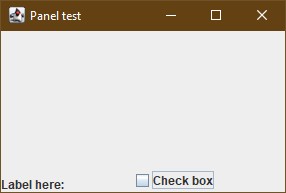
    public PanelTest() {
        testLayout = new GridBagLayout();
        setLayout(testLayout);
        gbc = new GridBagConstraints();

        // Give the cell extra space so the anchor is visible
        gbc.weightx = 1.0;
        gbc.weighty = 1.0;
        gbc.fill   = GridBagConstraints.NONE; // Don't stretch the component
        gbc.anchor = GridBagConstraints.SOUTHWEST; // Pin to bottom-left

        // label
        label = new JLabel("Label here:");
        add(label, gbc);
        // check box
        checkBox = new JCheckBox("Check box");
        add(checkBox, gbc);
    }
如果你的目标是为每个元素添加独立的锚点。
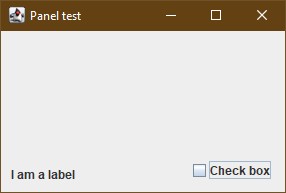
    public PanelTest() {
        testLayout = new GridBagLayout();
        setLayout(testLayout);
        gbc = new GridBagConstraints();

        // --- LABEL (left side) ---
        gbc.gridx   = 0;             // Column 0
        gbc.gridy   = 0;             // Row 0
        gbc.weightx = 0.5;           // Take up half the horizontal space
        gbc.weighty = 1.0;
        gbc.anchor  = GridBagConstraints.SOUTHWEST;
        gbc.fill    = GridBagConstraints.NONE;
        gbc.insets  = new Insets(0, 10, 10, 0); // Some padding
        add(new JLabel("I am a label"), gbc);

        // --- CHECKBOX (right side) ---
        gbc.gridx   = 1;             // Column 1
        gbc.weightx = 0.5;           // Take up the other half
        gbc.anchor  = GridBagConstraints.SOUTHEAST;
        gbc.insets  = new Insets(0, 0, 10, 10);
        add(new JCheckBox("Check box"), gbc);
    }
站内所有文章版权归属LeftHeroAI导航站,无授权禁止任何主体转载、抄袭、复制内容,亦不得私自架设镜像站点。一经侵权,本站将通过法律途径追责。
相关文章






汇集全球数千款 AI 工具,每日持续更新,配套 AI 开发学习资源,轻松用 AI 提升工作效率。快捷键 Ctrl+D/⌘+D 一键收藏本站。