


在第二列添加一个复选框
我有一个 ListViewGroup 控件,像这样:
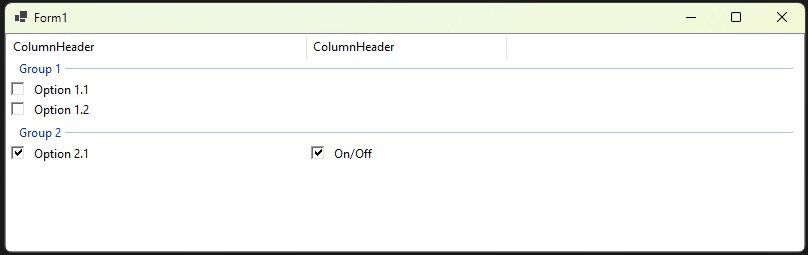
我需要在第二列的某个项目上添加一个复选框。问题在于点击无效,无法勾选/取消勾选(第一列或第二列都如此)。
下面是我的代码:
Public Class Form1

   Dim grp As ListViewGroup = Nothing

   Private Class LV_CheckBoxData
      Public Property MainCheckState As Boolean
      Public Property HasCheckBox As Boolean
      Public Property CheckState As Boolean
      Public Property Display As String
   End Class
   '-----------------------------------------------------------------------------------------------
   ' Add ListView Group
   Private Sub LV_AddGroup(name As String)
      grp = New ListViewGroup(name)
      lvTest.Groups.Add(grp)
   End Sub

   '-----------------------------------------------------------------------------------------------
   ' Add ListView item
   Private Sub LV_AddItem(name As String, isChecked As Boolean, Optional hasCheckBox As Boolean = False, Optional CheckBoxIsChecked As Boolean = False, Optional CheckBoxText As String = "On/Off")
      Dim item As New ListViewItem(name)
      item.SubItems.Add("")
      item.Tag = New LV_CheckBoxData With {
         .MainCheckState = isChecked,
         .HasCheckBox = hasCheckBox,
         .CheckState = CheckBoxIsChecked,
         .Display = CheckBoxText
      }
      item.Group = grp
      lvTest.Items.Add(item)
   End Sub
   Private Sub Form1_Load(sender As Object, e As EventArgs) Handles MyBase.Load
      lvTest.View = View.Details
      lvTest.OwnerDraw = True
      lvTest.FullRowSelect = True
      lvTest.CheckBoxes = False

      AddHandler lvTest.DrawColumnHeader, AddressOf lvTest_DrawColumnHeader
      AddHandler lvTest.DrawItem, AddressOf lvTest_DrawItem
      AddHandler lvTest.DrawSubItem, AddressOf lvTest_DrawSubItem
      AddHandler lvTest.MouseDown, AddressOf lvTest_MouseDown

      LV_AddGroup("Group 1")
      LV_AddItem("Option 1.1", False)
      LV_AddItem("Option 1.2", False)

      LV_AddGroup("Group 2")
      LV_AddItem("Option 2.1", True, True, True, "On/Off")
   End Sub

   Private Sub lvTest_DrawColumnHeader(sender As Object, e As DrawListViewColumnHeaderEventArgs) Handles lvTest.DrawColumnHeader
      e.DrawDefault = True
   End Sub

   Private Sub lvTest_DrawItem(sender As Object, e As DrawListViewItemEventArgs) Handles lvTest.DrawItem
      'e.DrawDefault = True
      e.DrawBackground()
   End Sub

   Private Sub lvTest_DrawSubItem(sender As Object, e As DrawListViewSubItemEventArgs) Handles lvTest.DrawSubItem
      Dim data = DirectCast(e.Item.Tag, LV_CheckBoxData)

      ' COLUMN 0 → built-in checkbox
      If e.ColumnIndex = 0 Then
         e.DrawBackground()

         Dim cbSize As Integer = 14
         Dim x As Integer = e.Bounds.X + 4
         Dim y As Integer = e.Bounds.Y + (e.Bounds.Height - cbSize) \ 2

         Dim state As ButtonState = If(Data.MainCheckState, ButtonState.Checked, ButtonState.Normal)

         ControlPaint.DrawCheckBox(e.Graphics, New Rectangle(x, y, cbSize, cbSize), state)

         Dim textX As Integer = x + cbSize + 6
         TextRenderer.DrawText(e.Graphics, e.SubItem.Text, lvTest.Font,
                          New Point(textX, e.Bounds.Y + 2), lvTest.ForeColor)

         Exit Sub
      End If

      ' COLUMN 1 → your custom checkbox
      If e.ColumnIndex = 1 AndAlso Data IsNot Nothing AndAlso Data.HasCheckBox Then
         e.DrawBackground()

         Dim cbSize As Integer = 14
         Dim x As Integer = e.Bounds.X + 4
         Dim y As Integer = e.Bounds.Y + (e.Bounds.Height - cbSize) \ 2

         Dim state As ButtonState = If(Data.CheckState, ButtonState.Checked, ButtonState.Normal)

         ControlPaint.DrawCheckBox(e.Graphics, New Rectangle(x, y, cbSize, cbSize), state)

         TextRenderer.DrawText(e.Graphics, Data.Display, lvTest.Font, New Point(x + cbSize + 6, e.Bounds.Y + 2), lvTest.ForeColor)

         Exit Sub
      End If

      ' DEFAULT TEXT FOR OTHER COLUMNS
      e.DrawBackground()
      TextRenderer.DrawText(e.Graphics, e.SubItem.Text, lvTest.Font, e.Bounds, lvTest.ForeColor)
   End Sub


   Private Sub lvTest_MouseDown(sender As Object, e As MouseEventArgs) Handles lvTest.MouseDown
      Dim ht As ListViewHitTestInfo = lvTest.HitTest(e.Location)
      If ht.Item Is Nothing OrElse ht.SubItem Is Nothing Then Exit Sub

      Dim subIndex As Integer = ht.Item.SubItems.IndexOf(ht.SubItem)
      If subIndex <> 1 Then Exit Sub

      Dim data = TryCast(ht.Item.Tag, LV_CheckBoxData)
      If data Is Nothing OrElse Not data.HasCheckBox Then Exit Sub

      Dim cbSize As Integer = 14
      Dim x As Integer = ht.SubItem.Bounds.X + 4
      Dim y As Integer = ht.SubItem.Bounds.Y + (ht.SubItem.Bounds.Height - cbSize) \ 2
      Dim checkBoxRect As New Rectangle(x, y, cbSize, cbSize)

      If checkBoxRect.Contains(e.Location) Then
         data.CheckState = Not data.CheckState
         lvTest.Invalidate(ht.SubItem.Bounds)
      End If
   End Sub

End Class
解决方案
我尝试了你的代码,同样遇到了这个问题。调试时我发现MouseDown事件会被触发两次:状态被连续切换两次(从True变为False,再从False变为True),因此看起来像是不可编辑,实际上却被编辑了两次。
在我查看时,发现ListView的设计器在 属性 的 事件 中显示了MouseDown事件。这意味着处理程序被附加了两次,一次由设计器,一次由代码,因此会双次触发。当我在事件属性中删除该处理程序(这会导致代码被清除,所以我需要重新设置),问题就消失了。
不知道,这个问题的原因是否在于你把处理程序的名称设成了设计器可能生成的同名。也许如果你使用一个非标准的名称,就不会遇到这个问题。
备选方案
问题在于你在使用 AddHandler 语句,但你的事件处理程序上又有 Handles 子句。请只使用其中之一,不要两者都用。正是 Handles 子句导致设计器在第一条回复中提到的地方显示事件处理程序。
在你的情况下,没有充分的理由使用 AddHandler。你应该使用 Handles 子句。一般来说,只有当对象是在运行时创建且你不能使用 Handles 子句时,才会使用 AddHandler。
站内所有文章版权归属LeftHeroAI导航站,无授权禁止任何主体转载、抄袭、复制内容,亦不得私自架设镜像站点。一经侵权,本站将通过法律途径追责。
相关文章






汇集全球数千款 AI 工具,每日持续更新,配套 AI 开发学习资源,轻松用 AI 提升工作效率。快捷键 Ctrl+D/⌘+D 一键收藏本站。