


使用Python的 Playwright滚动网页中的二级滚动条
我在尝试自动化一个包含不止一个滚动条的网页。有时滚动条在左侧,有时又在页面中间(例如,紧邻一个网页表格)。这些滚动条与最右边的整页滚动条不同。为便于理解,我附上了截图(这不是我的网页,遗憾地无法分享)。
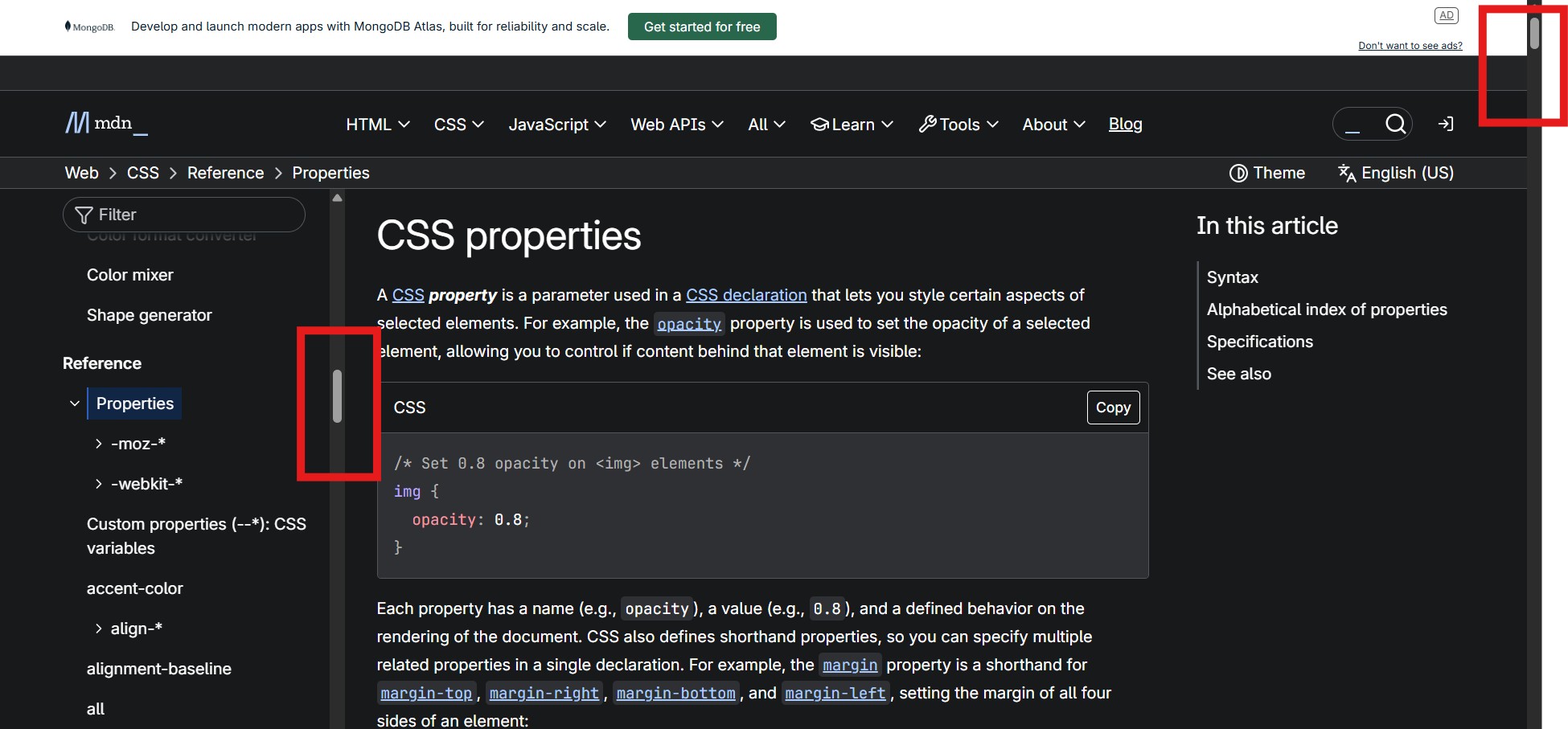
我想把二级滚动条(例如上面示例中左边的那个)拖到底部,以一次性查看所有内容。我已经尝试了如下代码片段:
def scroll_down(page, scroll_pause, max_scrolls):
    # page.mouse.click(x_coordinate, y_coordinate)
    for i in range(max_scrolls=5):
        print(f'Scrolling: {i+1}/{max_scrolls}'
        page.keyboard.press('End') OR page.evaluate('window.scrollTo(0, document.body.scrollHeight);')
        time.sleep(scroll_pause)
然而,这始终会触发右侧的页面滚动条。我也尝试过在表格/结构内部的某些坐标处手动点击,然后再尝试同样的方法。它需要我在表格内部手动点击一次,之后其余的代码就会运行,我就可以滚动出二级滚动条。但要在表格内的任意空白处点击,这一点无法实现自动化。
请问大家能帮忙吗?
解决方案
正如评论区所讨论的,我已经能够在MDN站点上使用你们提出的“聚焦到你想要滚动的元素内部并触发End键”这一技术:
from playwright.sync_api import sync_playwright # 1.58.0
import time


with sync_playwright() as p:
    browser = p.chromium.launch(headless=False)
    context = browser.new_context(viewport={"width": 1280, "height": 800})
    page = context.new_page()
    url = "https://developer.mozilla.org/en-US/docs/Web/CSS/Reference/Properties"
    page.goto(url, wait_until="load")
    page.locator("#main-sidebar a").first.focus() # focus anywhere within the sidebar
    time.sleep(0.2)
    page.keyboard.press("End")
    time.sleep(0.2)
    page.screenshot(path="proof.png")
打开proof.png显示左侧边栏已经滚动到底部,而主页面的滚动条位于顶部。
等待并不理想,因此如果这是用于生产环境,我会探索更稳妥的等待方式。一种做法是找到可滚动的元素,可以像下方所示那样自动定位,或手动定位,然后用JS将其滚动到底部:
# ... same as above ...
page.goto(url, wait_until="load")
page.evaluate("""
  () => {
    function findScrollParent(el) {
      while (el) {
        const style = getComputedStyle(el);
        if (/(auto|scroll)/.test(style.overflowY) &&
            el.scrollHeight > el.clientHeight) {
          return el;
        }
        el = el.parentElement;
      }
      return null;
    }
    const scrollable = findScrollParent(document.querySelector("#main-sidebar a"));
    scrollable.scrollTop = scrollable.scrollHeight;
  }"""
)
page.screenshot(path="proof.png")
请注意,如果滚动区域中有惰性加载的内容,您可能需要一个循环+ sleep + Page Down键(或向下箭头)的组合,逐步滚动。
滚动还有许多其他取决于具体用例的细微问题,因此不可能提供一刀切、对所有网站都适用的银弹解决方案。最好分享实际页面和高层目标,以便让解决方案针对该具体情况进行定制。
站内所有文章版权归属LeftHeroAI导航站,无授权禁止任何主体转载、抄袭、复制内容,亦不得私自架设镜像站点。一经侵权,本站将通过法律途径追责。
相关文章






汇集全球数千款 AI 工具,每日持续更新,配套 AI 开发学习资源,轻松用 AI 提升工作效率。快捷键 Ctrl+D/⌘+D 一键收藏本站。