


使用ShaderMask将 LinearGradient应用于文本并与阴影混合时,会在文本控件周围产生一个可见且略带透明的边框
我正在研究一个小部件操作的概念,试图在文本上混入一个LinearGradient,同时文本还带有一个与渐变排布相衬的阴影。
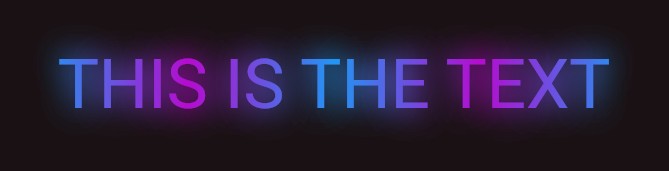
唯一的问题是,我注意到文本周围有一个淡淡的透明边框,在阴影的对比下,这个边框尤为明显。
请参考图片:

我本来期待文本周围有一个平滑的阴影效果。
以下是 MRE 的代码片段:
import 'package:flutter/material.dart';

void main() {
  runApp(const MyApp());
}

class MyApp extends StatelessWidget {
  const MyApp({super.key});

  // This widget is the root of your application.
  @override
  Widget build(BuildContext context) {
    return MaterialApp(
      debugShowCheckedModeBanner: false,
      title: 'Flutter Demo',
      theme: ThemeData(
        colorScheme: ColorScheme.fromSeed(
          primary: Colors.black54,
          seedColor: Colors.black,
          brightness: Brightness.dark,
        ),
      ),
      home: const MyHomePage(title: 'ShaderMask Shadow'),
    );
  }
}

class MyHomePage extends StatelessWidget {
  const MyHomePage({super.key, required this.title});
  final String title;

  @override
  Widget build(BuildContext context) {
    return Scaffold(
      appBar: AppBar(
        backgroundColor: Theme.of(context).colorScheme.primary,
        title: Text(title),
      ),
      body: Center(
        child: RichText(
          text: TextSpan(
            children: [
              WidgetSpan(
                child: ShaderMask(
                  blendMode: BlendMode.srcATop,
                  shaderCallback: (bounds) =>
                      LinearGradient(
                        colors: [
                          Colors.blue.shade500,
                          const Color.fromARGB(255, 181, 12, 207),
                          Colors.blue.shade500,
                          const Color.fromARGB(255, 181, 12, 207),
                          Colors.blue.shade500,
                        ],
                      ).createShader(
                        Rect.fromLTWH(0, 0, bounds.width, bounds.height),
                      ),
                  child: Text(
                    "THIS IS THE TEXT",
                    style: Theme.of(context).textTheme.headlineLarge!.copyWith(
                      fontSize: 69,
                      shadows: <Shadow>[
                        Shadow(
                          offset: Offset(0.0, 0.0),
                          blurRadius: 16.0,
                          color: Colors.blue.shade500.withValues(
                            alpha: 0.4,
                          ), // First color of the "gradient" shadow
                        ),
                        Shadow(
                          offset: Offset(0.0, 0.0),
                          blurRadius: 16.0,
                          color: const Color.fromARGB(255, 181, 12, 207)
                              .withValues(
                                alpha: 0.4,
                              ), // Second color of the "gradient" shadow
                        ),
                        Shadow(
                          offset: Offset(0.0, 0.0),
                          blurRadius: 16.0,
                          color: Colors.blue.shade500.withValues(
                            alpha: 0.4,
                          ), // First color of the "gradient" shadow
                        ),
                        Shadow(
                          offset: Offset(0.0, 0.0),
                          blurRadius: 16.0,
                          color: const Color.fromARGB(255, 181, 12, 207)
                              .withValues(
                                alpha: 0.4,
                              ), // Third color of the "gradient" shadow
                        ),
                        Shadow(
                          offset: Offset(0.0, 0.0),
                          blurRadius: 16.0,
                          color: Colors.blue.shade500.withValues(
                            alpha: 0.4,
                          ), // First color of the "gradient" shadow
                        ),
                      ],
                    ),
                    textAlign: TextAlign.center,
                  ),
                ),
              ),
            ],
          ),
        ),
      ), // This trailing comma makes auto-formatting nicer for build methods.
    );
  }
}
我有意地将这个设计概念仅应用于深色主题,以提升渐变在深色背景下的显示效果。
我还使用Flutter DevTools Inspector来追踪这个淡淡的透明边框相对于阴影的起源,发现它直接来自 "THIS IS THE TEXT" Text 小部件。
我尝试的步骤如下:
- 我把
RichText包裹在Padding小部件中(const EdgeInsets.all(16.0)用来匹配文本阴影的blurRadius),希望padding能提供足够的空间来完整容纳阴影。 - 我把
Text包裹在MediaQuery.removePadding小部件中,即:
dart
  MediaQuery.removePadding(
    context: context,
    child: Text("THIS IS THE TEXT",),
  ),
* 我尝试了所有其他的 ShaderMask 混合模式。
我尝试的这些步骤都没有奏效。
解决方案
经过多次反复尝试以解决 Text 小部件上的淡淡透明边框后,我终于找到了答案!我只需要找出将 padding 与阴影的 blurRadius 对齐的正确模式。
在本例中,我需要做的只是把 Text 包裹在一个 Padding 小部件中。
下面的代码片段供参考:
// ... other codes here
Padding(
  padding: const EdgeInsets.all(16.0),
  child: Text("THIS IS THE TEXT",),
),
// ... other codes here
注:仅仅使用一个值为 16.0 即可工作。只要确保 padding 的值始终与阴影的 blurRadius 相匹配。
下方图片供参考:
站内所有文章版权归属LeftHeroAI导航站,无授权禁止任何主体转载、抄袭、复制内容,亦不得私自架设镜像站点。一经侵权,本站将通过法律途径追责。
相关文章






汇集全球数千款 AI 工具,每日持续更新,配套 AI 开发学习资源,轻松用 AI 提升工作效率。快捷键 Ctrl+D/⌘+D 一键收藏本站。