


在WindowGroup中检测标签页(NSWindowTab)的关闭
场景/代码
我有一个SwiftUI应用,它显示带标签页的窗口(就像在一个 WindowGroup 里的 NSWindowTab):
import SwiftUI

@main
struct TabTestApp: App {
    var body: some Scene {
        WindowGroup{
            ContentView() // Hasn't any content of relevance to this question.
        }.commands{
            CommandGroup(after: .newItem) {
                Button("New Tab") {
                    guard let currentWindow = NSApp.keyWindow, let windowController = currentWindow.windowController else { return }
                    windowController.newWindowForTab(nil)
                    guard let newWindow = NSApp.keyWindow else { return }
                    if currentWindow != newWindow {
                        currentWindow.addTabbedWindow(newWindow, ordered: .above)
                    }
                }.keyboardShortcut(.init("t", modifiers: [.command]))
            }
        }
    }
}
问题
有没有办法检测一个或多个标签页的关闭,例如当用户点击标签栏上的“关闭其他标签页”选项,或按下CMD + W,以便在关闭前询问用户是否要保存更改?
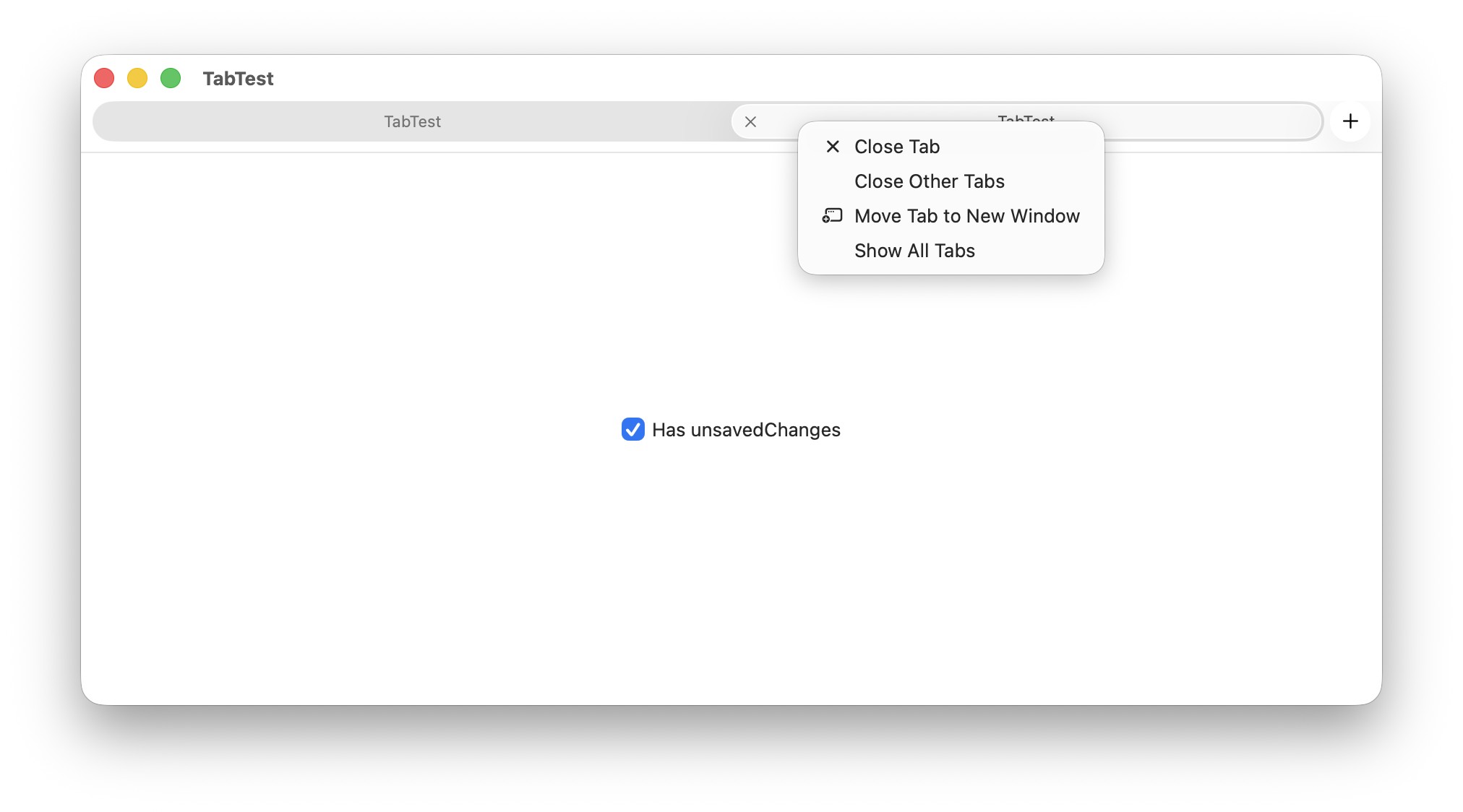
我尝试过以下方法,但都无效:
- 拦截
windowShouldClose—— 当一个窗口中的单个标签页被关闭时不会被调用(只有最后一个标签页在一个窗口被关闭时才会被调用)。 - 处理
onDissapear—— 因为关闭操作无法取消,所以不起作用。 - 使用
DocumentGroup—— 不起作用,因为相关应用并非处理文档(即存储在外部的文件),而是存储在数据库中的数据。
解决方案
拦截 windowShouldClose 对带标签页的窗口也应该起作用。你只需要确保你拿到的是正确的窗口。
你可以使用一个 NSViewRepresentable 来获取SwiftUI视图所在的窗口,如下所示:
struct WindowRetriever: NSViewRepresentable {
    @Binding var window: NSWindow?
    class HelperView: NSView {
        var windowChanged: ((NSWindow?) -> Void)?

        override func viewWillMove(toWindow newWindow: NSWindow?) {
            super.viewWillMove(toWindow: newWindow)
            windowChanged?(newWindow)
        }
    }

    func makeNSView(context: Context) -> HelperView {
        HelperView()
    }

    func updateNSView(_ nsView: HelperView, context: Context) {
        nsView.windowChanged = { window = $0 }
    }
}
示例用法:
struct ContentView: View {
    @State var window: NSWindow?
    @StateObject var delegate = WindowDelegateInterceptor()
    var body: some View {
        VStack {
            Toggle("Has unsaved changes", isOn: $delegate.hasChanges)
        }
        .background {
            WindowRetriever(window: $window)
        }
        .onChange(of: window) { oldValue, newValue in
            oldValue?.delegate = delegate.wrapped
            delegate.wrapped = newValue?.delegate
            newValue?.delegate = delegate
        }
    }
}

class WindowDelegateInterceptor: NSObject, ObservableObject, NSWindowDelegate {
    @Published var hasChanges = false

    // This property stores the NSWindowDelegate that SwiftUI uses.
    // To do this "properly", you should be forwarding all NSWindowDelegate methods to this
    // so that SwiftUI internals can still know about the state of the window
    weak var wrapped: (any NSWindowDelegate)?

    func windowShouldClose(_ sender: NSWindow) -> Bool {
        if hasChanges {
            let alert = NSAlert()
            alert.messageText = "Are you sure you want to close?"
            alert.addButton(withTitle: "No")
            alert.addButton(withTitle: "Yes")
            return alert.runModal() == .alertSecondButtonReturn
        } else {
            return true
        }
    }
}
站内所有文章版权归属LeftHeroAI导航站,无授权禁止任何主体转载、抄袭、复制内容,亦不得私自架设镜像站点。一经侵权,本站将通过法律途径追责。
相关文章






汇集全球数千款 AI 工具,每日持续更新,配套 AI 开发学习资源,轻松用 AI 提升工作效率。快捷键 Ctrl+D/⌘+D 一键收藏本站。