


在SwiftUI中,当导航栏标题较大时,居中的ScrollView内容在下拉刷新后无法回到原位
问: 在SwiftUI中,是否有办法让位于屏幕中间的 ScrollView 内容在 .refreshable 完成后不再向下移动?
预期效果: 占位内容在下拉刷新结束后仍然保持在屏幕中间的位置。
结果: 刷新结束后内容向下移动,只有我手动滚动才能回到居中位置。
我尝试过:
我也尝试使用 GeometryReader 将内容居中放在 ScrollView 里面,但 .refreshable ScrollView 的组合得到的结果仍然一样。
环境:
- 部署目标:iOS 26
- 在预览 / 模拟器 / 真机上均有复现
- 测试的iOS版本:iOS 18.x、iOS 26.x
最小可复现示例
struct RefreshView: View {
    var body: some View {
        NavigationStack {
            ScrollView(.vertical) {
                VStack(spacing: 30) {
                    Text("No content")
                    Image(systemName: "calendar")
                        .font(.largeTitle)
                    Text("Press here to add more")
                }
                .containerRelativeFrame([.horizontal, .vertical])
            }
            .refreshable {
                try? await Task.sleep(for: .seconds(2))
            }
            .navigationTitle("Title")
        }
    }
}
解决方案
It may be the modifier .containerRelativeFrame that is causing this problem. For content inside a ScrollView, the "container" is the ScrollView, but I am guessing that the size may change when a refresh is being performed and the activity indicator is showing.
可能是 .containerRelativeFrame 修饰符导致了这个问题。对于 ScrollView 内的内容,容器是 ScrollView,但我猜在执行刷新并显示活动指示器时,大小可能会改变。
I would suggest using a GeometryReader to measure the height of the area occupied by the ScrollView. Then:
- set the height of the
ScrollViewas the minimum height for theVStack - the maximum width of the
VStackcan simply be set to.infinity - the modifier
.containerRelativeFramecan be removed.
我建议使用 GeometryReader 来测量被 ScrollView 占据的区域的高度。然后:
- 将
ScrollView的高度设为VStack的最小高度 VStack的最大宽度可以简单地设为.infinity- 可以移除
.containerRelativeFrame修饰符
You said you tried using a GeometryReader already and it didn't work. However, you didn't show how you tried it. Give it a try as follows:
你说你已经尝试使用 GeometryReader,但似乎没有效果。不过你没有展示你是如何尝试的。按如下方式再试一次:
NavigationStack {
    GeometryReader { geo in
        ScrollView(.vertical) {
            VStack(spacing: 30) {
                // ...
            }
            .frame(maxWidth: .infinity, minHeight: geo.size.height)
        }
    }
    .refreshable {
        try? await Task.sleep(for: .seconds(2))
    }
    .navigationTitle("Title")
}
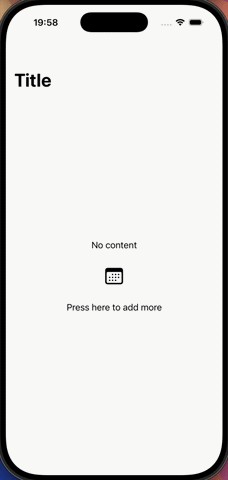
You will notice from the gif above that the content inside the ScrollView jumps around in a jerky way when the activity indicator disappears and the content slides back up to fill the space. The reason for the sudden movement may be because there is some native animation involved (the title slides up smoothly) but the height of the VStack is being changed without animation, so the change in height is sudden.
从上面的动图你会发现,ScrollView 内的内容在活动指示器消失、内容回到原位以填充空间时会跳跃地摆动。这种突然的移动的原因可能是在使用原生动画(标题平滑向上滑动)的同时,VStack 的高度在没有动画的情况下发生变化,因此高度的变化显得突兀。
To smooth out the movement, you could try to animate the change in height, but it is difficult to synchronize this with the native animation. Special measures are also needed when the view is first shown, otherwise the animation applied to the height causes the content to slide into position in a way that may not be desirable.
要让移动更平滑,可以尝试对高度的变化进行动画处理,但很难与原生动画同步。视图首次显示时还需要采取特殊措施,否则应用于高度的动画会让内容以一种可能并非理想的方式滑入到正确的位置。
An alternative and perhaps simpler approach is to use a fixed amount of top padding to move the placeholder content closer to the center of the screen, instead of trying to center it exactly by setting a minimum height. Something like:
另一种更简单的做法是使用固定的顶部内边距,将占位内容往屏幕中心推近,而不是通过设定最小高度来实现精确居中。类似这样:
VStack(spacing: 30) {
    // ...
}
.frame(maxWidth: .infinity)
.padding(.top, geo.size.height > 400 ? 200 : 60)
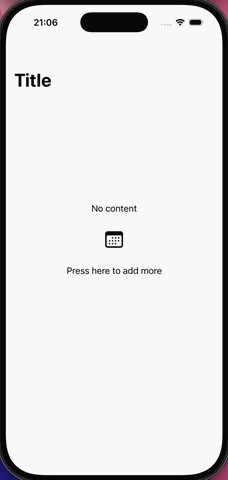
The movement is much smoother with this approach:
使用这种方式,移动会更平滑:
相关文章





