


在macOS 26下,如何解决NSRulerView绘制时与窗口标题栏冲突的问题?
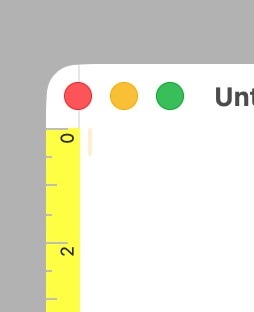
将垂直标尺附加到滚动视图时,分隔线会一直绘制到窗口的顶部(macOS Tahoe):
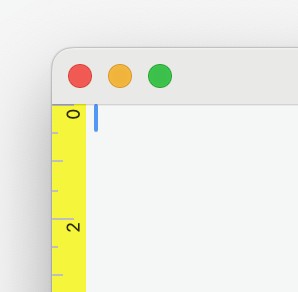
请将其与早前版本的工作方式比较,例如macOS Sequoia(15.7.2):
这是预期行为吗?能修复吗?
这些截图是使用一个极简的SwiftUI应用生成的,该应用嵌入了NSTextView和 NSRulerView,使用NSViewRepresentable,见下文。
struct CustomEditor: NSViewRepresentable {

    @Binding var text: String

    func makeNSView(context: Context) -> NSScrollView {
        let scrollView = NSTextView.scrollableTextView()
        let editorView = scrollView.documentView as! NSTextView

        scrollView.verticalRulerView = NSRulerView(scrollView: scrollView, orientation: .verticalRuler)
        scrollView.rulersVisible = true

        editorView.delegate = context.coordinator

        return scrollView
    }

    func updateNSView(_ scrollView: NSScrollView, context: Context) {
        context.coordinator.owner = self
    }

    func makeCoordinator() -> CustomEditorCoordinator {
        return CustomEditorCoordinator(owner: self)
    }
}
解决方案
尝试在滚动视图的init方法中加入
self.clipsToBounds = true
在滚动视图的init方法中。
站内所有文章版权归属LeftHeroAI导航站,无授权禁止任何主体转载、抄袭、复制内容,亦不得私自架设镜像站点。一经侵权,本站将通过法律途径追责。
相关文章






汇集全球数千款 AI 工具,每日持续更新,配套 AI 开发学习资源,轻松用 AI 提升工作效率。快捷键 Ctrl+D/⌘+D 一键收藏本站。