


我要怎么把纹理贴到目标区域?
我正在把我的万花筒应用从OpenGL(以及Objective-C!)迁移到SwiftUI与 Metal。
我已经把源图像设置为纹理,并从纹理中绘制三角形或彩色线条。现在需要解决的问题是更新我的片段着色器,让它知道要使用纹理中的哪个三角形区域来绘制到目标。当前的代码只是把纹理中的像素复制到目标缓冲区的同一位置。我希望无论我在哪里绘制,都能将纹理中的任意一个三角形绘制到目标中。
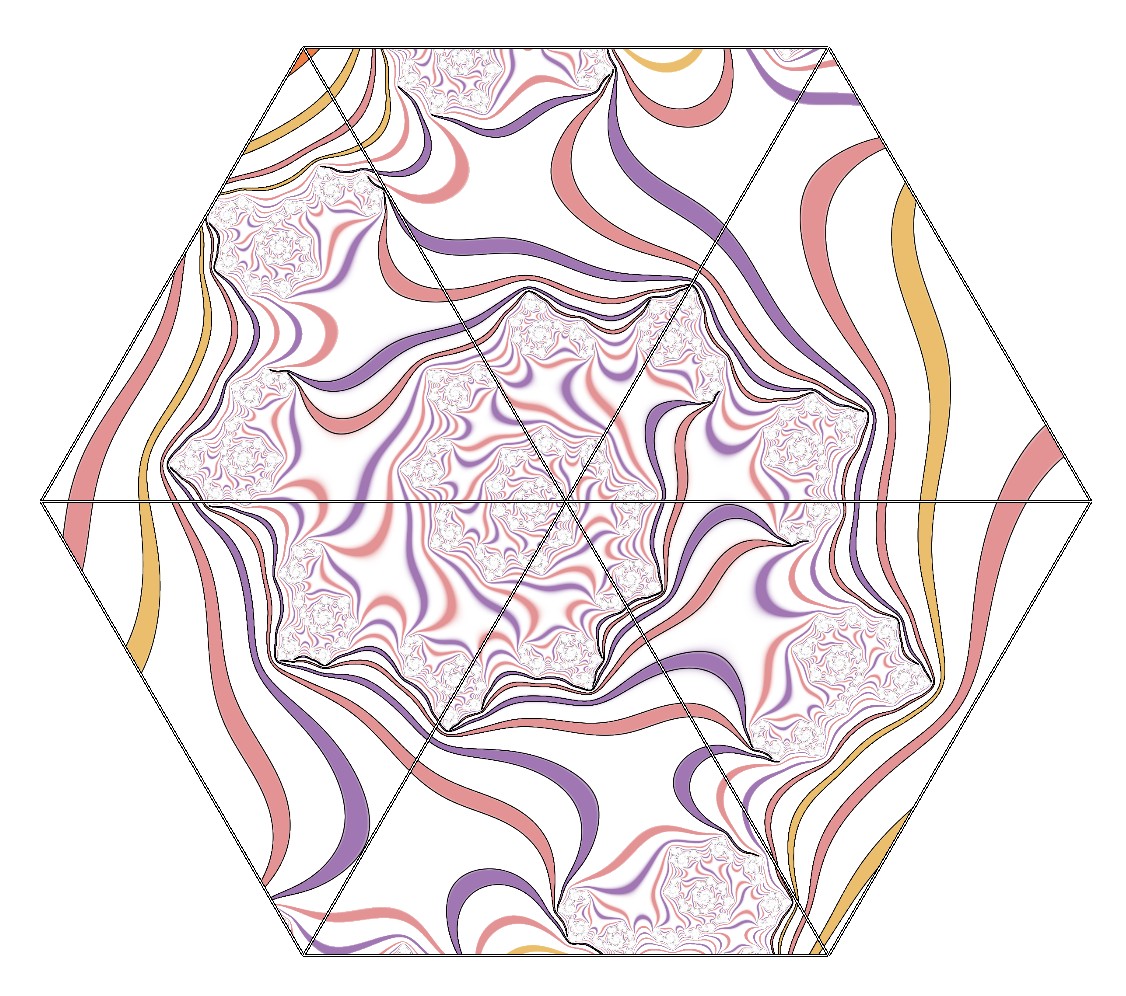
以下是我现在得到的结果:
与之相比,我希望纹理中的相同三角形区域被绘制到每个目标三角形中,如下所示:
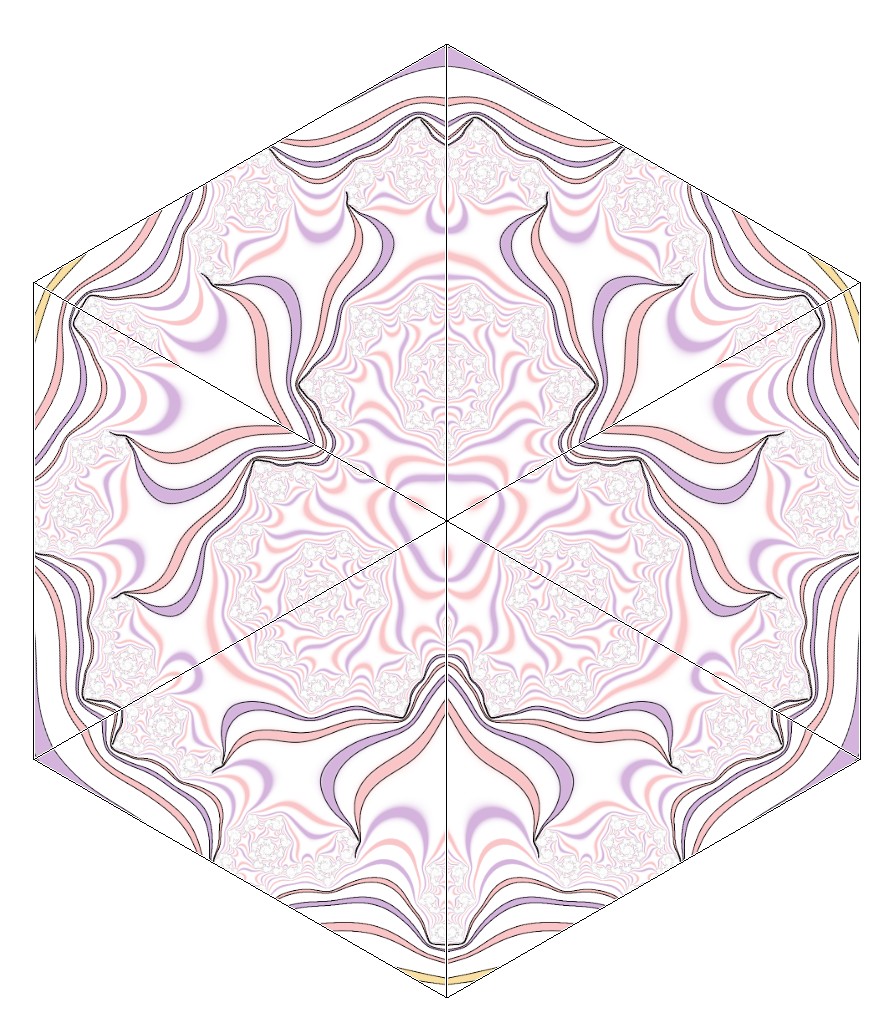
(请注意,每个三角形中的图像是相同的。在这个示例中,每个交替的三角形是翻转的。先忽略这一点。)
我的片段着色器如下。它将根据一个参数要么从纹理中绘制,要么绘制固定颜色:
struct Uniforms {
    float4 color;
    bool drawWithTexture;
    TrianglePoints trianglePoints;
};

fragment float4 fragment_main(VertexOut in [[stage_in]],
                              texture2d<float> tex [[texture(0)]],
                              constant Uniforms& uniforms [[buffer(1)]]) {
    constexpr sampler s(address::repeat, filter::linear);
    if (uniforms.drawWithTexture) {
        float2 coord = in.texCoord;
        // Texture co-ord is flipped vertically. flip it back.
        coord[1] = coord[1] * -1;
        return tex.sample(s, coord);
    } else {
        return uniforms.color;
    }
}
以及顶点着色器:
vertex VertexOut vertex_main(const device float2* position [[buffer(0)]],
                             uint vid [[vertex_id]]) {
    VertexOut out;
    float2 pos = position[vid];
    out.position = float4(pos, 0, 1);
    out.texCoord = pos * 0.5 + 0.5; // basic mapping
    return out;
}
我需要了解如何从纹理中的一个固定三角形获取像素,而不是根据我在目标中绘制的位置的坐标来采样。
解决方案
使用 pos 为 texCoord 将只会根据像素在屏幕上的位置对纹理进行采样。如果你想让所有三角形使用纹理中的同一三角形区域,那么对于每个三角形,你从 vertex_main 返回的 texCoord 需要与 pos 无关。
在你的顶点缓冲区中,你可能也希望像位置一样逐个传递 texCoord:
struct VertexIn {
    float2 position;
    float2 texCoord;
};

vertex VertexOut vertex_main(const device VertexIn* vertexBuffer [[buffer(0)]],
                             uint vid [[vertex_id]]) {
    VertexOut out;
    VertexIn in = vertexBuffer[vid];
    out.position = float4(in.position, 0, 1);
    out.texCoord = in.texCoord;
    return out;
}
但我也不确定你在CPU端如何定义你的顶点缓冲区,但你似乎想在每对现有位置浮点后面添加用于 texCoords 的浮点数。对于你的18个顶点(如果你使用索引则为7 个唯一顶点),把纹理坐标定义成类似下面这样的形式:
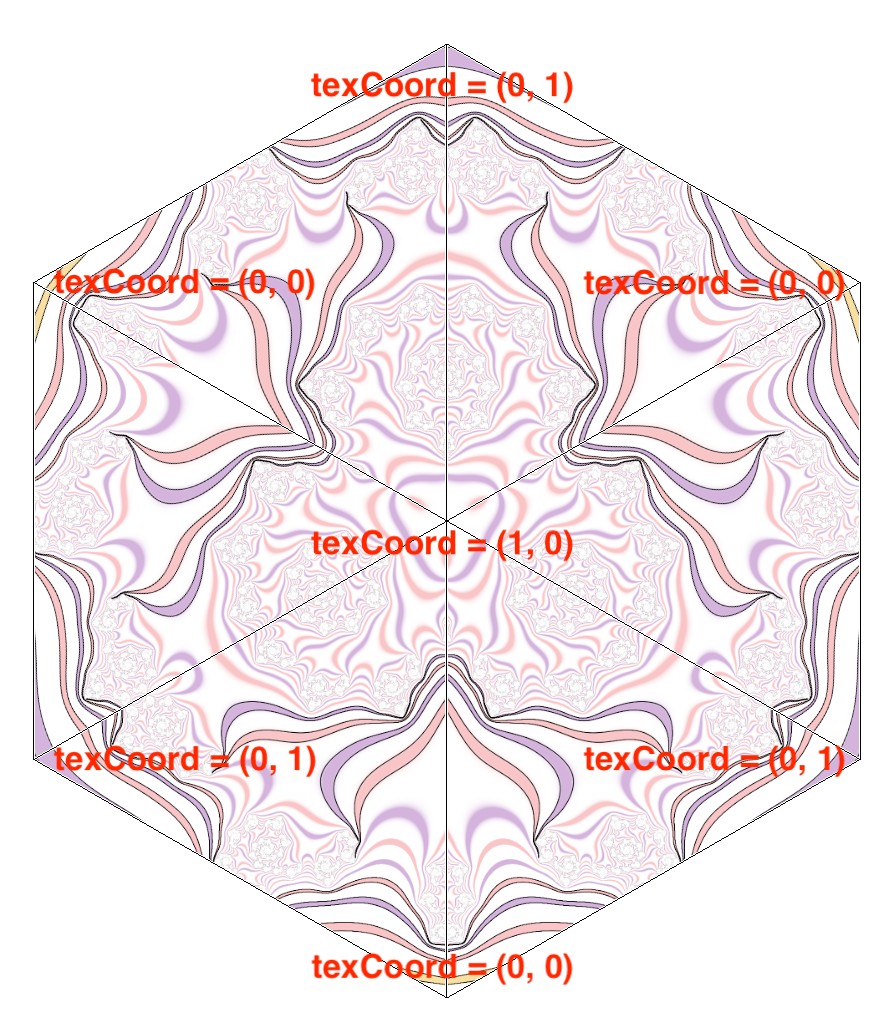
因此在Swift端,而不是(大概是):
let vertexBuffer: [Float] = [
    x0, y0,
    x1, y1,
    ...
]
做类似这样的事情:
let vertexBuffer: [Float] = [
    x0, y0, 0, 1
    x1, y1, 1, 0
    ...
]
但要将顶点与图片中相应的 texCoord 值匹配起来。
不过我使用 (0, 0)、(0, 1) 和 (1, 0) 作为示例。得到你期望的结果取决于纹理文件的布局。把0 和1 换成0 到1 之间的其他数值,直到选中纹理文件中的正确区域。
相关文章





