


Android 17如何在XML中实现新的定位按钮?
随着新的Android 17即将推出
https://android-developers.googleblog.com/2026/03/location-privacy.html?m=1
我们到底该如何在XML布局中实现“Location button”呢?
解决方案
更新(2026年 6月 18日)
截至2026年 6月 18日,你现在可以使用新发布的 androidx.core.locationbutton:locationbutton artifact:
dependencies {
    implementation("androidx.core:core-locationbutton:1.0.0-SNAPSHOT")
}
现在也有一个针对 androidx.core.locationbutton 包的API参考文档。
原始解答仍按原样保留如下:
正如评论中所提到的,截至2026年 5月 14日,现在有一个(即将发布的)androidx.core:core-locationbutton artifact可用,用于在你的内容中包含Location Button视图;在Android 17之前的版本将回退为普通视图。
请注意,它仅在 AndroidX快照仓库 中可用,因此你需要将其添加到设置脚本的仓库中:
dependencyResolutionManagement {
    repositories {
        google()
        mavenCentral()
        // Replace [buildId] with the actual build ID, for e.g. 15435577
        maven("https://androidx.dev/snapshots/builds/[buildId]/artifacts/repository")
    }
}
然后将该artifact作为依赖项添加到应用程序/相关模块的构建脚本中:
dependencies {
    implementation("androidx.core:core-locationbutton:1.0.0-SNAPSHOT")
}
备注
- 看起来有一个隐含要求:应用的主题必须继承自AppCompat主题,因此请确保你这样做。
- 变更列表 含有一个Markdown文件,提供如何使用该按钮的示例:
1.将控件添加到你的XML布局中
你可以直接把
LocationButton添加到你的XML布局中。它不支持子视图。
xml
<androidx.core.locationbutton.LocationButton
    android:id="@+id/location_button"
    android:layout_width="wrap_content"
    android:layout_height="wrap_content"
    app:backgroundColor="@color/custom_button_background"
    app:cornerRadius="24dp"
    android:iconTint="@color/custom_button_foreground"
    app:locationButtonTextType="use_precise_location"
    android:textColor="@color/custom_button_foreground" />
提示: 确保颜色选择保持高对比度(至少4.5:1),以符合无障碍规范。
2.注册监听器
在你的Activity或 Fragment中,设置
LocationButtonListener以接收权限授予结果。```kotlin val locationButton = findViewById
(R.id.location_button) locationButton.setLocationButtonListener(object : LocationButton.LocationButtonListener { override fun onPermissionResult(granted: Boolean) { if (granted) { // Permission acquired! Proceed with location logic. } else { // Handle denial gracefully. } }
// Optional: Override if you want to track remote session failures in your analytics.
override fun onSessionError(throwable: Throwable) {
    // Handle the throwable
}
}) ```
3.处理后备权限(较旧版本Android)
在Android版本低于17(SDK 37)时,该控件会使用
ActivityCompat.requestPermissions触发标准权限对话框。由于LocationButton是一个视图,无法从Activity拦截onRequestPermissionsResult,因此你必须在你的Activity或 Fragment中手动处理权限结果。
kotlin
override fun onRequestPermissionsResult(
    requestCode: Int,
    permissions: Array<out String>,
    grantResults: IntArray
) {
    super.onRequestPermissionsResult(requestCode, permissions, grantResults)
    if (requestCode == 1001) { // Default request code used by LocationButton
        val granted = grantResults.isNotEmpty() &&
            grantResults[0] == android.content.pm.PackageManager.PERMISSION_GRANTED
        // Proceed with location logic based on 'granted'
    }
}
来源自 Add LocationButton View Library - androidx-core-core-locationbutton-documentation.md * 自定义属性的完整清单如下:
```xml
<declare-styleable name="LocationButton">
    <!-- Standard Android Attributes -->
    <attr name="iconTint" format="color" />
    <attr name="android:textColor"/>
    <attr name="android:maxLines"/>
    <attr name="android:textAllCaps"/>
    <attr name="android:includeFontPadding"/>
    <attr name="android:background"/>
    <attr name="android:ellipsize"/>
    <attr name="android:stateListAnimator"/>

    <!-- Custom Attributes -->
    <attr name="backgroundColor" format="color" />
    <attr name="strokeColor" format="color" />
    <attr name="strokeWidth" format="dimension"/>
    <attr name="cornerRadius" format="dimension"/>
    <attr name="pressedCornerRadius" format="dimension"/>

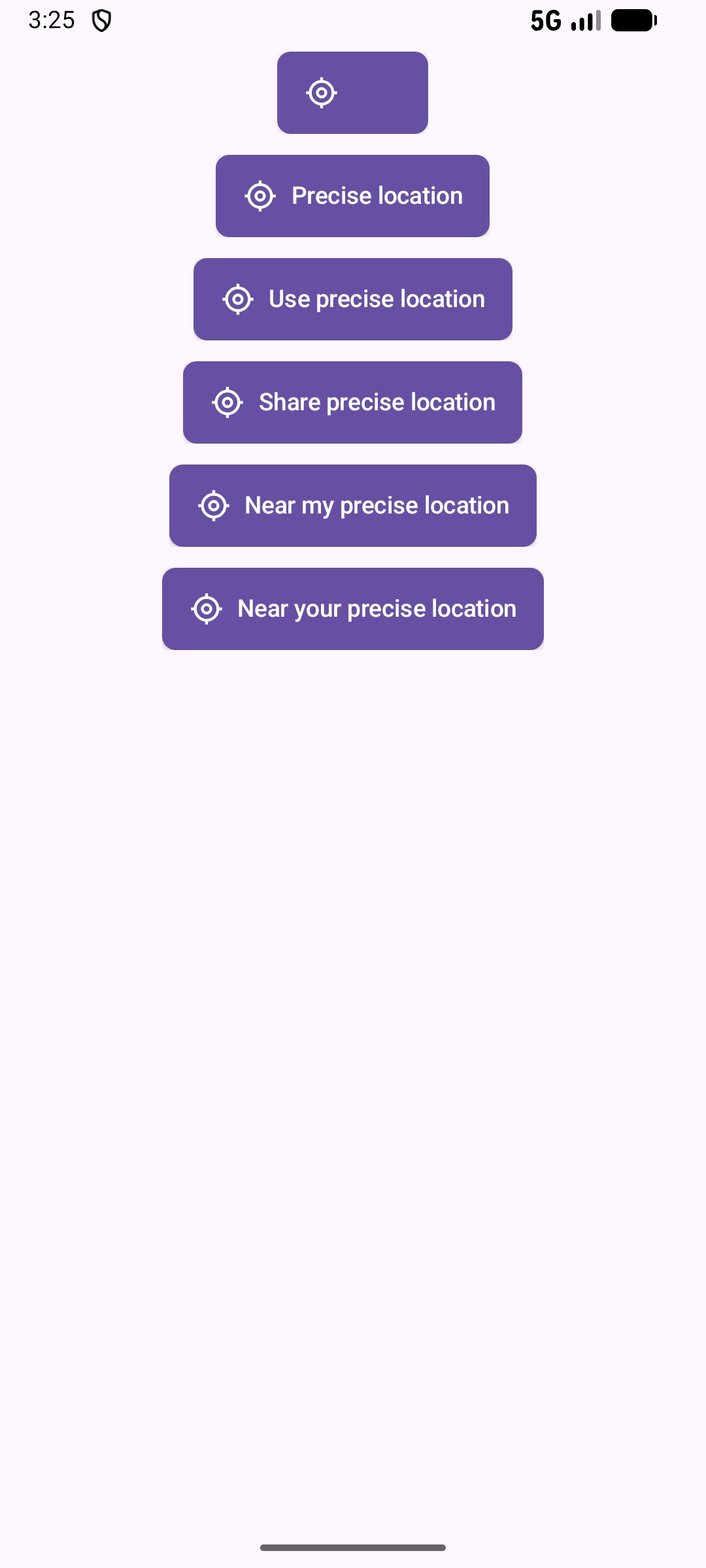
    <attr name="locationButtonTextType" format="enum">
        <enum name="none" value="0" />
        <enum name="precise_location" value="1" />
        <enum name="use_precise_location" value="2" />
        <enum name="share_precise_location" value="3" />
        <enum name="near_my_precise_location" value="4" />
        <enum name="near_your_precise_location" value="5" />
    </attr>
</declare-styleable>
```
大多数属性的作用应该很清楚。
-
app:locationButtonTextType属性将设置按钮应显示的文本,以及相应的文本:XML值 属性 显示文本 noneTEXT_TYPE_NONE(无文本) precise_locationTEXT_TYPE_PRECISE_LOCATION精确位置 use_precise_locationTEXT_TYPE_USE_PRECISE_LOCATION使用精确位置 share_precise_locationTEXT_TYPE_SHARE_PRECISE_LOCATION分享精确位置 near_my_precise_locationTEXT_TYPE_NEAR_MY_PRECISE_LOCATION接近我的精确位置 near_your_precise_locationTEXT_TYPE_NEAR_YOUR_PRECISE_LOCATION接近你的精确位置 以下是这些值的预览:
相关文章





