


是否仅在SwiftUI的透明按钮外侧应用阴影?
我有一个SwiftUI按钮,背景透明、圆角边框,并带有阴影。
问题在于按钮是透明的,因此阴影会在圆角矩形的外部和内部都可见。我希望阴影只出现在按钮外部,不渗入透明的内部。
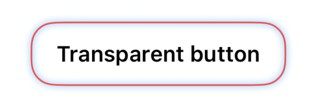
下面是一个最小的示例:
import SwiftUI

#Preview("StackOverflow Transparent Button Shadow") {
    let cornerRadius: CGFloat = 15

    Button {} label: {
        Text("Transparent button")
            .font(.system(size: 14, weight: .semibold))
            .foregroundStyle(.black)
            .padding(.horizontal, 16)
            .padding(.vertical, 8)
            .frame(height: 40, alignment: .center)
    }
    .background(.white)
    .clipShape(RoundedRectangle(cornerRadius: cornerRadius))
    .overlay {
        RoundedRectangle(cornerRadius: cornerRadius)
            .stroke(.red, lineWidth: 1)
            .shadow(
                color: .blue,
                radius: 2,
                x: 0,
                y: 0
            )
    }
    .padding(48)
    .background(Color.white)
}
这会在边框周围产生光晕,但阴影也会渲染在按钮透明区域的内部。
我想要的是:
- 保持按钮背景透明
- 保持圆角边框可见
- 仅在圆角矩形外部应用阴影/光晕
- 避免阴影出现在按钮内部
有没有推荐的SwiftUI方式来遮罩或裁剪阴影,使其仅在形状外部呈现?
解决方案
要获得仅外部、中心透明的阴影,你可以对一个填充形状应用阴影,再用 .destinationOut 将中心挖空,并在顶部单独绘制边框。
shadow 在SwiftUI中是基于alpha蒙版渲染的,并在两个方向上扩展,因此把它应用到 stroke 时,阴影也会向内部扩散。
Button {} label: {
    Text("Transparent button")
        .font(.system(size: 14, weight: .semibold))
        .foregroundStyle(.black)
        .padding(.horizontal, 16)
        .padding(.vertical, 8)
        .frame(height: 40, alignment: .center)
}
.clipShape(RoundedRectangle(cornerRadius: cornerRadius))
.overlay {
    ZStack {
        RoundedRectangle(cornerRadius: cornerRadius)
            .shadow(
                color: .green,
                radius: 2,
                x: 0,
                y: 0
            )
        RoundedRectangle(cornerRadius: cornerRadius)
            .blendMode(.destinationOut)
    }
    .compositingGroup()

    RoundedRectangle(cornerRadius: cornerRadius)
        .stroke(.red, lineWidth: 1)
}
.padding(48)
.background(Color.white)
站内所有文章版权归属LeftHeroAI导航站,无授权禁止任何主体转载、抄袭、复制内容,亦不得私自架设镜像站点。一经侵权,本站将通过法律途径追责。
相关文章






汇集全球数千款 AI 工具,每日持续更新,配套 AI 开发学习资源,轻松用 AI 提升工作效率。快捷键 Ctrl+D/⌘+D 一键收藏本站。