


如何实现一个由两列卡片组成的网格,点击时能将卡片扩展为全屏显示?
我想做一个笔记视图,在这个视图中,单条笔记会以两列的滚动网格方式显示。我希望当点开某张笔记卡片时,能够打开整条笔记并占满整个屏幕。我不能直接使用 withAnimation,因为它把卡片嵌入我正在使用的LazyVGrid中。我尝试按如下方式使用 matchedGeometry,但那会从左上角展开扩展视图,而不是让卡片本身展开。
struct CardView: View {

    let title: String

    let nameSpace: Namespace.ID

    var body: some View {
        VStack() {
            Text(title)
                .font(.headline)
                .foregroundStyle(.white)
        }
        .frame(width: 150, height: 200)
        .background(.blue)
        .matchedGeometryEffect(id: "card", in: nameSpace)
    }
}

struct ExpandedCardView: View {

    let title: String

    let nameSpace: Namespace.ID

    let screenWidth = UIScreen.main.bounds.width
    let screenHeight = UIScreen.main.bounds.height


    var body: some View {

        VStack {
            Text(title)
                .font(.title)
                .foregroundStyle(.white)
        }
        .frame(width: screenWidth, height: screenHeight)
        .background(.blue)
        .matchedGeometryEffect(id: "card", in: nameSpace)
    }
}

struct ParentView: View {

    @State private var cardExpanded: Bool = false
    @Namespace private var nameSpace

    var body: some View {

        ZStack {

            if (cardExpanded == false) {
                CardView(title: "This is a title", nameSpace: nameSpace)
                    .onTapGesture {
                        withAnimation {
                            cardExpanded.toggle()
                        }

                    }
            }
            else {
                ExpandedCardView(title: "This is a title", nameSpace: nameSpace)
                    .onTapGesture {
                        withAnimation {
                            cardExpanded.toggle()
                        }
                    }
                    .zIndex(1)
            }
        }
    }
}
我不确定该如何让它工作。我想要的效果类似于iOS上 Safari应用中的标签页外观,也类似于iOS的 Files应用的工作方式。下面是一张Safari中标签页外观的图片:
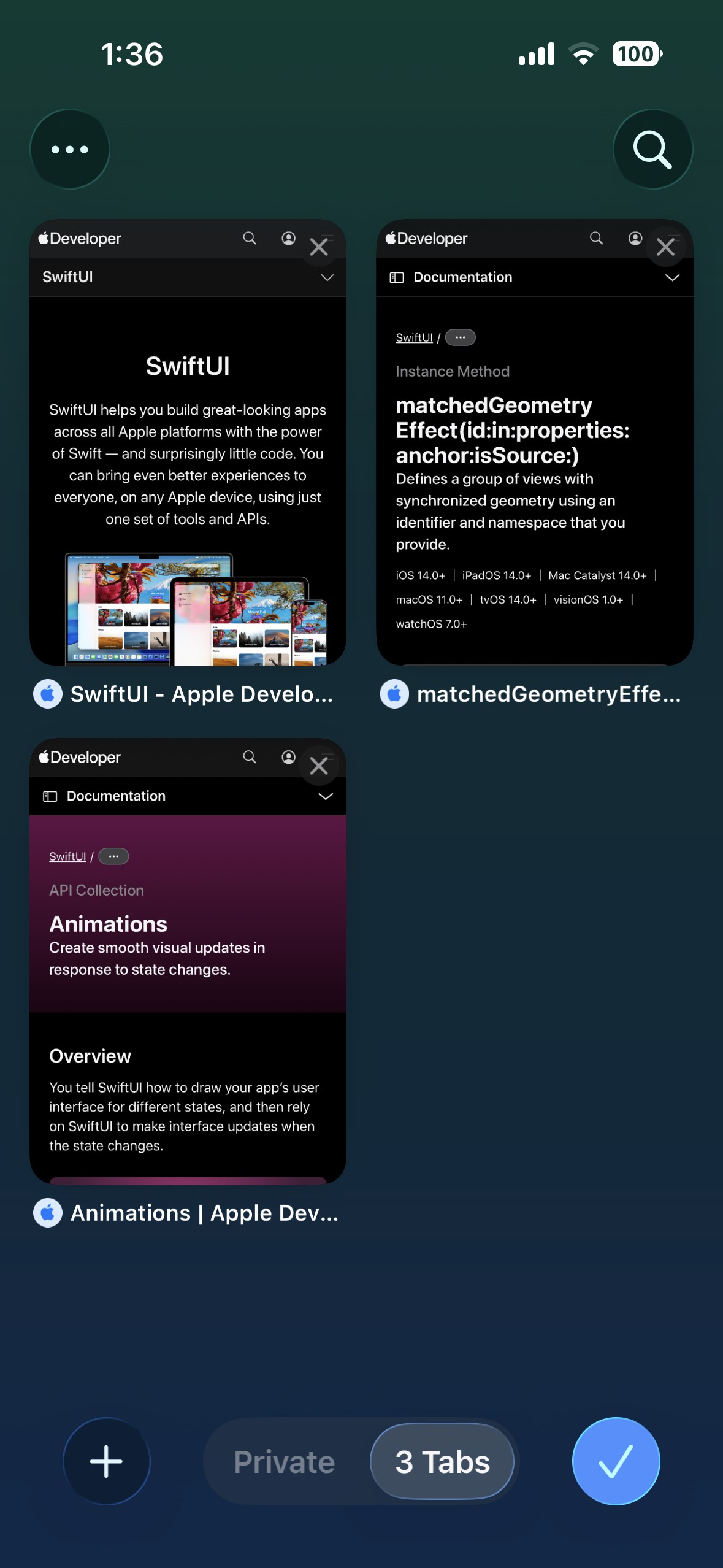
我很喜欢通过使用 withAnimation 获得的动画效果,但由于卡片无法逃离LazyVGrid,效果没有按预期工作。使用 withAnimation 的代码如下:
struct CardView: View {
    @State var isExpanded: Bool = false
    let title: String

    let screenWidth = UIScreen.main.bounds.width
    let screenHeight = UIScreen.main.bounds.height

    var body: some View {
        VStack() {
            Text(title)
                .font(.headline)
                .scaleEffect(isExpanded ? 2 : 1)
                .foregroundColor(.white)
        }
        .frame(
            width: isExpanded ? screenWidth : 150,
            height: isExpanded ? screenHeight : 200
        )
        .background(Color.blue)
        .zIndex(isExpanded ? 1 : 0)
        .onTapGesture {
            withAnimation {
                isExpanded.toggle()
            }
        }
    }
}

struct ParentView: View {

    private let columns = [
        GridItem(.flexible(), spacing: 16),
        GridItem(.flexible(), spacing: 16)
    ]

    var body: some View {

        ZStack {

            ScrollView {

                LazyVGrid(columns: columns) {

                    ForEach(0..<20) { _ in
                        CardView(title: "This is a title")
                    }

                }
            }

        }

    }
}
我会很感激如果有人能帮我理解实现我想要的外观所需的正确架构。
解决方案
你描述的第一个问题很有意思:
我尝试按如下使用matchedGeometry,但它是从左上角带出展开视图,而不是扩大卡片。
这是你提供的代码的工作方式:
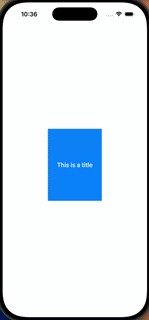
默认情况下,.matchedGeometryEffect 使用一个 anchor 的 .center,因此我发现视图并没有以屏幕中心作为过渡的锚点,这有点让人意外。
为了让它以屏幕中心作为过渡的锚点来工作,似乎需要把 matchedGeometryEffect 的锚点改为 UnitPoint(x: 0.25, y: 0.25)。这表示一个位于顶部左上角与中心之间的点的一半处。其他说明:
- 如果你想在动画过程中看到大视图的尺寸变化,请使用带有
maxWidth和maxHeight的frame,而不是固定的width和height。 UIScreen.main.bounds已被弃用,因此最好不要使用。此外,它在iPad的分屏模式下也不起作用。- 无论如何,没有必要了解确切的屏幕尺寸,只需要改用
maxWidth: .infinity和maxHeight: .infinity。 - 安全区域的边距会让锚点复杂一些。为了让示例简单,下面的代码在将蓝色背景应用到大视图时并不会忽略安全区域边界。
// CardView

VStack() {
    // ...
}
.frame(width: 150, height: 200)
.background(.blue)
.matchedGeometryEffect(id: "card", in: nameSpace, anchor: UnitPoint(x: 0.25, y: 0.25)) // 👈 anchor added
// ExpandedCardView

VStack {
    // ...
}
.frame(maxWidth: .infinity, maxHeight: .infinity) // 👈 updated
.background { Color.blue } // 👈 updated
.matchedGeometryEffect(id: "card", in: nameSpace, anchor: UnitPoint(x: 0.25, y: 0.25)) // 👈 anchor added
下面是在进行这些修改后示例的样子:
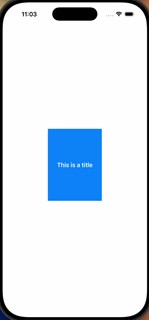
因此,将 matchedGeometryEffect 的锚点改为另一位置,是解决过渡过程中位置漂移这一初始问题的一种方式。
关于实现点击后扩展成全屏视图的两列卡片网格的目标:
- 我对 [照片应用风格的.matchedGeometryEffect意外工作] 的回答展示了如何使用
matchedGeometryEffect来实现(见第2部分)。 - 另一个示例可在我对 如何实现类似App Store功能页的动画 的回答中看到。该示例在扩展状态下展示了不同的视图,这也正是你现在在做的。
- 作为替代机制,你可以考虑使用
navigationTransition,将选中的笔记以全屏覆盖方式呈现。关于示例,请参见我对 如何在iOS中复现原生iMessage联系人/个人资料切换动画的精确实现? 的回答。
如果你在实现效果时遇到困难,我建议发一个新问题,聚焦于你遇到的具体问题。
相关文章





