


在iOS上,Flutter的 TypeAheadField组件的覆盖层和阴影在对话框后仍然可见
我在iOS上使用 flutter_typeahead 时遇到了一个问题。
当屏幕上已经存在一个 TypeAheadField 时,打开对话框(showDialog)后,对话框背后会出现一个怪异的深色覆盖层/阴影/幽灵式UI。
这个问题只在iOS上出现。Android表现正常。
即使在以下情况下,这个问题仍然存在:
- 建议已关闭
- 键盘已收起
- 输入框未获得焦点
看起来来自 TypeAheadField 的 OverlayEntry 仍在对话框后面被渲染出来。
截图:
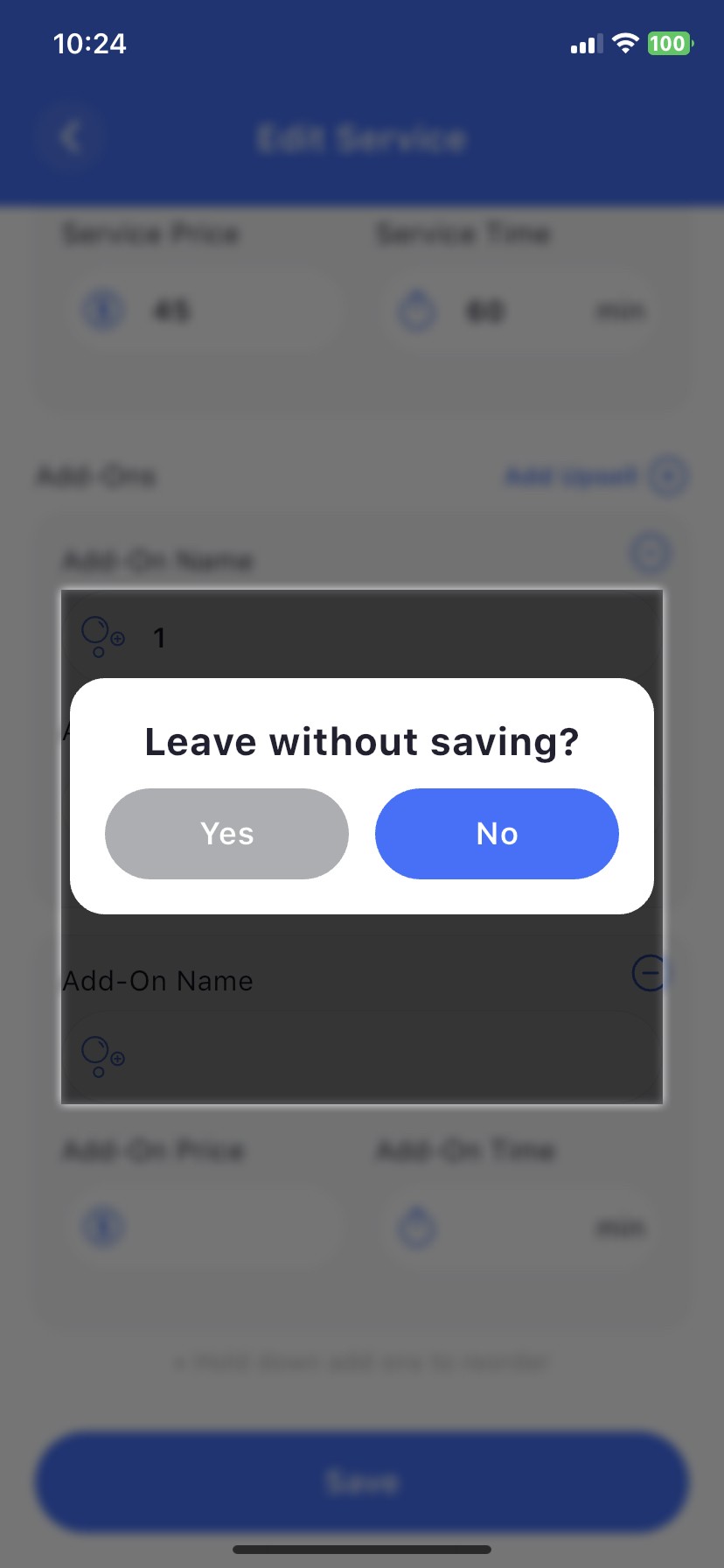
当前实现:
class _AddOnsTypeAhead extends StatelessWidget {
  const _AddOnsTypeAhead({
    required this.index,
    required this.controller,
  });

  final int index;
  final VendorServiceController controller;

  @override
  Widget build(BuildContext context) {
    return TypeAheadField<AllAddonsModel>(
      constraints: const BoxConstraints(maxHeight: 250),

      listBuilder: (context, children) =>
          CustomTypeAheadScrollbar(
            maxHeight: 250,
            children: children,
          ),

      direction: VerticalDirection.up,

      hideOnEmpty: true,

      controller: controller.addOnsType[index],

      suggestionsCallback: (pattern) {
        return controller.allAddonsModel.where((element) {
          final name = (element.name ?? '').toLowerCase();
          final patternLower = pattern.toLowerCase();

          final isDuplicate = controller.addOnsList.any(
            (e) => (e.name ?? '').toLowerCase() == name,
          );

          return name.contains(patternLower) && !isDuplicate;
        }).toList();
      },

      decorationBuilder: (context, child) => DecoratedBox(
        decoration: BoxDecoration(
          color: Colors.white,
          borderRadius: BorderRadius.circular(12),
          boxShadow: [
            BoxShadow(
              color: Colors.black.withOpacity(0.2),
              offset: const Offset(0, 5),
              blurRadius: 4,
            ),
          ],
        ),
        child: child,
      ),

      itemBuilder: (context, suggestion) {
        return ListTile(
          title: Text(suggestion.name ?? ''),
        );
      },

      onSelected: (suggestion) {
        controller.addOnsType[index].text =
            suggestion.name ?? '';
      },

      builder: (context, textController, focusNode) {
        return TextField(
          focusNode: focusNode,
          controller: textController,
        );
      },
    );
  }
}
对话框代码:
void openChangeDialog(BuildContext context) {
  showDialog(
    context: context,
    builder: (context) => BackdropFilter(
      filter: ImageFilter.blur(sigmaY: 3, sigmaX: 3),
      child: Dialog(
        backgroundColor: ThemeColors.scaffoldBack(context),
        shape: RoundedRectangleBorder(borderRadius: BorderRadius.circular(Utils.s20)),
        child: Padding(
          padding: const .all(Utils.commonPad),
          child: Column(
            mainAxisSize: .min,
            children: [
              const AppText(
                'Leave without saving?',
                fontSize: Utils.s22,
                fontFamily: FontFamily.bold,
                textAlign: .center,
              ),
              Utils.s12.vertical,
              Row(
                children: [
                  Expanded(
                    child: CommonBtn(
                      AppString.yes,
                      vertical: Utils.s12,
                      btnColor: ThemeColors.textColor(context),
                      onTap: () {
                        pageBack(context);
                        pageBack(context);
                      },
                    ),
                  ),
                  Utils.s15.horizontal,
                  Expanded(
                    child: CommonBtn(vertical: Utils.s12, AppString.no, onTap: () => pageBack(context)),
                  ),
                ],
              ),
            ],
          ),
        ),
      ),
    ),
  );
}
解决方案
BackdropFilter 不能直接成为 showDialog 构建器的直接子节点。相反,设置 barrierColor: Colors.transparent,并在对话框控件内部自行处理模糊和变暗效果。
void openChangeDialog(BuildContext context) {
  showDialog(
    context: context,
    barrierColor: Colors.transparent, // 👈 kill the default dark barrier
    builder: (context) => Stack(
      children: [
        // Your blur + dim layer — scoped entirely within the dialog route
        BackdropFilter(
          filter: ImageFilter.blur(sigmaX: 3, sigmaY: 3),
          child: Container(
            color: Colors.black.withOpacity(0.3), // replaces the barrier dimming
          ),
        ),
        // The actual dialog
        Center(
          child: Dialog(
            backgroundColor: ThemeColors.scaffoldBack(context),
            shape: RoundedRectangleBorder(
              borderRadius: BorderRadius.circular(Utils.s20),
            ),
            child: Padding(
              padding: const EdgeInsets.all(Utils.commonPad),
              child: Column(
                mainAxisSize: MainAxisSize.min,
                children: [
                  const AppText(
                    'Leave without saving?',
                    fontSize: Utils.s22,
                    fontFamily: FontFamily.bold,
                    textAlign: TextAlign.center,
                  ),
                  Utils.s12.vertical,
                  Row(
                    children: [
                      Expanded(
                        child: CommonBtn(
                          AppString.yes,
                          vertical: Utils.s12,
                          btnColor: ThemeColors.textColor(context),
                          onTap: () {
                            pageBack(context);
                            pageBack(context);
                          },
                        ),
                      ),
                      Utils.s15.horizontal,
                      Expanded(
                        child: CommonBtn(
                          AppString.no,
                          vertical: Utils.s12,
                          onTap: () => pageBack(context),
                        ),
                      ),
                    ],
                  ),
                ],
              ),
            ),
          ),
        ),
      ],
    ),
  );
}
站内所有文章版权归属LeftHeroAI导航站,无授权禁止任何主体转载、抄袭、复制内容,亦不得私自架设镜像站点。一经侵权,本站将通过法律途径追责。
相关文章






汇集全球数千款 AI 工具,每日持续更新,配套 AI 开发学习资源,轻松用 AI 提升工作效率。快捷键 Ctrl+D/⌘+D 一键收藏本站。