


JavaScript媒体会话API:暂停可用,播放不可用
我在尝试使用 Media Session API。这是浏览器内置的播放控制:
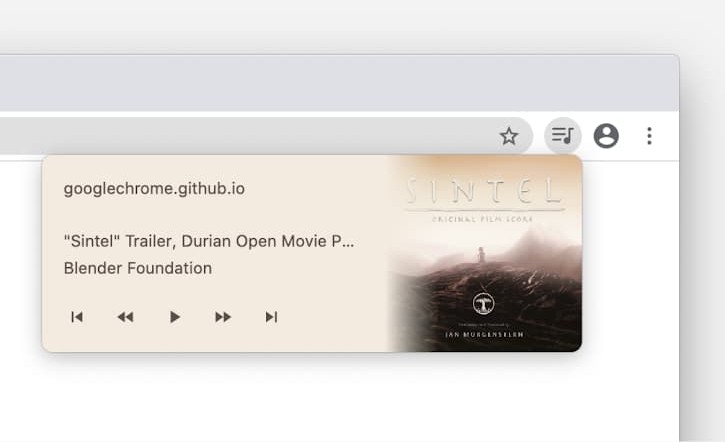
暂停按钮确实可以把声音和进度条暂停,但暂停按钮在继续播放时不会变成播放按钮。用Chrome测试过。如何解决?
if ('mediaSession' in navigator) {
  let audioCtx, oscillator, gainNode;

  navigator.mediaSession.setActionHandler('play', () => {
    audioCtx.resume();
    navigator.mediaSession.playbackState = 'playing';
  });

  navigator.mediaSession.setActionHandler('pause', () => {
    audioCtx.suspend();
    navigator.mediaSession.playbackState = 'paused';
  });

  // set some `duration` so that the seek bar serves
  // as an additional indicator of the paused state
  if ('setPositionState' in navigator.mediaSession) {
    navigator.mediaSession.setPositionState({
      duration: 20,
      position: 0,
    });
  }

  button.onclick = async () => {
    if (!audioCtx) {
      audioCtx = new AudioContext();
      oscillator = audioCtx.createOscillator();
      gainNode = audioCtx.createGain();
      oscillator.connect(gainNode);
      gainNode.connect(audioCtx.destination);
      oscillator.frequency.value = 440;
      gainNode.gain.value = 0.1;
      oscillator.start();
      await audioCtx.resume();
      navigator.mediaSession.playbackState = 'playing';
    }
  };
}
<button id="button">Initialize</button>
Stack Snippets的警告:
- 在编写新答案时,Stack Snippets的模态对话框似乎无法正确运行。选项“保存并插入到帖子”或编辑现有帖子似乎可以正常工作。
- 每个浏览器标签页只有一个媒体控件。在这个SO页面上同时运行多个片段可能会相互干扰。点击“隐藏结果”或暂停声音都无法防止干扰。请重新加载页面,但要小心未保存的文本。
类似但并不完全相同的问题:
- 在Mac上连初始化和暂停都不起作用?Firefox不会接受“完全静默”作为变通办法 → 问题(可能需要GitHub登录) → PR → 差异
- 对规范的讨论尚无定论(可能需要GitHub登录) → 在Chrome中甚至连初始化和暂停都不能工作
- 没有Android通知; 信息未显示
解决方案
需要说明的是,这是我第一次接触这个API,并且在一些研究和试验中依赖了AI工具……
据我所知,这似乎需要把它附着到一个 <audio> 元素上才能完全发挥作用。浏览器似乎通过该元素来真正维持播放,至少这是我所看到的。
不过我能够让它完全正常工作的唯一办法,是再给那个 <audio> 元素提供一个循环的空音源。这有点像hack,我希望有更干净的实现方式,但我还没找到。
所有这些最终把你的示例推到了以下更新:
if ('mediaSession' in navigator) {
  let audioCtx, oscillator, gainNode;

  // Build a 1-sample silent WAV as a data URI to anchor the media session UI.
  // NOTE: This part was entirely AI-built for this self-contained example
  const silentBytes = new Uint8Array([
    0x52,0x49,0x46,0x46, // "RIFF"
    0x26,0x00,0x00,0x00, // file size − 8
    0x57,0x41,0x56,0x45, // "WAVE"
    0x66,0x6D,0x74,0x20, // "fmt "
    0x10,0x00,0x00,0x00, // fmt chunk size = 16
    0x01,0x00,           // PCM
    0x01,0x00,           // mono
    0x44,0xAC,0x00,0x00, // 44100 Hz sample rate
    0x88,0x58,0x01,0x00, // byte rate
    0x02,0x00,           // block align
    0x10,0x00,           // 16 bits per sample
    0x64,0x61,0x74,0x61, // "data"
    0x02,0x00,0x00,0x00, // data chunk size = 2
    0x00,0x00,           // 1 silent sample
  ]);
  const anchor = new Audio(
    `data:audio/wav;base64,${btoa(String.fromCharCode(...silentBytes))}`
  );
  anchor.loop = true;

  // Update the play/pause actions here to also play/pause the audio element
  navigator.mediaSession.setActionHandler('play', async () => {
    await audioCtx.resume();
    await anchor.play();
    navigator.mediaSession.playbackState = 'playing';
  });
  navigator.mediaSession.setActionHandler('pause', () => {
    audioCtx.suspend();
    anchor.pause();
    navigator.mediaSession.playbackState = 'paused';
  });

  // Replace `duration` inferred from the tiny looping `Audio`
  // (which causes seek-bar flicker) by some value
  if ('setPositionState' in navigator.mediaSession) {
    navigator.mediaSession.setPositionState({
      duration: 20,
      position: 0,
    });
  }

  button.onclick = async () => {
    if (!audioCtx) {
      audioCtx = new AudioContext();
      oscillator = audioCtx.createOscillator();
      gainNode = audioCtx.createGain();
      oscillator.connect(gainNode);
      gainNode.connect(audioCtx.destination);
      oscillator.frequency.value = 440;
      gainNode.gain.value = 0.1;
      oscillator.start();

      // As above, also play the audio element
      await audioCtx.resume();
      await anchor.play();
      navigator.mediaSession.playbackState = 'playing';
    }
  };
}
<button id="button">Initialize</button>
站内所有文章版权归属LeftHeroAI导航站,无授权禁止任何主体转载、抄袭、复制内容,亦不得私自架设镜像站点。一经侵权,本站将通过法律途径追责。
相关文章






汇集全球数千款 AI 工具,每日持续更新,配套 AI 开发学习资源,轻松用 AI 提升工作效率。快捷键 Ctrl+D/⌘+D 一键收藏本站。