


Safari在插件卡片中出现无效请求
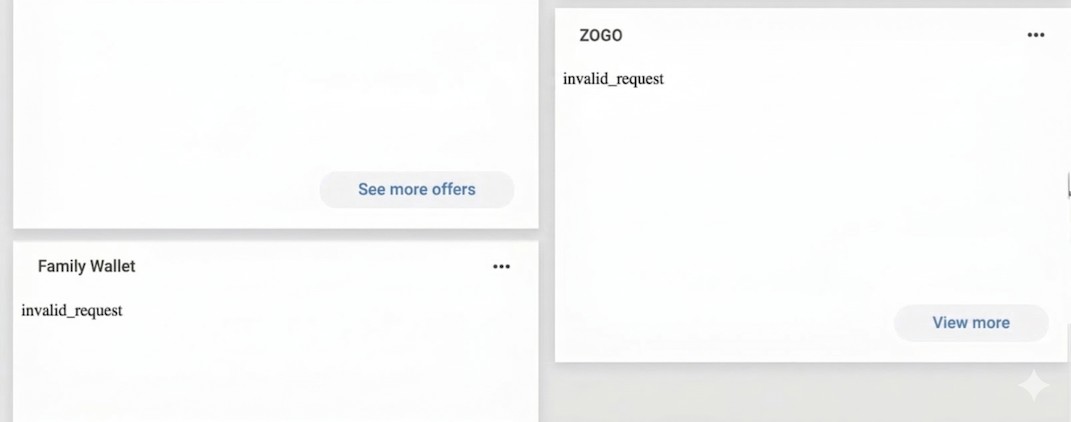
我们在桌面版Safari中发现,我们的仪表板插件卡,以及其他我们未创建的插件卡(如Zogo)加载不正常,只显示错误信息invalid_request。
基于我的观察,Chrome与 Safari之间的主要差异是Safari无法完成OIDC流程。例如,当插件卡的iframe通过src属性向我们的后端发送初始请求(这是外部应用程序定义的第一个重定向URI),我们返回一个包含所有必要查询字符串参数的URL,例如https://digital.garden-fi.com/a/consumer/api/v0/oidc/auth给 Digital Garden。然后浏览器跟随该请求,会被重定向到类似于https://digital.garden-fi.com/login?returnUrl=/a/consumer/api/v0/oidc/interaction/3KVqUfoZ_Dumc2Lrv0ABC/login-complete的 URL。在Chrome中它实际上会继续OIDC流程并且工作。据我所知,iframe似乎无法访问Digital Garden的 cookies(可能是ConsumerJWT cookie),以告知它用户处于已登录状态,因此它将用户视为需要再次登录Digital Garden。
我相当确定这在最近一段时间是可行的,因此我预计要么是Banno,要么是Safari的更新最近破坏了这种集成。这问题不仅限于Digital Garden,因为在我们客户使用的不同Banno实例中也在发生。
我尝试在Safari里关闭以下设置,但没有区别:
- Prevent cross-site tracking
- Opt-in partitioned cookies (CHIPS)
- Disable Full 3rd-Party Cookie Blocking (ITP)
我还开启了“Intelligent Tracking Prevention debug mode”,也没在控制台看到它记录可能被阻止的内容。
以下是一个最小、可复现的示例:
mre.js:
/**
 * Minimal Reproducible Example - OAuth 2.0 PKCE Flow with Express
 * This demonstrates the complete OAuth flow in a single file
 */

const express = require('express');
const https = require('https');
const fs = require('fs');
const crypto = require('crypto');
const fetch = require('node-fetch').default;
const { jwtDecode } = require('jwt-decode');

const app = express();

// Configuration
const CONFIG = {
    app_port: 8080,
    api: {
        environment: 'https://digital.garden-fi.com',
        client_id: '',    // TODO: Set your client ID here
        client_secret: '' // TODO: Set your client secret here
    }
};

// In-memory store for state/code verifier pairs
const stateStore = new Map();

// PKCE Helper Functions
function createPkcePair() {
    const codeVerifier = crypto.randomBytes(60).toString('hex').slice(0, 128);
    const codeChallenge = crypto.createHash('sha256')
        .update(Buffer.from(codeVerifier))
        .digest('base64')
        .replace(/=/g, '')
        .replace(/\+/g, '-')
        .replace(/\//g, '_');
    return { codeVerifier, codeChallenge };
}

function createState() {
    return crypto.randomBytes(60).toString('hex').slice(0, 128);
}

// Token Exchange
async function exchangeAuthCode(baseUrl, clientId, clientSecret, authCode, redirectUri, codeVerifier) {
    const tokenUrl = `${baseUrl}/a/consumer/api/v0/oidc/token`;

    const response = await fetch(tokenUrl, {
        method: 'POST',
        headers: { 'Content-Type': 'application/x-www-form-urlencoded' },
        body: `client_id=${clientId}&client_secret=${clientSecret}&grant_type=authorization_code&code=${authCode}&redirect_uri=${redirectUri}&code_verifier=${codeVerifier}`
    });

    const tokenResponse = await response.json();
    return {
        accessToken: tokenResponse.access_token,
        idToken: jwtDecode(tokenResponse.id_token)
    };
}

// Routes
app.get('/auth', async (req, res) => {
    const redirectUri = `https://localhost:${CONFIG.app_port}/auth/callback`;

    if (req.query.state) {
        stateStore.delete(req.query.state);
    }

    const { codeVerifier, codeChallenge } = createPkcePair();
    const state = createState();
    stateStore.set(state, codeVerifier);

    const authBaseURL = `${CONFIG.api.environment}/a/consumer/api/v0/oidc/auth`;
    const params = new URLSearchParams({
        scope: 'openid profile https://api.banno.com/consumer/auth/accounts.readonly',
        response_type: 'code',
        client_id: CONFIG.api.client_id,
        redirect_uri: redirectUri,
        state: state,
        code_challenge: codeChallenge,
        code_challenge_method: 'S256',
        claims: JSON.stringify({
            id_token: { 'https://api.banno.com/consumer/claim/institution_id': null },
            userinfo: { 'https://api.banno.com/consumer/claim/institution_id': null }
        })
    });

    const authorizationURL = `${authBaseURL}?${params}`;
    console.log(`Authorization URL: ${authorizationURL}`);
    res.redirect(authorizationURL);
});

app.get('/auth/callback', async (req, res) => {
    const redirectUri = `https://localhost:${CONFIG.app_port}/auth/callback`;

    if (!req.query.code || !req.query.state) {
        return res.status(400).send('Auth error: Missing code or state');
    }

    const state = req.query.state;
    const codeVerifier = stateStore.get(state);
    stateStore.delete(state);

    if (!codeVerifier) {
        return res.status(400).send('Auth error: Invalid state');
    }

    try {
        const tokens = await exchangeAuthCode(
            CONFIG.api.environment,
            CONFIG.api.client_id,
            CONFIG.api.client_secret,
            req.query.code,
            redirectUri,
            codeVerifier
        );

        console.log('Identity Token:', tokens.idToken);

        res.send('Hello World!');
    } catch (error) {
        res.status(500).send(`Error: ${error.message}`);
    }
});

// Start server
const options = {
    key: fs.readFileSync('key.pem'),
    cert: fs.readFileSync('cert.pem')
};

https.createServer(options, app).listen(CONFIG.app_port, () => {
    console.log(`OAuth Server running at https://localhost:${CONFIG.app_port}`);
    console.log(`Start auth flow at: https://localhost:${CONFIG.app_port}/auth`);
});
package.json:
{
  "scripts": {
    "start": "node mre.js"
  },
  "dependencies": {
    "crypto": "^1.0.1",
    "express": "^5.2.1",
    "fs": "^0.0.1-security",
    "https": "^1.0.0",
    "jwt-decode": "^4.0.0",
    "node-fetch": "^3.3.2"
  }
}
重现步骤:
-
在“Build external applications”下复制 “Client ID”和“Client secret”,分别粘贴到
mre.js的第20行和第21行(见CONFIG对象中的TODO)。 - 将第一条Primary redirect URI设置为 "https://localhost:8080/auth"(不带引号),第二条设为 "https://localhost:8080/auth/callback"(不带引号),然后点击Save。
-
在 "Plugin configuration" 下:
-
将Title设置为 "My Test Plugin"(不带引号)
- 将Description设置为 "Test Description"(不带引号)
- 将Initial Height设置为300
- 点击Save
- 如未安装Node.js,请安装
- 将
mre.js和package.json文件放在同一目录中 - 在终端中进入该目录并执行以下命令:
bash
   openssl req -x509 -newkey rsa:4096 -keyout key.pem -out cert.pem -days 365 -nodes -subj "/C=US/ST=State/L=City/O=Organization/CN=localhost"
   npm install
   npm run start
6.将你的操作系统配置为信任 cert.pem,并重启Safari
7.通过Safari登录 https://digital.garden-fi.com/login
8.注意插件卡显示 "invalid_request",然后切换到Chrome,看看是否显示 "Hello World!"
解决方案
这听起来像Safari在做Banno文档所警告的事情。
卡面是一个iframe,而你的 /auth 端点正从该iframe重定向到不同域名的Banno OIDC。Safari不允许该重定向链依赖现有的Banno会话cookies,因此Banno将用户视为未登录,将该帧指向 /login,最终插件卡显示 invalid_request。
这与 Safari中的身份验证失败 的情况以及插件的 身份验证/生产cookie指南 相符。
因此我不会先去追逐PKCE或重定向URI的配置,尤其是Chrome可以无问题地完成相同流程。
两种实际的修复方法是:从顶层视图或展开视图启动/重试认证,而不是从卡面iframe;或者将插件托管在FI的 Banno Online域名的子域下。例如,使用桥接的 expanded view links 而不是在卡面内部静默启动OIDC。
相关文章





