


在Selenium中,使用By.ID查找元素可用,但使用By.XPATH就不可用
我想在Firefox中自动清除所有浏览数据(about:preferences#privacy):
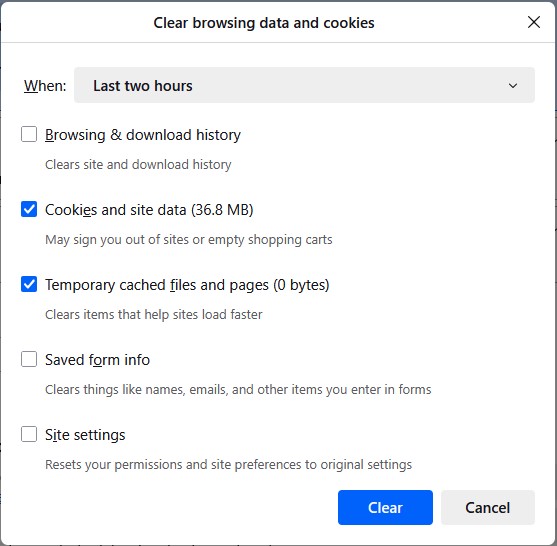
在此过程中,我在对 By.XPATH 与 By.ID 进行搜索时遇到了一个问题。请看以下HTML:
<stack id="dialogStack">
<vbox id="dialogTemplate" class="dialogOverlay dialogOverlay-0" align="center"
pack="center" topmost="true" style="visibility: inherit; --subdialog-inner-height: 482px;">
<vbox class="dialogBox" pack="end" role="dialog" aria-labelledby="dialogTitle"
resizable="false" style="min-width: calc(532px); min-height: calc(545px);">
<hbox class="dialogTitleBar" align="center">
<button class="dialogClose close-icon" data-l10n-id="close-button" aria-label="Close">
<hbox class="box-inherit button-box" align="center" pack="center" flex="1"
anonid="button-box">
<image class="button-icon"/>
<label class="button-text"/>
</hbox>
</button>
</hbox>
<browser class="dialogFrame" autoscroll="false" disablehistory="true" name="dialogFrame-0" style="width: 557px; min-width: 510px; height: min( calc(100vh - 104px), var(--subdialog-inner-height, 482px) );"/>
</vbox>
</vbox>
<vbox id="dialogTemplate" class="dialogOverlay dialogOverlay-1" align="center" pack="center" topmost="true">
<vbox class="dialogBox" pack="end" role="dialog" aria-labelledby="dialogTitle">
<hbox class="dialogTitleBar" align="center">
<label class="dialogTitle" flex="1"/>
<button class="dialogClose close-icon" data-l10n-id="close-button" aria-label="Close">
<hbox class="box-inherit button-box" align="center" pack="center" flex="1"
anonid="button-box">
<image class="button-icon"/>
<label class="button-text"/>
</hbox>
</button>
</hbox>
<browser class="dialogFrame" autoscroll="false" disablehistory="true" name="dialogFrame-1"/>
</vbox>
</vbox>
</stack>
以及以下的Python代码:
driver = webdriver.Remote (
  command_executor = SELENIUM_GRID_HUB + '/wd/hub',
  options = opts)

driver.set_window_size (1280, 1024)

wait = WebDriverWait (driver, 10)

current_window_handle = driver.current_window_handle
driver.execute_script ("window.open('');")
wait.until (EC.number_of_windows_to_be (2))
for handle in driver.window_handles:
  if handle != current_window_handle:
    driver.switch_to.window (handle)
    break

driver.get ('about:preferences#privacy')
wait.until (EC.element_to_be_clickable (
  (By.ID, 'clearSiteDataButton'))).click ()

t = wait.until (EC.presence_of_element_located (
      (By.ID, "dialogStack")))
print('00', t.get_attribute('outerHTML'))

print ('01', wait.until (EC.presence_of_all_elements_located (
         (By.ID, "dialogTemplate"))))
print ('02', wait.until (EC.presence_of_all_elements_located (
         (By.XPATH, "//vbox[@id='dialogTemplate']"))))
上面的HTML片段来自第一次print()。第二个print() 的返回值是:
01 [<selenium.webdriver.remote.webelement.WebElement (session="2d172d71-aac2-4930-bcc8-56d7a5ee1910", element="730fe339-76fc-4a28-a3f8-9b9070804f90")>, <selenium.webdriver.remote.webelement.WebElement (session="2d172d71-aac2-4930-bcc8-56d7a5ee1910", element="ed748919-2b7f-4667-91d8-fd09d7f1b9d2")>, <selenium.webdriver.remote.webelement.WebElement (session="2d172d71-aac2-4930-bcc8-56d7a5ee1910", element="9f8395e2-3667-43e8-bdbf-8ad9368cc345")>]
然而,第三个print() 会因为 TimeoutException() 而失败。为什么XPATH搜索不起作用?我在 https://codebeautify.org/Xpath-Tester 上对上述HTML进行测试,结果与By.ID搜索的答案相同。
解决方案
如果你只是想清除cookies,Selenium提供了相关命令,例如:
# delete cookie with name "test1"
driver.delete_cookie("test1")

# delete all cookies
driver.delete_all_cookies()
有关更多命令和示例,请参阅 https://www.selenium.dev/documentation/webdriver/interactions/cookies。
如果你需要更具体的功能,Firefox也提供了相应的API,https://developer.mozilla.org/en-US/docs/Mozilla/Add-ons/WebExtensions/API/cookies/remove。
我强烈建议使用这些API,而不是试图通过UI来实现,因为UI可能会变。始终优先使用API调用而不是UI。UI测试存在更高的风险、速度更慢,并且更可能需要维护。
站内所有文章版权归属LeftHeroAI导航站,无授权禁止任何主体转载、抄袭、复制内容,亦不得私自架设镜像站点。一经侵权,本站将通过法律途径追责。
相关文章






汇集全球数千款 AI 工具,每日持续更新,配套 AI 开发学习资源,轻松用 AI 提升工作效率。快捷键 Ctrl+D/⌘+D 一键收藏本站。