


在Express中尝试翻译验证错误信息时,它们会显示为“Invalid value”
我在Express项目中安装了i18next的相关包并启用了i18next。
middleware\localization.ts:
import i18next from "i18next";
import Backend from "i18next-fs-backend";
import { LanguageDetector } from "i18next-http-middleware";

i18next
  .use(Backend)
  .use(LanguageDetector)
  .init({
    lng: "sr",
    ns: ["validation"],
    fallbackLng: "en",
    backend: { loadPath: `../lang/{lng}/{ns}.json` }
  });
并写了一个包含翻译的文件 lang/sr/validation.json。https://pastebin.com/mXVNXgwa
我有很多验证模式,其错误信息会被i18next翻译,例如 registerSchema,它应用于注册的POST路由。
validation\authSchemas.ts:
import { checkSchema } from "express-validator";
import i18next from "i18next";
import moment from "moment";

// 3 input validation & sanitization
export const registerSchema = checkSchema({
  email: {
    notEmpty: { errorMessage: i18next.t("field.empty", { attr: i18next.t("attrs.email") }) },
    isEmail: { errorMessage: i18next.t("email.email", { attr: i18next.t("attrs.email") }) }
  },
  password1: {
    notEmpty: { errorMessage: i18next.t("field.empty", { attr: i18next.t("attrs.password1") }) }
  },
  password2: {
    notEmpty: { errorMessage: i18next.t("field.empty", { attr: i18next.t("attrs.password2") }) },
    custom: {
      errorMessage: i18next.t("password2.confirmed"),
      options: (value, { req }) => value === req.body.password1
    }
  },
  phone: {
    notEmpty: { errorMessage: i18next.t("field.empty", { attr: i18next.t("attrs.phone") }) },
    matches: {
      errorMessage: i18next.t("phone.regex"),
      options: /\+381 \d{2} \d{6,7}/gm
    }
  },
  firstName: {
    notEmpty: { errorMessage: i18next.t("field.empty", { attr: i18next.t("attrs.firstName") }) },
    isAlpha: { errorMessage: i18next.t("field.alpha", { attr: i18next.t("attrs.firstName") }) }
  },
  lastName: {
    notEmpty: { errorMessage: i18next.t("field.empty", { attr: i18next.t("attrs.lastName") }) },
    isAlpha: { errorMessage: i18next.t("field.alpha", { attr: i18next.t("attrs.lastName") }) }
  },
  birthDate: {
    notEmpty: { errorMessage: i18next.t("field.empty", { attr: i18next.t("attrs.birthDate") }) },
    isDate: { errorMessage: i18next.t("field.date", { attr: i18next.t("attrs.birthDate") }) },
    custom: {
      errorMessage: i18next.t("birthDate.adult"),
      options: (value) => {
        const age = moment().diff(new Date(value), "years");
        return age >= 18;
      }
    }
  }
});
routes\index.ts:
import { Router } from "express";

import controller from "../controllers/authController";
import { requireAuth } from "../middleware/auth";
import { limitAuth } from "../middleware/rateLimits";
import { loginSchema, registerSchema } from "../validation/authSchemas";

const router = Router();

// 3 input validation & sanitization
router.post("/registracija", limitAuth, registerSchema, controller.register);
当我点击提交按钮时,所有的校验信息都显示为 Invalid value。
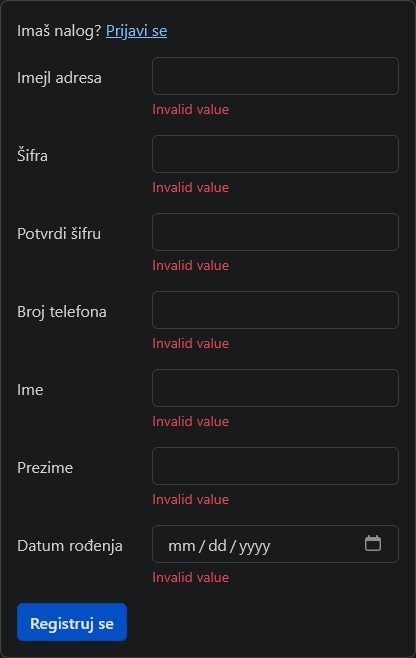
我该如何修复这个问题,让实际的错误信息显示出来?
解决方案
由于你使用的是翻译库/中间件,必须先处理请求,因此你需要使用一个能够处理请求并返回消息的函数,即动态消息。
所以,尝试将 errorMessage ...: { errorMessage: i18next.t("field.empty", { attr: i18next.t("attrs.email") }) }, 全部改成如下所示(另外,使用 req.t,因为它是由其中间件暴露/增强的):
...: { errorMessage: (value, { req }) => req.t("field.empty", { attr: req.t("attrs.email") }) },
参见:
你可以在任何支持消息的地方提供函数来构建动态验证消息。 当你使用翻译库来提供定制化消息时,这尤其有用:
check(field, withMessage) and .withMessage() work the same
check('something').isInt().withMessage((value, { req, location, path }) => {
return req.translate('validation.message.path', { value, location, path });
}),
以及:
/**
The error message if there's a validation error,
or a function for creating an error message dynamically.
*/
errorMessage?: FieldMessageFactory | ErrorMessage;
https://github.com/express-validator/express-validator/blob/master/src/middlewares/schema.ts#L25
export type FieldMessageFactory = (
value: any,
meta: Meta
any;
编辑:
你需要使用 handle 函数将 .t 方法附加到 req 对象,然后在 app/router 中使用它。试试这个:
//localization.ts
import { LanguageDetector, handle } from "i18next-http-middleware";
//...
export const i18nextMiddleware = handle(i18next);
并将其挂载到express应用/路由中:
import { i18nextMiddleware } from  "../middleware/localization";

//..
// or app.use(i18nextMiddleware);
router.use(i18nextMiddleware);
express-validator的错误应该看起来像这样:
  errors: [
    {
      value: undefined,
      msg: 'Polje email je obavezno',
      param: 'email',
      location: 'body'
    },
    {
      value: undefined,
      msg: 'Polje imejl adresa mora biti ispravna imejl adresa.',
      param: 'email',
      location: 'body'
    }
  ]
另外,确保你的翻译包含相应的键,以及你如何将错误附加到前端的方法。
相关文章





