


在表格视图中使用QComboBox进行多行编辑
我有一个相当复杂的模型,里面有好几部分,我想把它们显示在一个TreeView中。现在,人员在一列,城市在另一列。人员和城市被分成两部分。(这只是一个用于视觉分割的示例;实际上,人员和城市都属于同一个模型的一部分。)
我想实现让用户按以下方式编辑这棵树: 用户在树中选中某一行并编辑该行的数据。如果用户选中了多行,我也希望允许他们编辑这些行。我不知道有没有更“优雅”的做法,但目前我的做法是这样的:
#include <QApplication>
#include <QTreeView>
#include <QStandardItemModel>
#include <QComboBox>
#include <QHeaderView>

int main(int argc, char *argv[]) {
    QApplication app(argc, argv);

    QPalette lightPalette;
    app.setPalette(lightPalette);

    QStandardItemModel model(0, 3);
    model.setHorizontalHeaderLabels({"#", "City", "Peoples"});

    // My "Model"
    auto data = QList<QStringList>{{"Paris", "London", "Tokio"}, {"Caesar", "Napoleon", "Enstein"}};

    QTreeView tree;
    tree.setModel(&model);
    tree.setSelectionMode(QAbstractItemView::ExtendedSelection);
    tree.setSelectionBehavior(QAbstractItemView::SelectRows);

    int globalCounter = 1;

    auto addRow = [&](QStandardItem* parent, QString c, QString p) {
        QList<QStandardItem*> rowItems;
        rowItems << new QStandardItem(QString::number(globalCounter++)); // Add row counter
        rowItems << new QStandardItem(c); // Add city
        rowItems << new QStandardItem(p); // Add people
        parent->appendRow(rowItems);
    };

    // Group header
    QStandardItem* mainRoot = new QStandardItem("Main List Group");
    model.appendRow({mainRoot, new QStandardItem(""), new QStandardItem("")});
    for(int i=0; i<3; ++i)
        addRow(mainRoot, "Paris", "Caesar");

    // Separator
    QList<QStandardItem*> sepItems;
    for(int i=0; i<3; ++i) {
        auto* s = new QStandardItem("");
        s->setBackground(Qt::lightGray);
        s->setSelectable(false);
        sepItems << s;
    }
    model.appendRow(sepItems);

    // 3. Additional List
    QStandardItem* extraRoot = new QStandardItem("Additional List Group");
    model.appendRow({extraRoot, new QStandardItem(""), new QStandardItem("")});
    for(int i=0; i<3; ++i)
        addRow(extraRoot, "London", "Napoleon");

    tree.expandAll();


    QObject::connect(tree.selectionModel(), &QItemSelectionModel::selectionChanged, [&] {
        // Clear widgets in all columns
        for(int r=0; r < model.rowCount(); ++r) {
            for(int c=0; c<3; ++c)
                tree.setIndexWidget(model.index(r, c), nullptr);
            QModelIndex rootIdx = model.index(r, 0);
            for(int cr=0; cr < model.rowCount(rootIdx); ++cr)
                for(int cc=0; cc<3; ++cc)
                    tree.setIndexWidget(model.index(cr, cc, rootIdx), nullptr);
        }

        auto sel = tree.selectionModel()->selectedIndexes();
        if (sel.isEmpty()) return;

        // select first selected row
        QModelIndex target = sel.first();
        // Condition: draw combobox if the row has a parent and column 0 contains text (a number)
        if (!target.parent().isValid() || target.siblingAtColumn(0).data().toString().isEmpty())
            return;

        QModelIndex parent = target.parent();
        int row = target.row();

        for (int col : {1, 2}) {
            // create Comboboxes
            auto* cb = new QComboBox(&tree);
            cb->addItems(data[col-1]);
            cb->setCurrentText(model.index(row, col, parent).data().toString());
            cb->setFocusPolicy(Qt::NoFocus);
            tree.setIndexWidget(model.index(row, col, parent), cb);

            QObject::connect(cb, &QComboBox::currentTextChanged, [&, col](const QString &t) {
                for (auto &idx : tree.selectionModel()->selectedIndexes()) {
                    if (idx.column() == col) {
                        // set the selected data
                        model.setData(idx, t);
                    }
                }
            });
        }
    });

    tree.show();
    return app.exec();
}
现在,所有代码都放在信号处理程序里。也许这不是一个好主意?
尽管代码示例可以工作、也能运行,我将用截图来逐步说明我想要的效果(包含多种场景):
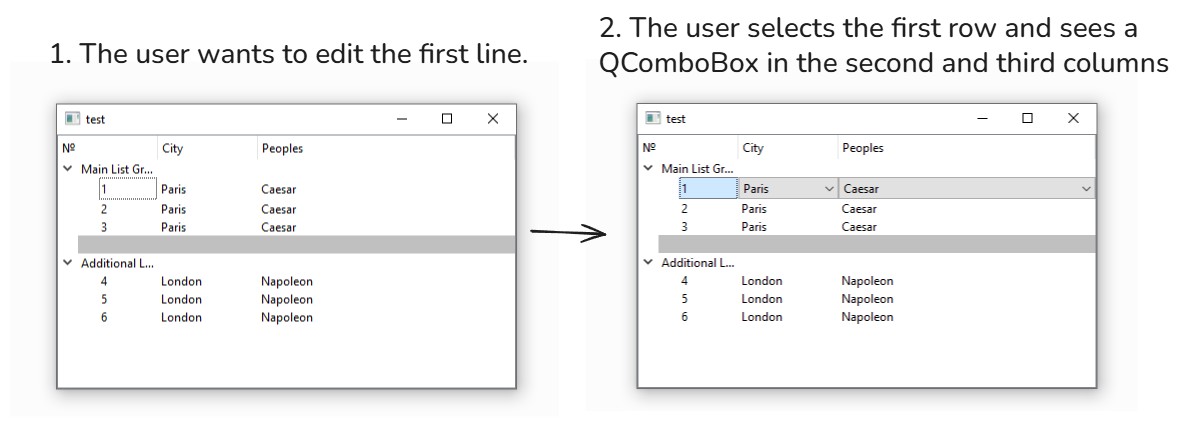
场景1:用户仅仅想修改单独的一行
- 第一步:用户选中想要修改的行后,会看到一组选项。请注意,QComboBox仅在第二列和第三列出现,而不在第一列。(模型中的数字不会改变)
第一行包含值“Paris”和“Caesar”
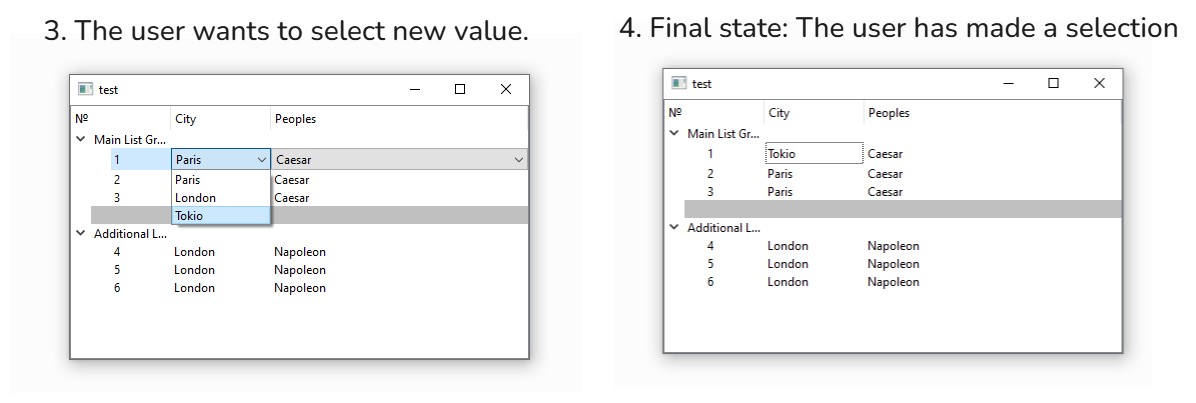
- 第二步:用户希望将第二列、第一行的新值设为“Tokio”。
场景2:用户想一次性修改多行。
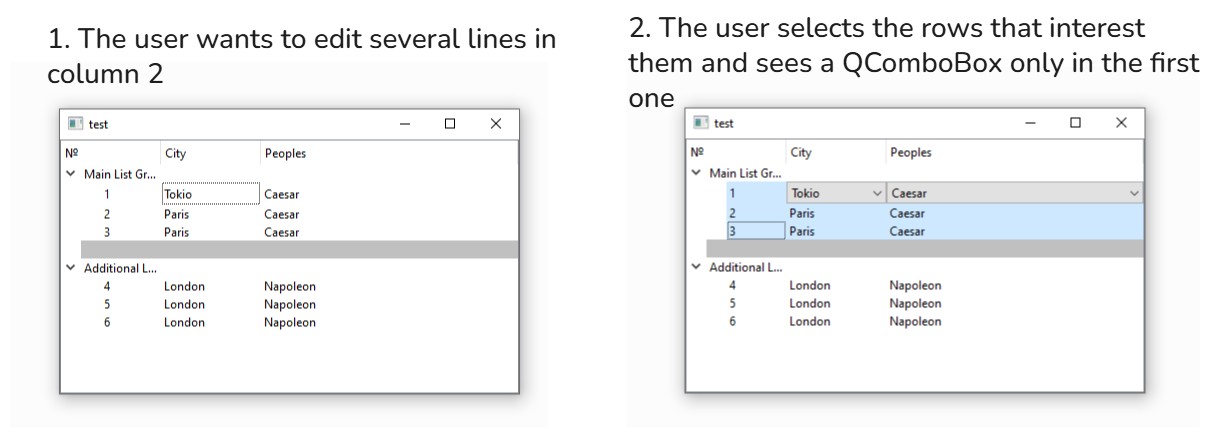
- 第一步。现在假设用户想要修改多个数值。我将使用场景1中的“最终状态”模型。
用户选中多行
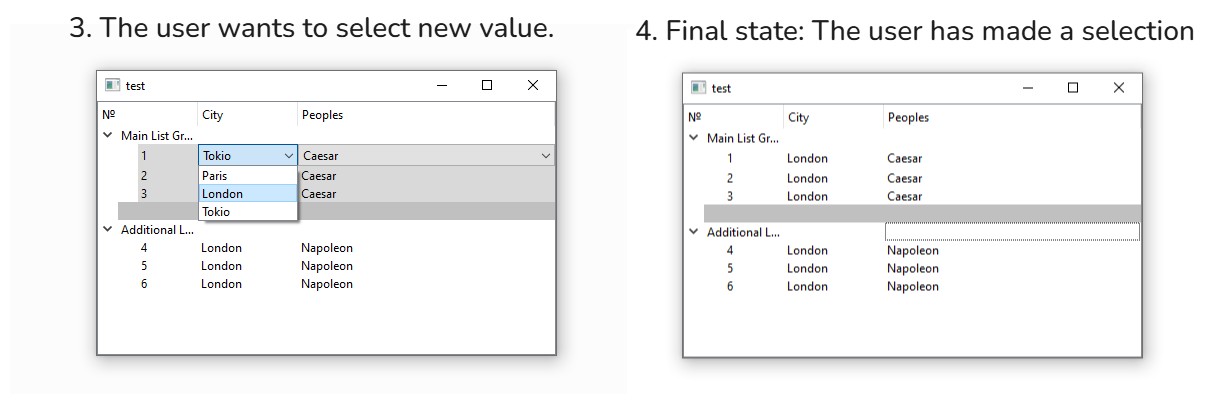
- 第二步。用户进行了选择,所选行中的数值都会改变(由于在第二列只选中了一个QComboBox,因此数值只在第二列的行中改变)。
场景3:
用户选中了一个标题。没有任何变化,因为标题不可编辑。(在我的代码里,我是通过检查该元素是否有父项来实现的。)
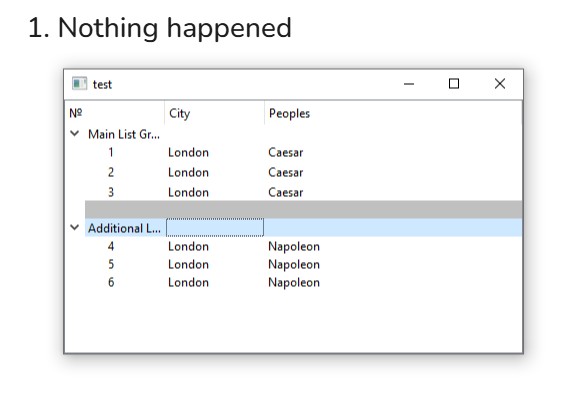
如何让这段代码更符合语言习惯、也更易于使用?也许使用委托(delegates)会有帮助?
解决方案
这里有几个问题:
- 如何让某些单元格不可编辑
- 如何实现当对某个索引进行修改时,模型能够传播这些改动的逻辑
- 如何实现一个委托
前两项是关于模型的,最后一项最终还是关于视图的。
下面先谈谈“模型”的部分。我打算移除不方便的组合框,因为它们似乎会在树中出现一些bug(当用户在树中执行一些不太直接的操作时),并通过改变编辑触发条件来实现多选与编辑的同时可能性。
现在,来谈谈你在模型上可以做些什么。
对任意模型工作的一点前提
恕我直言,你应该始终避免使用 QStandardItemModel 这个便利类(尽管在StackOverflow的最小可复现示例中使用它是可以的)。
大多数有经验的Qt开发者都知道,就像 Q[...]Widget 与 Q[...]View 这样的对比,便利性往往以牺牲灵活性与可维护性为代价。
问题1:防止对索引进行编辑
QStandardItemModel 让你可以通过 [QStandardItem::setFlags] 或 [QStandardItem::setEditable] 来阻止对索引的编辑(这与你的代码不同,后者允许你编辑单元格但不能用组合框)。
通过从 QAbstractItemModel 派生的类(但不是 QStandardItemModel),将逻辑(仅在有有效父索引时才允许编辑索引)写在 QAbstractItemModel::flags 中。
问题2:在你的模型上实现复杂的 setData 逻辑
任何需要在多种模型、多种类上可重用的复杂逻辑,应该放在 QAbstractProxyModel 的子类中,或在可能的情况下,放在它的子类 QIdentityProxyModel 中。
这里,你想做两件事:
- 将对同一列中所有已选索引的改动向外传播
- 当同一行中的一个索引被修改时,另一同一行的索引也随之改变
下面给出两种实现方式(也可能有更多):
方案1:覆盖 setData
通过这一方案,两个代理模型彼此嵌套,各自负责一个动作,该动作在模型设置数据时由视图调用。这是更直接的实现方式,也是我写的两种方法中更安全的一种(原因后文会提及)。
另一方面,如果你把 model 附加到另一个视图并直接在那里编辑,你将完全绕过代理模型,因此逻辑也不会被应用。
我特地调用了 blockSignals,以便在编辑范围上手动发出单个 dataChanged 信号,而不是在当前单个索引上发出。
请注意,两个代理模型类在 setItemData 的实现上实际上是相同的,但我选择不再通过为该方法添加一个额外的类来让代码变得更加复杂。
class SetDataOnColumnProxyModel : public QIdentityProxyModel
{
public:
    SetDataOnColumnProxyModel(QObject* parent = nullptr);
    bool setData(const QModelIndex& index, const QVariant& value, int role = Qt::EditRole) override;
    bool setItemData(const QModelIndex& index, const QMap<int, QVariant>& roles) override;
    void setSelectionModel(QItemSelectionModel* model);

public slots:
    void onSelectionModelDestroyed(QObject* model);

    QItemSelectionModel* selectionModel;

};

SetDataOnColumnProxyModel::SetDataOnColumnProxyModel(QObject* parent) :
    QIdentityProxyModel(parent),
    selectionModel(nullptr)
{}
bool SetDataOnColumnProxyModel::setData(const QModelIndex& index, const QVariant& value, int role)
{
    if (selectionModel && (role == Qt::DisplayRole || role == Qt::EditRole)) {
        QModelIndex topLeft = index, bottomRight = index;
        blockSignals(true);
        for (auto selectedIndex : selectionModel->selectedIndexes()) {
            if (selectedIndex.column() == index.column() /*&& selectedIndex.parent() == index.parent()*/) {
                if (selectedIndex.row() < topLeft.row())
                    topLeft = selectedIndex;
                else if (selectedIndex.row() > bottomRight.row())
                    bottomRight = selectedIndex;

                QIdentityProxyModel::setData(selectedIndex, value, role);
            }
        }
        blockSignals(false);
        emit dataChanged(topLeft, bottomRight, { role });
        return true;
    }
    else
        return QIdentityProxyModel::setData(index, value, role);

}
bool SetDataOnColumnProxyModel::setItemData(const QModelIndex& index, const QMap<int, QVariant>& roles)
{
    bool result = true;
    auto newRoles = roles;

    for (auto role : { Qt::DisplayRole, Qt::EditRole }) {
        auto iterator = roles.find(role);
        if (iterator != roles.end()) {
            QVariant value = iterator.value();
            newRoles.erase(iterator);
            result &= setData(index, value, role);
        }
    }
    result &= QIdentityProxyModel::setItemData(index, newRoles);
    return result;
}
void SetDataOnColumnProxyModel::setSelectionModel(QItemSelectionModel* model)
{
    selectionModel = model;
    QObject::connect(model, &QObject::destroyed, this, &SetDataOnColumnProxyModel::onSelectionModelDestroyed);
}
void SetDataOnColumnProxyModel::onSelectionModelDestroyed(QObject* model) {
    if (selectionModel == model)
        selectionModel = nullptr;
}


class NapoleonProxyModel : public QIdentityProxyModel {
public:
    NapoleonProxyModel(QObject* parent = nullptr);
    bool setData(const QModelIndex& index, const QVariant& value, int role = Qt::EditRole) override;
    bool setItemData(const QModelIndex& index, const QMap<int, QVariant>& roles) override;
};

NapoleonProxyModel::NapoleonProxyModel(QObject* parent) :
    QIdentityProxyModel(parent)
{}
bool NapoleonProxyModel::setData(const QModelIndex& index, const QVariant& value, int role)
{
    if (role == Qt::DisplayRole || role == Qt::EditRole && index.column() == 2 && value == "Napoleon") {
        QIdentityProxyModel::setData(index.siblingAtColumn(1), "none", role);
    }
    return QIdentityProxyModel::setData(index, value, role);
}
bool NapoleonProxyModel::setItemData(const QModelIndex& index, const QMap<int, QVariant>& roles)
{
    bool result = true;
    auto newRoles = roles;

    for (auto role : { Qt::DisplayRole, Qt::EditRole }) {
        auto iterator = roles.find(role);
        if (iterator != roles.end()) {
            QVariant value = iterator.value();
            newRoles.erase(iterator);
            result &= setData(index, value, role);
        }
    }
    result &= QIdentityProxyModel::setItemData(index, newRoles);
    return result;
}
方案2:连接到 dataChanged
另一种做法是一个代理模型,在它的源模型被编辑时就完成工作。这是一种“如果这样,就那样”的实现。
这种方法更强大,因为它会对直接在源模型上所做的改动做出反应,包括其他视图直接对源模型所做的修改。
这种方法的缺点显然是,你在由 dataChanged 触发的函数中调用 setData。如果不小心,这种做法会带来与在一个函数中调用 repaint(),而这个函数又被 paintEvent() 调用时相同的无限递归问题。
通过使用一个 disconnect 标志来打破循环:代理模型暂停监听来自源的编辑,随后对源进行编辑,最后重新开始监听编辑。
为了让事情更有趣,我将让代理模型本身不携带这段逻辑,而是从外部函数(std::function<...> 中的lambda)获取逻辑。你也可以用同样的方式使用Functor类;只要它能感知当前的选区,哪里实现都可以。
class IFTTTProxyModel : public QIdentityProxyModel
{
public:
    IFTTTProxyModel(QObject* parent = nullptr);

    void appendDataChangedRule(const dataChangedIf& ifThis, const dataChangedThen& thenThat, bool disconnect = true);

public slots:
    void onDataChanged(const QModelIndex& topLeft, const QModelIndex& bottomRight, const QList<int>& roles);

private:
    QList<std::tuple<dataChangedIf, dataChangedThen, bool>> dataChangedRules;
    QMetaObject::Connection dataChangedConnection;
};

IFTTTProxyModel::IFTTTProxyModel(QObject* parent) :
    QIdentityProxyModel(parent)
{
    dataChangedConnection = connect(this, &QAbstractItemModel::dataChanged, this, &IFTTTProxyModel::onDataChanged);
}
void IFTTTProxyModel::appendDataChangedRule(const dataChangedIf& ifThis, const dataChangedThen& thenThat, bool disconnect)
{
    dataChangedRules.append(std::make_tuple(ifThis, thenThat, disconnect));
}
void IFTTTProxyModel::onDataChanged(const QModelIndex& topLeft, const QModelIndex& bottomRight, const QList<int>& roles)
{
    for (auto [ifThis, thenThat, disconnect] : dataChangedRules) {
        if (ifThis(topLeft, bottomRight, roles)) {
            if (disconnect)
                QObject::disconnect(dataChangedConnection);
            thenThat(topLeft, bottomRight, roles);
            if (disconnect)
                dataChangedConnection = connect(this, &QAbstractItemModel::dataChanged, this, &IFTTTProxyModel::onDataChanged);
        }
    }
}
方案3:方案1和方案2的混合
当然,你也可以把两种方法结合起来;例如:
- 使用方案1中的
SetDataOnColumnProxyModel,因为它处理的是最可能导致无限循环的操作…… - …嵌套在一个轻量版本的
IFTTTProxyModel中,在其中你只负责对每一行在用Napoleon编辑时设置none。
以下是主流程,在没有你的组合框花哨操作的情况下,但对模型仍有 setEditable 调用,以及使用的两种方案(屏幕中的每个场景都在一个窗口里显示):
int main(int argc, char* argv[]) {
    QApplication app(argc, argv);

    QPalette lightPalette;
    app.setPalette(lightPalette);

    QStandardItemModel model(0, 3);
    model.setHorizontalHeaderLabels({ "№", "City", "Peoples" });

    auto data = QList<QStringList>{ {"Paris", "London", "Tokio"}, {"Caesar", "Napoleon", "Enstein"} };

    QTreeView tree1, tree2;
    tree1.setSelectionMode(QAbstractItemView::ExtendedSelection);
    tree1.setSelectionBehavior(QAbstractItemView::SelectRows);
    tree1.setEditTriggers(QAbstractItemView::CurrentChanged);
    tree2.setSelectionMode(QAbstractItemView::ExtendedSelection);
    tree2.setSelectionBehavior(QAbstractItemView::SelectRows);
    tree2.setEditTriggers(QAbstractItemView::CurrentChanged);

    {
        int globalCounter = 1;

        auto addRow = [&](QStandardItem* parent, QString c, QString p) {
            QList<QStandardItem*> rowItems;
            rowItems << new QStandardItem(QString::number(globalCounter++)); // Add row counter
            rowItems << new QStandardItem(c); // Add city
            rowItems << new QStandardItem(p); // Add people
            parent->appendRow(rowItems);
            };

        // Declare a whole row at once so that each item inside it can be made non-editable
        // This will be repeated for every top-level index
        QList<QStandardItem*> mainRootRow{ new QStandardItem("Main List Group"), new QStandardItem(""), new QStandardItem("") };
        for (auto item : mainRootRow)
            item->setEditable(false);
        model.appendRow(mainRootRow);
        for (int i = 0; i < 3; ++i)
            addRow(mainRootRow[0], "Paris", "Caesar");

        // Separator
        QList<QStandardItem*> sepItems;
        for (int i = 0; i < 3; ++i) {
            auto* s = new QStandardItem("");
            s->setBackground(Qt::lightGray);
            s->setSelectable(false);
            s->setEditable(false);
            sepItems << s;
        }
        model.appendRow(sepItems);

        // 3. Additional List
        QList<QStandardItem*> extraRootRow{ new QStandardItem("Additional List Group"), new QStandardItem(""), new QStandardItem("") };
        for (auto item : extraRootRow)
            item->setEditable(false);
        model.appendRow(extraRootRow);
        for (int i = 0; i < 3; ++i)
            addRow(extraRootRow[0], "London", "Napoleon");

    } {
        NapoleonProxyModel* napoleonModel = new NapoleonProxyModel(&tree1);
        napoleonModel->setSourceModel(&model);

        SetDataOnColumnProxyModel* sdocModel = new SetDataOnColumnProxyModel(&tree1);
        sdocModel->setSourceModel(napoleonModel);

        tree1.setModel(sdocModel);
        sdocModel->setSelectionModel(tree1.selectionModel());
    } {
        IFTTTProxyModel* iftttModel = new IFTTTProxyModel(&tree2);

        auto ifPeoplesChanged_Napoleon = [](const QModelIndex& topLeft, const QModelIndex& bottomRight, const QList<int>& roles) -> bool
            {
                return (roles.contains(Qt::DisplayRole) && topLeft.column() <= 2 && bottomRight.column() >= 2);
            };
        auto thenPeoplesChanged_Napoleon = [iftttModel](const QModelIndex& topLeft, const QModelIndex& bottomRight, const QList<int>& roles) -> void
            {
                for (auto r = topLeft.row(); r <= bottomRight.row(); ++r) {
                    if (topLeft.sibling(r, 2).data(Qt::DisplayRole) == "Napoleon") {
                        iftttModel->setData(topLeft.sibling(r, 1), "none");
                    }
                }
            };


        auto ifDataChanged_PropagateToSelection = [](const QModelIndex& topLeft, const QModelIndex& bottomRight, const QList<int>& roles) -> bool
            {
                return (roles.contains(Qt::DisplayRole));
            };
        auto thenDataChanged_PropagateToSelection = [iftttModel, &tree2](const QModelIndex& topLeft, const QModelIndex& bottomRight, const QList<int>& roles) -> void
            {
                for (auto& index : tree2.selectionModel()->selectedIndexes()) {
                    if (index.column() >= topLeft.column() && index.column() <= bottomRight.column() &&
                        (index.row() < topLeft.row() || index.row() >= bottomRight.row())) {
                        iftttModel->setData(index, topLeft.siblingAtColumn(index.column()).data());
                    }
                }
            };

        iftttModel->setSourceModel(&model);

        iftttModel->appendDataChangedRule(ifPeoplesChanged_Napoleon, thenPeoplesChanged_Napoleon);
        iftttModel->appendDataChangedRule(ifDataChanged_PropagateToSelection, thenDataChanged_PropagateToSelection, false);

        tree2.setModel(iftttModel);
    }

    tree1.expandAll();
    tree2.expandAll();

    tree1.show();
    tree2.show();
    return app.exec();
}
相关文章





