


按正确的顺序使用自定义验证器
我有一个DTO类,它包含类级别的自定义验证器,Password 和 ConfirmPassword,依赖于其他字段,我打算在另一个DTO对象上使用它们。
@Data
@Builder(toBuilder = true)
@Password
@ConfirmPassword
public class RegisterDTO {
    @NotBlank(message = "{email.NotBlank}")
    @Email(message = "{email.Email}")
    private String email;
    @NotBlank(message = "{password.NotBlank}")
    private String password;
    private String password2;
    @NotBlank(message = "{phone.NotBlank}")
    @Pattern(regexp = "^\\+381 \\d{2} \\d{6,7}$", message = "{phone.Pattern}")
    private String phone;
    @NotBlank(message = "{firstName.NotBlank}")
    @Pattern(regexp = "^\\p{L}*$", message = "{firstName.Alpha}")
    private String firstName;
    @NotBlank(message = "{lastName.NotBlank}")
    @Pattern(regexp = "^\\p{L}*$", message = "{lastName.Alpha}")
    private String lastName;
    @NotNull(message = "{birthDate.NotNull}")
    @Adult
    @DateTimeFormat(pattern = "yyyy-MM-dd")
    private LocalDate birthDate;
}
com/example/realestate/constraints/PasswordConstraint.java 检查密码是否包含字母、数字和特殊字符的混合,并且是否与 email 相同:
private boolean min(String password) {
    int min = 8;
    return password.length() < min;
}

private boolean mixed(String password) {
    boolean upper = password.chars().anyMatch(c -> Character.isAlphabetic(c) && Character.isUpperCase(c));
    boolean lower = password.chars().anyMatch(c -> Character.isAlphabetic(c) && Character.isLowerCase(c));
    return !(upper && lower);
}

private boolean numbers(String password) {
    return password.chars().noneMatch(Character::isDigit);
}

private boolean symbols(String password) {
    String symbols = "!\"#$%&'()*+,-./:;<=>?@[\\]^_`{|}~";
    return password.chars().noneMatch(c -> symbols.indexOf(c) >= 0);
}

@Override
public boolean isValid(Object dto, ConstraintValidatorContext context) {
    context.disableDefaultConstraintViolation();

    try {
        Field emailField = dto.getClass().getDeclaredField("email");
        Field passwordField = dto.getClass().getDeclaredField("password");
        emailField.setAccessible(true);
        passwordField.setAccessible(true);

        String email = (String) emailField.get(dto);
        String password = (String) passwordField.get(dto);

        if (password == null || password.isEmpty()) return true;

        if (password.equals(email)) {
            context.buildConstraintViolationWithTemplate("{password.Email}")
                .addPropertyNode("password")
                .addConstraintViolation();
            return false;
        }

        if (min(password)) {
            context.buildConstraintViolationWithTemplate("{password.Min}")
                .addPropertyNode("password")
                .addConstraintViolation();
            return false;
        }

        if (mixed(password)) {
            context.buildConstraintViolationWithTemplate("{password.Mixed}")
                .addPropertyNode("password")
                .addConstraintViolation();
            return false;
        }

        if (numbers(password)) {
            context.buildConstraintViolationWithTemplate("{password.Numbers}")
                .addPropertyNode("password")
                .addConstraintViolation();
            return false;
        }

        if (symbols(password)) {
            context.buildConstraintViolationWithTemplate("{password.Symbols}")
                .addPropertyNode("password")
                .addConstraintViolation();
            return false;
        }

        return true;
    } catch (NoSuchFieldException | IllegalAccessException e) {
        throw new RuntimeException(e);
    }
com/example/realestate/constraints/ConfirmPasswordConstraint.java 检查 password 与 password2 是否匹配:
@Override
public boolean isValid(Object dto, ConstraintValidatorContext context) {
    context.disableDefaultConstraintViolation();

    try {
        Field field1 = dto.getClass().getDeclaredField("password");
        Field field2 = dto.getClass().getDeclaredField("password2");
        field1.setAccessible(true);
        field2.setAccessible(true);

        String password = (String) field1.get(dto);
        String password2 = (String) field2.get(dto);

        if (password != null && !password.equals(password2)) {
            context.buildConstraintViolationWithTemplate(context.getDefaultConstraintMessageTemplate())
                .addPropertyNode("password2")
                .addConstraintViolation();
            return false;
        }

        return true;
    } catch (NoSuchFieldException | IllegalAccessException e) {
        throw new RuntimeException(e);
    }
}
templates/auth/register.html:
<div class="col-12">
  <div class="input-group">
    <div class="form-floating">
      <input class="form-control" type="password" id="password" th:field="*{password}">
      <label for="password">Lozinka</label>
    </div>

    <div class="form-floating">
      <input class="form-control" type="password" id="password2" th:field="*{password2}">
      <label for="password2">Potvrdi lozinku</label>
    </div>
  </div>
  <div class="form-text text-danger" th:if="${#fields.hasErrors('password')}" th:errors="*{password}"></div>
  <div class="form-text text-danger" th:if="${#fields.hasErrors('password2')}" th:text="${#fields.errors('password2')[0]}"></div>
</div>
问题在于这两个验证器的错误信息会同时出现在网页上,但应该先验证 password,然后再验证 password2。我在只有一个 password 字段中输入了 1。
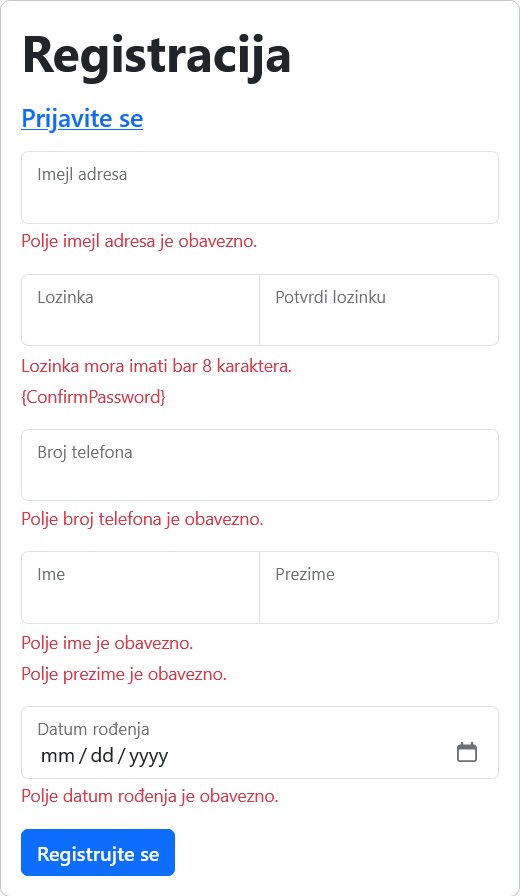
我尝试为两个验证器添加分组,但随后我根本看不到它们的错误信息。
@Data
@Builder(toBuilder = true)
@Password(groups = {PasswordGroup.class})
@ConfirmPassword(groups = {ConfirmPasswordGroup.class})
public class RegisterDTO {
com/example/realestate/constraints/groups/OrderedValidation.java:
@GroupSequence({Default.class, PasswordGroup.class, ConfirmPasswordGroup.class})
public interface OrderedValidation {
}
com/example/realestate/controllers/AuthController.java:
@PostMapping("/registracija")
public String register(Model model, HttpServletRequest request, RedirectAttributes attributes,
    @ModelAttribute("dto") @Validated(OrderedValidation.class) RegisterDTO dto, BindingResult result) {
    // 2 Input validation & sanitization
    if (result.hasErrors()) {
        model.addAttribute("dto", dto);
        return "auth/register";
    }
我再次在 password 字段输入了 1(值的长度小于8),但这次没有显示任何错误信息。
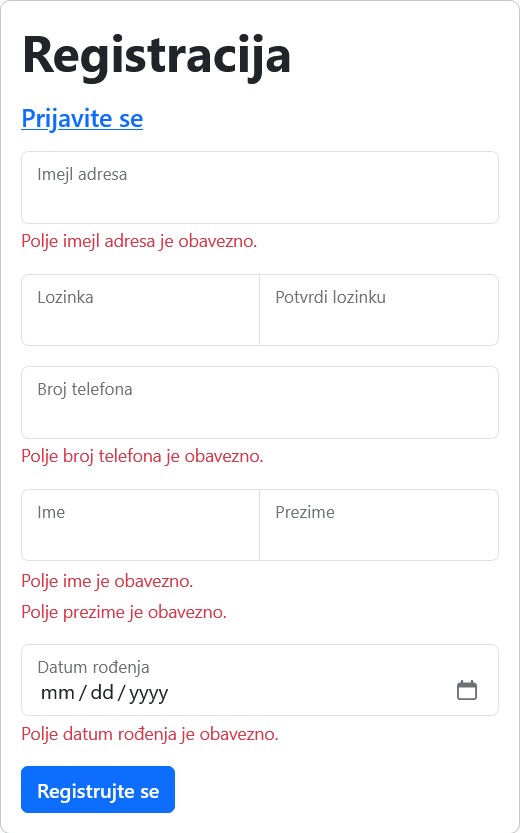
解决方案
仅在 @Password 及其他条件都成功时执行 @ConfirmPassword
你指定了这个 GroupSequence:
@GroupSequence({Default.class, PasswordGroup.class, ConfirmPasswordGroup.class})
public interface OrderedValidation {
}
这样,@Validated(OrderedValidation.class) 将先尝试使用 Default 组对所有内容进行验证。只有前面的验证(包括 Default 组)成功时,PasswordGroup 和 ConfirmPasswordGroup 的验证才会执行。
如果你想始终执行 @Password 验证,但只有在前者成功时才执行 @ConfirmPassword,你可以使用你的 GroupSequence,但改用 Default 组来对 @Password 进行验证:
@GroupSequence({Default.class, ConfirmPasswordGroup.class}) // no PasswordGroup.class
public interface OrderedValidation {
}
@Password // no groups=, let it use the default group
@ConfirmPassword(groups = ConfirmPasswordGroup.class) // use the group here
public class RegisterDTO {
// that one can stay as-is
@PostMapping("/registracija")
public String register(Model model, HttpServletRequest request, RedirectAttributes attributes,
    @ModelAttribute("dto") @Validated(OrderedValidation.class) RegisterDTO dto, BindingResult result) {
仅在依赖于 @Password 时执行 @ConfirmPassword
在前一种做法中,@ConfirmPassword 约束不仅绑定于 @Password 约束,还绑定于其他约束。如果你想让它依赖于 @Password,但在例如 Default 组中的其他某些项失败时仍然执行它,可以改为从你的 @GroupSequence 中移除默认分组,但确保它仍然通过将其加入 @Validated 来进行验证。
// in this sequence, ConfirmPasswordGroup will be executed if and only if PasswordGroup succeeds
@GroupSequence({PasswordGroup.class, ConfirmPasswordGroup.class}) // no Default group
public interface OrderedValidation {
}
@Password(groups = PasswordGroup.class)// this is in the Password group
@ConfirmPassword(groups = ConfirmPasswordGroup.class) // use the second group here
public class RegisterDTO {
// in your @Validated annotation, specify both the Default group and the OrderedValidation group
@PostMapping("/registracija")
public String register(Model model, HttpServletRequest request, RedirectAttributes attributes,
    @ModelAttribute("dto") @Validated({Default.class, OrderedValidation.class}) RegisterDTO dto, BindingResult result) {
免责声明:这个问题也在其他地方被问过。我在另一个地方回答过之后,现在也把答案放在这里,供未来的读者参考。
相关文章





