


Vue.js 3中的DOM事件未转发给子组件
我正在把一个Vue2应用迁移到Vue3。
我正在运行 兼容性构建(Vue 3.1.0,使用 @vue/compat: 3.1.0)。
我有自定义按钮组件,如下:
<template>
  <button class="EditButton">
    <SvgIcon name="edit" />
    <span>Edit</span>
  </button>
</template>

<style scoped>
/* Some style */
</style>
我的应用当前调用这个按钮的方式是
<EditButton
  id="edit-button"
  :disabled="!aCondition"
  @click.native="editPost(post)"
/>
这样做可以正常工作。.native 事件修饰符在Vue 3中已被弃用,我已经移除了它(参见 vue3 v-on-native-modifier文档)。根据文档,v-on 监听器如果不是作为组件事件声明的一部分,应该作为DOM事件添加到第一个根元素上(在我的情况下是 button)。
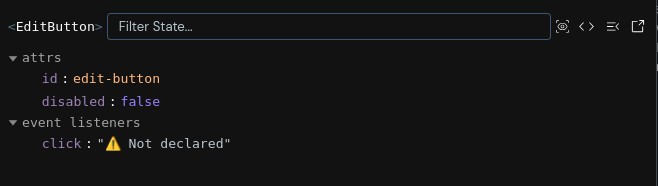
然而这并不起作用。移除 .native 会在组件的 $attrs 中移除 onClick 监听器,以下是在开发者工具窗口中看到的结果:
下面是我的Vite配置,或许有用:
export default defineConfig({
  resolve: {
    alias: {
      "@": fileURLToPath(new URL("./src", import.meta.url)),
      vue: '@vue/compat'
    },
  },
  plugins: [
    vue({
      template: {
        compilerOptions: {
          compatConfig: {
            MODE: 2
          }
        }
      }
    }),
    createSvgIconsPlugin({
      iconDirs: [fileURLToPath(new URL("./src/assets/icons", import.meta.url))],
      symbolId: "icon-[name]",
    }),
  ]});
我的问题很简单,在Vue 3中如何处理点击事件,我到底哪里做错了?
解决方案
在Vue 3中,你应该移除 .native,但要确保组件在 emits 中没有声明 click。
如果组件只有一个根元素,像你的 <button> 那样,这应该可行:
<EditButton
  id="edit-button"
  :disabled="!aCondition"
  @click="editPost(post)"
/>
并且组件可以保持为单根组件:
<template>
  <button class="EditButton">
    <SvgIcon name="edit" />
    <span>Edit</span>
  </button>
</template>
Vue 3会自动把未声明的属性和监听器透传到子组件的根元素。因此 id、disabled 和 @click 应该透传到 button。
通常导致这种透传失效的情况,是子组件将该事件声明为组件事件:
defineEmits(['click'])
或者,在Options API中:
emits: ['click']
一旦 click 被声明为组件事件,Vue就会把 @click 视为自定义组件事件,而不是原生DOM监听器,因此它不会自动附加到根元素 button。
如果你确实希望 EditButton 显式暴露一个组件事件,请自行触发它:
<template>
  <button class="EditButton" @click="$emit('click', $event)">
    <SvgIcon name="edit" />
    <span>Edit</span>
  </button>
</template>
但如果你只需要原生按钮点击,不要在 emits 中声明 click;让Vue将监听器透传到根元素。
站内所有文章版权归属LeftHeroAI导航站,无授权禁止任何主体转载、抄袭、复制内容,亦不得私自架设镜像站点。一经侵权,本站将通过法律途径追责。
相关文章






汇集全球数千款 AI 工具,每日持续更新,配套 AI 开发学习资源,轻松用 AI 提升工作效率。快捷键 Ctrl+D/⌘+D 一键收藏本站。