


TMP输入字段的行类型MultiLineSubmit与 MultiLineNewline有什么区别?
In Unity, a TMP_InputField, in the Input Field Settings section of its editor, has a property called lineType:
在Unity中,TMP_InputField 的输入字段设置(编辑器中的Input Field Settings部分)有一个名为 lineType 的属性:
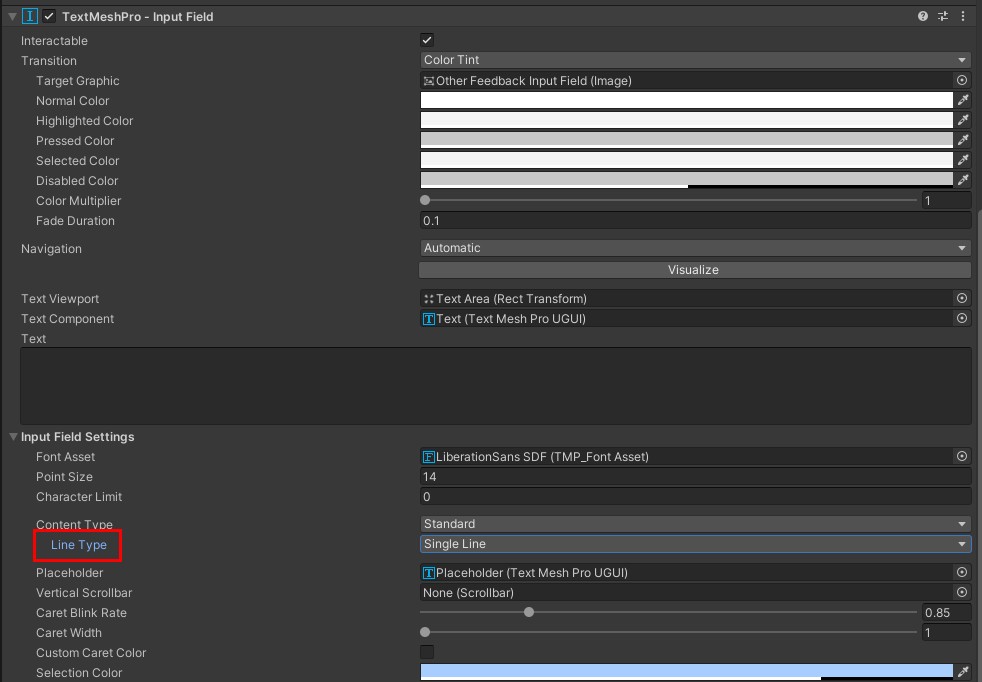
This is a property of type TMP_InputField.LineType, an enum with 3 possible values; SingleLine, MultiLineSubmit and MultiLineNewline .
这是一个类型为 TMP_InputField.LineType 的属性,是一个包含三种可能取值的枚举;分别是 SingleLine、MultiLineSubmit 和 MultiLineNewline。
The difference between SingleLine and the two multi-line values is obvious - when typing text into my input field in the former, it will all remain on one line, even if the line is longer than the text box width. The muti-line values will of course make long text wrap onto a new line.
在 SingleLine 与另外两种多行值之间的差异很明显——在前者的输入框中输入文本时,文本会始终保持在同一行,即使该行的长度超过文本框宽度也如此。当然,多行值会使长文本换到新的一行。
The difference between the latter two values is not obvious to me, and the documentation I linked to is pretty bare bones. Can someone explain what the difference is between the two of them?
后两种取值之间的差异对我来说并不明显,我所链接的文档也相当简略。有人能解释它们之间的区别吗?
解决方案
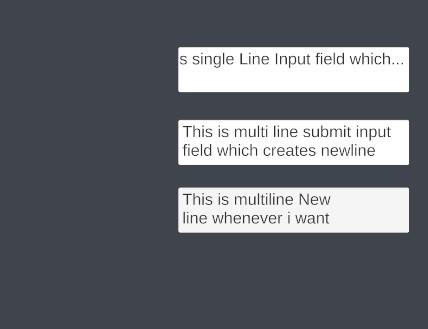
- 单行 :
仅允许文本在单行显示。
这允许单行输入,也就是说你输入的内容无论是否按下回车,都会保持在单行,不会出现多行。
- 多行提交 :
允许文本使用多行,只有在需要时才换行。
这允许输入字段中出现多行文本,但不会响应用户按下的回车。只有在文本达到输入字段容量、需要新的一行时才会换到下一行。
- 多行回车换行 :
允许文本使用多行。用户可以通过按回车键来换行。
这让用户可以随时输入多行文本,就像使用记事本、TextEdit或 Word文档一样。
下面是参考图片,帮助你更好地理解
相关文章





