


在Azure的 API管理(APIM)中,暂时封锁正在扫描我的API的 IP地址
我正在尝试阻止针对我的网站的扫描,例如以 /.env 结尾的请求。
这些请求会通过Azure Front Door转发到Node.js服务器,再到APIM,最后到我的后端服务器。在Azure API Management级别,我使用它来缓存任何试图进行扫描的IP,但它并不能阻止任何请求。
<policies>
    <inbound>
        <base />
        <!-- Check if this IP is blocked -->
        <cache-lookup-value key="@("blocked-ip-" + context.Request.IpAddress)" variable-name="isBlocked" />
        <choose>
            <when condition="@(context.Variables.ContainsKey("isBlocked"))">
                <return-response>
                    <set-status code="403" reason="Forbidden" />
                    <set-body>Access denied.</set-body>
                </return-response>
            </when>
        </choose>
        <!-- Detect /.env probe and block the IP -->
        <choose>
            <when condition="@(context.Request.Url.Path.EndsWith("/.env") || context.Request.Url.Path.EndsWith("/.env."))">
                <cache-store-value key="@("blocked-ip-" + context.Request.IpAddress)" value="true" duration="300" />
                <return-response>
                    <set-status code="403" reason="Forbidden" />
                    <set-body>Access denied.</set-body>
                </return-response>
            </when>
        </choose>

        <!-- This is just a test policy to see it's being reached. It IS being reached. -->
        <rate-limit-by-key calls="1" renewal-period="6" counter-key="@(context.Request.IpAddress)" />
    </inbound>
    <backend>
        <base />
    </backend>
    <outbound>
        <base />
    </outbound>
    <on-error>
        <base />
    </on-error>
</policies>
这个策略应用在“产品”级别:
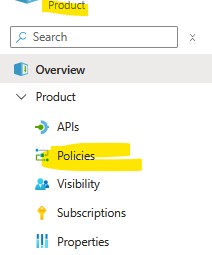
根据Azure的 文档,我可以在策略级别应用“Rate”(也就是限流,我猜)。
然而,像 /.env 的请求在没有被阻止的情况下继续通过。我到底哪里做错了?
有没有办法阻止恶意扫描?
解决方案
你需要将策略放在“所有API”级别。
同时确保你所有的API都包含 base 标签。
.....

<!-- Step 1: Check if this IP is already banned -->
<cache-lookup-value key="@("banned-ip-" + context.Request.IpAddress)" variable-name="isBanned" />
<choose>
    <when condition="@(context.Variables.ContainsKey("isBanned"))">
        <return-response>
            <set-status code="403" reason="Forbidden" />
            <set-body>Your IP has been temporarily blocked.</set-body>
        </return-response>
    </when>
</choose>
<!-- Step 2: If the request targets a suspicious path, ban the IP -->
<choose>
    <when condition="@(context.Request.Url.Path.Contains("/.env") || context.Request.Url.Path.Contains("/.aws"))">
        <cache-store-value key="@("banned-ip-" + context.Request.IpAddress)" value="true" duration="300" />
        <return-response>
            <set-status code="403" reason="Forbidden" />
            <set-body>Your IP has been blocked.</set-body>
        </return-response>
    </when>
</choose>

....
此外,你还需要创建一个兜底端点,否则在调用未明确定义的端点时,你的策略将被忽略。
实现方法有几种。例如,创建一个名为“MyHoneypot”的API,在其中为 GET /* 定义一个端点,POST等等也是如此。
你还可以通过添加一个“禁止”模式清单来进一步改进(稍后我会编辑,向你展示怎么做)。
随意调整封禁时长。请不要永久封禁该IP。IP会变化,若你长期封禁,普通用户可能会被阻止访问。
站内所有文章版权归属LeftHeroAI导航站,无授权禁止任何主体转载、抄袭、复制内容,亦不得私自架设镜像站点。一经侵权,本站将通过法律途径追责。
相关文章






汇集全球数千款 AI 工具,每日持续更新,配套 AI 开发学习资源,轻松用 AI 提升工作效率。快捷键 Ctrl+D/⌘+D 一键收藏本站。