


TWebBrowser.Silent = TRUE仍然会显示“证书无效”错误提示
我有一个 TWebBrowser,其 .Silent 属性被设置为 True,但仍然弹出该消息。
该站点的安全证书吊销信息不可用。您要继续吗?
unit browsertest;

interface

uses
  Windows, Messages, SysUtils, Variants, Classes, Graphics, Controls, Forms,
  Dialogs, StdCtrls, OleCtrls, SHDocVw;

type
  TForm1 = class(TForm)
    WebBrowser1: TWebBrowser;
    Button1: TButton;
    procedure Button1Click(Sender: TObject);
  private
    { Private declarations }
  public
    { Public declarations }
  end;

var
  Form1: TForm1;

implementation

{$R *.dfm}

procedure TForm1.Button1Click(Sender: TObject);
begin
  self.WebBrowser1.Silent := True;
  self.WebBrowser1.Navigate('http://...');
end;

end.
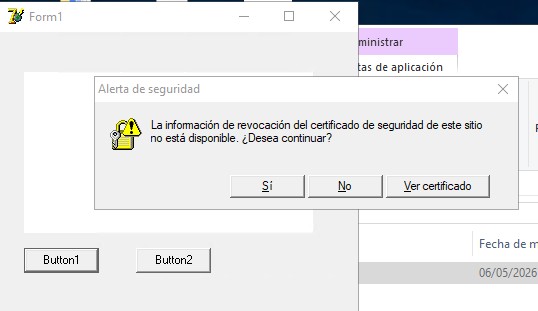
如何解决这个问题,使弹出框不再出现?这必须以编程方式完成,因此不能编辑Internet首选项(因为这是分发给成千上万的客户端)。
这个消息会在某些计算机上出现,但并非在所有计算机上都会出现。
解决方案
TWebBrowser.Silent := True 不会抑制证书警告。要阻止 “Revocation information for the security certificate…” 对话框,必须在导航之前对您的进程禁用吊销检查。
下面是我的代码,可能可行。
unit browsertest;

interface

uses
  Windows, SysUtils, Classes, Controls, Forms, StdCtrls, OleCtrls, SHDocVw, WinInet;

type
  TForm1 = class(TForm)
    WebBrowser1: TWebBrowser;
    Button1: TButton;
    procedure Button1Click(Sender: TObject);
  end;

var
  Form1: TForm1;

implementation

{$R *.dfm}

procedure DisableCertRevocation;
var
  Flags: DWORD;
  Size: DWORD;
begin
  Size := SizeOf(Flags);
  InternetQueryOption(nil, INTERNET_OPTION_SECURITY_FLAGS, @Flags, Size);
  Flags := Flags or SECURITY_FLAG_IGNORE_REVOCATION;
  InternetSetOption(nil, INTERNET_OPTION_SECURITY_FLAGS, @Flags, Size);
end;

procedure TForm1.Button1Click(Sender: TObject);
begin
  DisableCertRevocation;
  WebBrowser1.Silent := True;
  WebBrowser1.Navigate('https://...');
end;

end.
弹出窗口是由Internet Explorer的安全引擎在无法检查证书吊销状态时触发的。设置 Silent := True 仅隐藏脚本错误和ActiveX提示,而不会隐藏证书警告。
通过设置 SECURITY_FLAG_IGNORE_REVOCATION,您告诉WinINet(由WebBrowser控件使用)仅对您的进程跳过吊销检查,从而避免修改注册表或进行系统范围的更改。
站内所有文章版权归属LeftHeroAI导航站,无授权禁止任何主体转载、抄袭、复制内容,亦不得私自架设镜像站点。一经侵权,本站将通过法律途径追责。
相关文章






汇集全球数千款 AI 工具,每日持续更新,配套 AI 开发学习资源,轻松用 AI 提升工作效率。快捷键 Ctrl+D/⌘+D 一键收藏本站。