


为什么这个用Boost协程实现的简短程序在Windows上总是崩溃?
有人能解释为什么在Windows MSYS2下使用Boost 1.91.0时,这个程序无法正确终止吗?它总是卡死或崩溃。该问题也出现在Boost 1.90.0以及Boost-1.89.0(自行编译)上。
在Linux的 Goldbot在线编译器上无法复现该问题,这表明问题可能与ASIO在 Windows上实现协程的方式有关。
#include <boost/asio.hpp>
#include <iostream>

using namespace boost::asio;

int main() {
    for (int i = 0; i < 5; i++) {
        io_context ioc;
        co_spawn(
            ioc,
            [i]() -> boost::asio::awaitable<void> {
                auto ex = co_await this_coro::executor;
                steady_timer timer(ex, std::chrono::milliseconds(100));
                co_await timer.async_wait(use_awaitable);
                std::cout << "Timer expired # " << i << '\n';
            },
            detached);
        ioc.run();
    }
    return 0;
}
该程序使用MSYS包中的GCC 15.2.0与 GCC 16.1.0两个工具链构建。下面是调试器输出的崩溃信息 gdb:
$ gdb ./program.exe
GNU gdb (GDB) 17.1
Copyright (C) 2025 Free Software Foundation, Inc.
License GPLv3+: GNU GPL version 3 or later <http://gnu.org/licenses/gpl.html>
This is free software: you are free to change and redistribute it.
There is NO WARRANTY, to the extent permitted by law.
Type "show copying" and "show warranty" for details.
This GDB was configured as "x86_64-w64-mingw32".
Type "show configuration" for configuration details.
For bug reporting instructions, please see:
<https://www.gnu.org/software/gdb/bugs/>.
Find the GDB manual and other documentation resources online at:
    <http://www.gnu.org/software/gdb/documentation/>.

For help, type "help".
Type "apropos word" to search for commands related to "word"...
Reading symbols from ./program.exe...
(gdb) run
Starting program: C:\msys64\home\me\program.exe
[New Thread 9256.0xa328]
[New Thread 9256.0x54c]
[New Thread 9256.0x2ce0]
[New Thread 9256.0x946c]
Timer expired # 0

Thread 5 received signal SIGSEGV, Segmentation fault.
[Switching to Thread 9256.0x946c]
0x00007ff6aaad04de in _InterlockedExchange (Target=0xfeeefeeefeeeff4e, Value=1) at C:/msys64/mingw64/include/psdk_inc/intrin-impl.h:1738
1738        return __sync_lock_test_and_set(Target, Value);
(gdb)
以下是调试会话中的更多信息:
(gdb) info threads
  Id   Target Id          Frame
  1    Thread 9256.0xb2d4 0x00007ffc9bb43414 in ntdll!ZwCreateThreadEx () from C:\WINDOWS\SYSTEM32\ntdll.dll
  2    Thread 9256.0xa328 0x00007ffc9bb457b4 in ntdll!ZwWaitForWorkViaWorkerFactory () from C:\WINDOWS\SYSTEM32\ntdll.dll
  3    Thread 9256.0x54c  0x00007ffc9bb457b4 in ntdll!ZwWaitForWorkViaWorkerFactory () from C:\WINDOWS\SYSTEM32\ntdll.dll
  4    Thread 9256.0x2ce0 0x00007ffc9bb457b4 in ntdll!ZwWaitForWorkViaWorkerFactory () from C:\WINDOWS\SYSTEM32\ntdll.dll
* 5    Thread 9256.0x946c 0x00007ff6aaad04de in _InterlockedExchange (Target=0xfeeefeeefeeeff4e, Value=1) at C:/msys64/mingw64/include/psdk_inc/intrin-impl.h:1738
(gdb) bt
#0  0x00007ff6aaad04de in _InterlockedExchange (Target=0xfeeefeeefeeeff4e, Value=1) at C:/msys64/mingw64/include/psdk_inc/intrin-impl.h:1738
#1  boost::asio::detail::win_iocp_io_context::timer_thread_function::operator() (this=0x260d8c0)
    at C:/msys64/home/me/program/build/debug/_deps/boost-src/libs/asio/include/boost/asio/detail/impl/win_iocp_io_context.ipp:73
#2  boost::asio::detail::posix_thread::func<boost::asio::detail::win_iocp_io_context::timer_thread_function, std::allocator<void> >::run (this=0x260d8b0)
    at C:/msys64/home/me/program/build/debug/_deps/boost-src/libs/asio/include/boost/asio/detail/posix_thread.hpp:119
#3  0x00007ff6aac1a10a in boost::asio::detail::asio_detail_posix_thread_function (arg=<optimized out>)
    at C:/msys64/home/me/program/build/debug/_deps/boost-src/libs/asio/include/boost/asio/detail/impl/posix_thread.ipp:75
#4  0x00007ff6aa9f68dc in pthread_create_wrapper ()
#5  0x00007ffc9b92f0ad in msvcrt!_beginthreadex () from C:\WINDOWS\System32\msvcrt.dll
#6  0x00007ffc9b92f17c in msvcrt!_endthreadex () from C:\WINDOWS\System32\msvcrt.dll
#7  0x00007ffc9b6fe8d7 in KERNEL32!BaseThreadInitThunk () from C:\WINDOWS\System32\kernel32.dll
#8  0x00007ffc9ba6c3fc in ntdll!RtlUserThreadStart () from C:\WINDOWS\SYSTEM32\ntdll.dll
#9  0x0000000000000000 in ?? ()
编辑:我发现将io_context的 ioc声明为静态并在每次ioc.run() 之后调用ioc.restart() 可以“修复”崩溃。这表明io_context的销毁与定时器线程的终止之间可能存在竞态条件(Windows为定时器使用专用线程)。
解决方案
I tried to reproduce this on a new windows machine, following the steps I outlined in the README.md: https://github.com/sehe/repro-msys64-coros
安装MSYS
已获取安装程序 https://github.com/msys2/msys2-installer/releases/download/2026-03-22/msys2-x86_64-20260322.exe
接着安装一些必需项
pacman -S mingw-w64-ucrt-x86_64-gcc
pacman -S mingw-w64-ucrt-x86_64-cmake
pacman -S mingw-w64-ucrt-x86_64-make
pacman -S mingw-w64-ucrt-x86_64-git
克隆仓库
git clone https://github.com/sehe/repro-msys64-coros
cd repro-msys64-coros
cmake -B build .
ninja -C build/
./build/hello.exe
It JustWorked(TM)
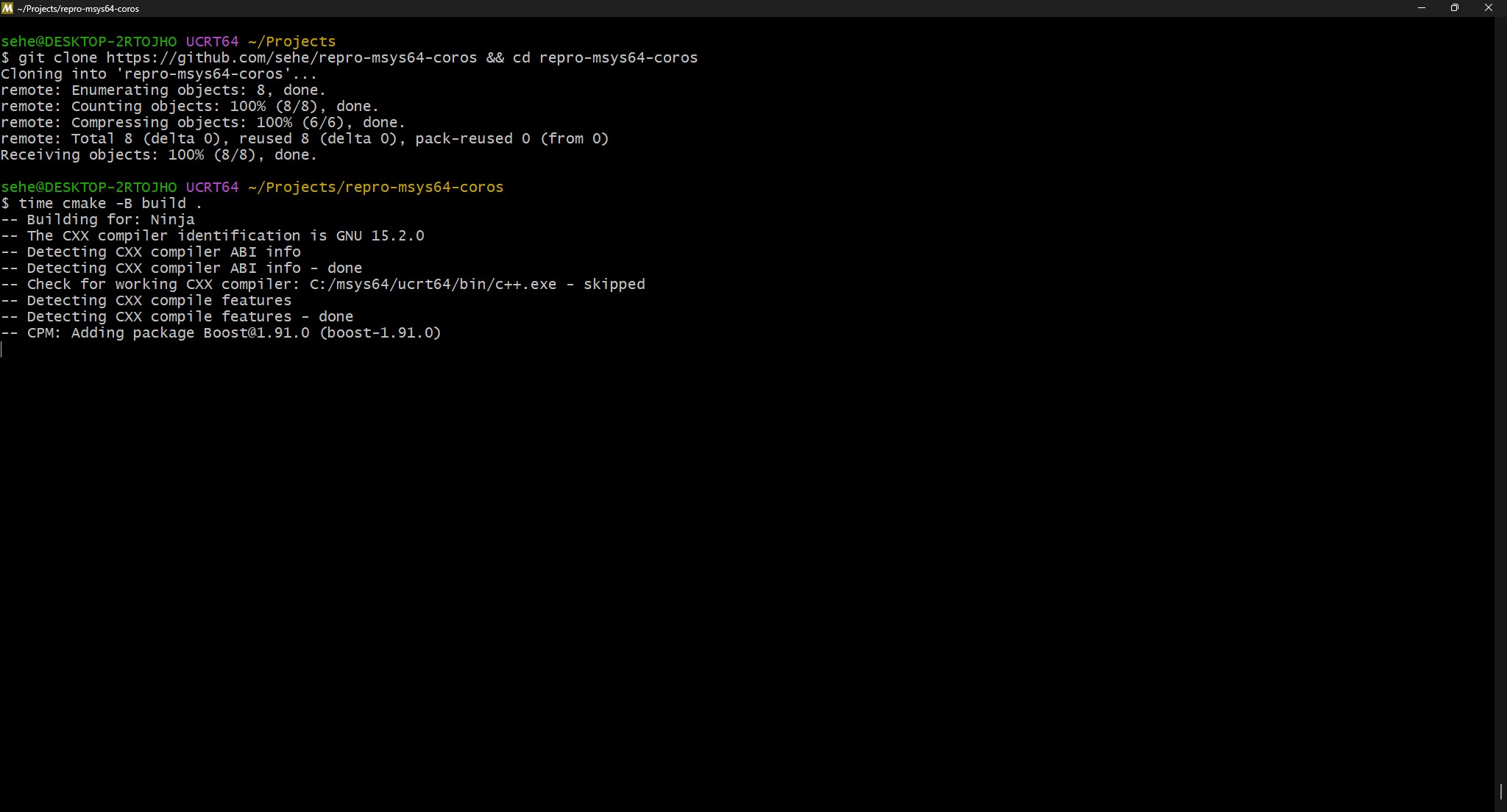

虽然花费的时间说实话确实有点离谱?

值得注意的观察
我能发现的唯一明显不同之处,是需要安装 mingw-w64-ucrt-x86_64-gcc 才能在我的shell中真正得到GCC。
UCRT似乎指的是 [环境(文档)]:
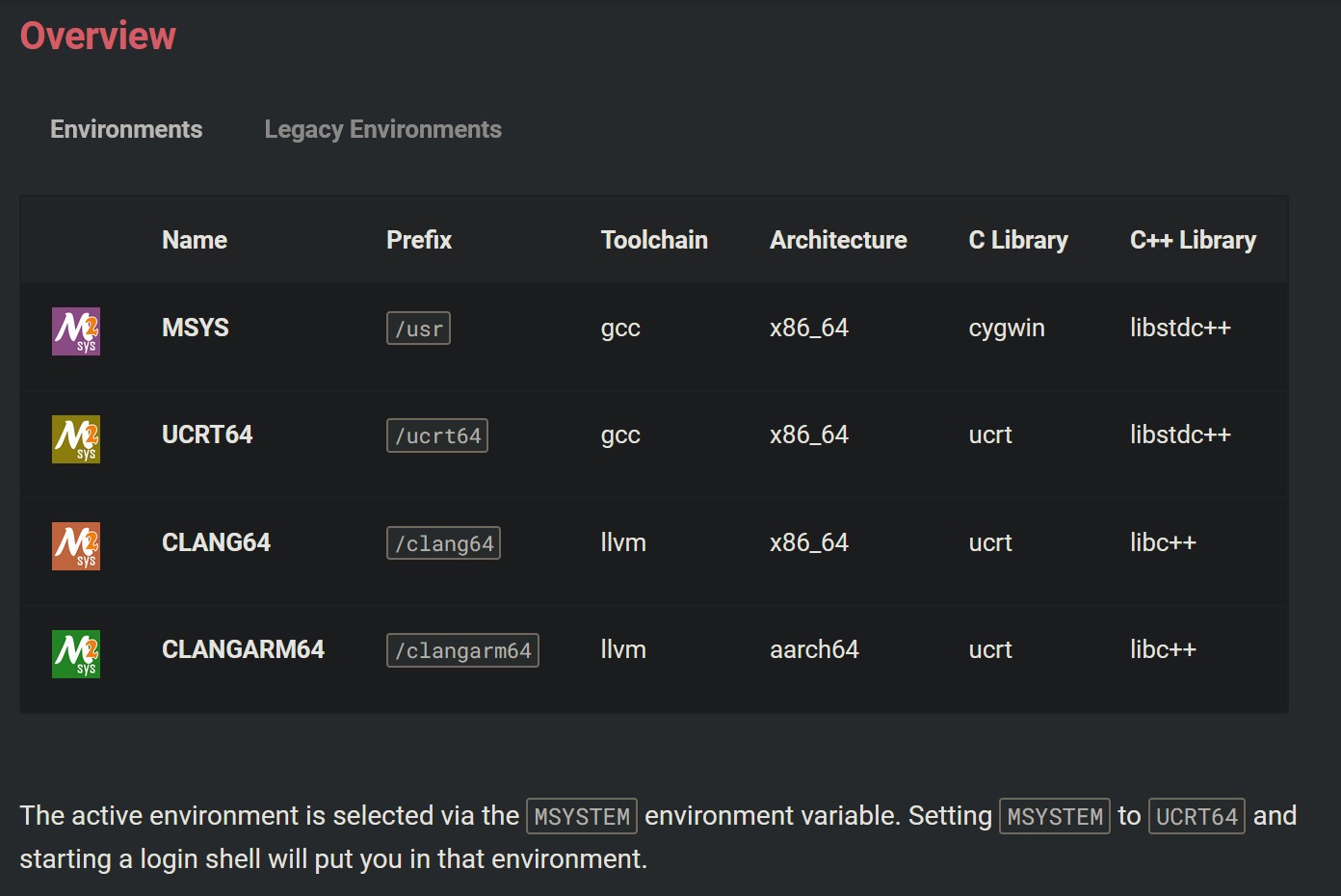
所以看起来你确实可能使用了混合了不同标准库的环境,或者甚至不小心选择了一个实际上并不为当前用途所支持的MSYS环境?
另请注意,我还需要链接ws2_32.lib,它可能会链接到一组不同的运行时库。
相关文章





