


在尝试将单元格从一个工作表复制到另一个工作表时,VBA会出现错误:对象 '_worksheet' 的Range方法失败
我在使用Microsoft 365 for Business的 Excel。我打算通过VBA自动化我的数据采集过程,将包含新数据的单元格区域复制粘贴到另一张工作表的表格中。我使用下面的代码来选择合适的单元格,但在我标记为双星号的那一行上,持续收到“Method 'Range' of object: '_worksheet' failed”错误,已经大约两天没法解决了:
Sub UpdateQCLog()

Dim sourceSheet As Worksheet
Dim destinationSheet As Worksheet
Dim sourceRange As Range
Dim lastcopyRow As Long
Dim lastdestinationRow As Long

Set sourceSheet = ThisWorkbook.Sheets("QC Production Live Log Import")
Set destinationSheet = ThisWorkbook.Sheets("% Yield by Product")
lastcopyRow = sourceSheet.Range("J2:J" & Rows.Count).End(xlUp).Row
**Set sourceRange = sourceSheet.Range("J2:N" & lastcopyRow)**

sourceSheet.Activate
sourceRange.Copy
destinationSheet.Activate
lastdestinationRow = Range("A:E" & Rows.Count).End(xlUp).Row
Range("A" & lastdestinationRow).Select
Selection.PasteSpecial Paste:=xlPasteValuesAndNumberFormats
Application.CutCopyMode = False

End Sub
有没有人能解释为什么Excel似乎找不到这个范围?
我知道lastcopyRow是由一个与我的sourceRange (J2:N) 不同的范围 (J2:J) 决定的,这是因为我的最后两列数据并不总是填满。即使在尝试通过范围 (J2:N) 来确定lastcopyRow时,我仍然收到了这个错误消息。
我计划稍后再修改这段代码,按照本站点看到的建议来避免激活工作表,但一个问题一个问题地解决。
解决方案
你应该使用
lastcopyRow = sourceSheet.Range("J" & Rows.Count).End(xlUp).Row
当使用 ...Range("J2:J" & rows.count).End(xlUp).Row 时,它会查看那个范围的最后一行。
例如:
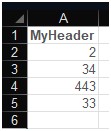
下面的脚本输出的是……如下:
Sub t()
Dim lastRow As Long
Dim lastRngRow As Long

lastRow = Range("A" & Rows.Count).End(xlUp).Row
Debug.Print lastRow
'  THIS PRINTS 5, which is what you'd be looking for

lastRngRow = Range("A2:A" & Rows.Count).End(xlUp).Row
Debug.Print lastRngRow
'  THIS PRINTS 1, since it looks at `A2:A5` *then* goes to `xlUp`.

End Sub
站内所有文章版权归属LeftHeroAI导航站,无授权禁止任何主体转载、抄袭、复制内容,亦不得私自架设镜像站点。一经侵权,本站将通过法律途径追责。
相关文章






汇集全球数千款 AI 工具,每日持续更新,配套 AI 开发学习资源,轻松用 AI 提升工作效率。快捷键 Ctrl+D/⌘+D 一键收藏本站。