


Excel:运行时错误 '1004',停止循环
运行时遇到一个错误,我觉得是因为MergeCells代码中的循环没有停止。
在我的数据中,A列有日期,如果同一个日期重复,我想把它们合并并居中显示。当A 列再也没有日期,只有空单元格时,我希望MergeCells代码能够停止并继续执行宏中的下一个任务(自动筛选)。
另外,我可以在代码中添加一个设置:如果某个单元格没有与其他单元格合并,它仍然居中吗?
我的代码如下:
Selection.FormatConditions(1).ColorScaleCriteria(3).Type = _
        xlConditionValueHighestValue
    With Selection.FormatConditions(1).ColorScaleCriteria(3).FormatColor
        .Color = 7039480
        .TintAndShade = 0
    End With
    Range("L23").Select
    ActiveWindow.SmallScroll Down:=0
    Columns("A:A").Select
    Dim rng As Range

MergeCells:

For Each rng In Selection

If rng.Value = rng.Offset(1, 0).Value And rng.Value <> "" Then
Range(rng, rng.Offset(1, 0)).Merge
Range(rng, rng.Offset(1, 0)).HorizontalAlignment = xlCenter
Range(rng, rng.Offset(1, 0)).VerticalAlignment = xlCenter
GoTo MergeCells
End If
Next

    ActiveWindow.SmallScroll Down:=0
    Rows("1:1").Select
    Selection.AutoFilter
    Rows("1:5").Select
    Selection.Insert Shift:=xlDown, CopyOrigin:=xlFormatFromLeftOrAbove
    Columns("A:A").Select
    Selection.Insert Shift:=xlToRight, CopyOrigin:=xlFormatFromLeftOrAbove
    Cells.Select
    With Selection.Font
解决方案
这假设你的日期集合不重复,且日期从A2开始 (.Cells(2,1))
Public Sub Test()

    'Reference the range of cells containing dates.
    'Assumes there's nothing below the dates.
    With ThisWorkbook.Worksheets("Sheet1") 'Update worksheet name if needed.
        Dim DateRng As Range
        Set DateRng = .Range(.Cells(2, 1), .Cells(.Rows.Count, 1).End(xlUp))
    End With

    With DateRng

        'Grab the first date in the range.
        Dim FirstCell As Range
        Set FirstCell = .Cells(1, 1)

        'After the LastCell for a date is found the FirstCell is
        'updated to reference the cell below that.  Once a blank cell is reached
        'the loop will stop.
        Do Until FirstCell = ""

            'Find the last cell containing the FirstCell date.
            'This works by looking backwards through the range.
            Dim LastCell As Range
            Set LastCell = .Find(What:=DateValue(FirstCell), _
                                 After:=FirstCell, _
                                 LookIn:=xlFormulas, _
                                 LookAt:=xlWhole, _
                                 SearchOrder:=xlByRows, _
                                 SearchDirection:=xlPrevious)

            'If both First and Last cells are the same address then centre,
            'otherwise merge and centre.
            If FirstCell.Address = LastCell.Address Then
                FirstCell.HorizontalAlignment = xlCenter
            Else
                With Range(FirstCell, LastCell)
                    'Suppress the message box that appears when merging.
                    Application.DisplayAlerts = False
                    .MergeCells = True
                    .VerticalAlignment = xlCenter
                    .HorizontalAlignment = xlCenter
                    Application.DisplayAlerts = True
                End With
            End If

            'Reference the next FirstCell.
            Set FirstCell = LastCell.Offset(1)

        Loop

    End With

End Sub
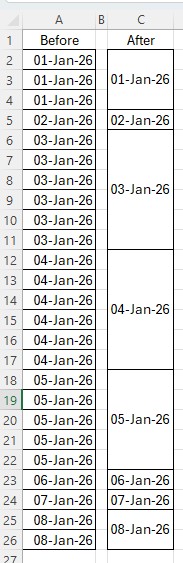
备选方案
另一种版本的代码。适用于当前工作表。假设日期从单元格 A2 (firstcell) 开始。
Sub MergeProc()
    Dim firstcell As Range, lastcell As Range
    Set firstcell = Range("A2")
    Set lastcell = Cells(Rows.Count, 1).End(xlUp)
    Dim rng As Range
    Set rng = Range(firstcell, lastcell)
    Dim comp
    comp = Application.IfError(Application.Delta(rng.Offset(1).Value2, rng.Value2), 0)
    Application.DisplayAlerts = False
    Dim i As Long, j
    i = 1
    Do
        j = Application.Match(0, comp, 0)
        If IsError(j) Then Exit Do
        With firstcell.Range(Cells(i, 1), Cells(j, 1))
            .Merge
            .HorizontalAlignment = xlCenter
            .VerticalAlignment = xlCenter
        End With
        i = j + 1
        comp(j, 1) = 1
    Loop
    Application.DisplayAlerts = True
End Sub
站内所有文章版权归属LeftHeroAI导航站,无授权禁止任何主体转载、抄袭、复制内容,亦不得私自架设镜像站点。一经侵权,本站将通过法律途径追责。
相关文章






汇集全球数千款 AI 工具,每日持续更新,配套 AI 开发学习资源,轻松用 AI 提升工作效率。快捷键 Ctrl+D/⌘+D 一键收藏本站。